BASIC OPERATION
3
20
1
7
4
10
15
18
2
8
13
5
11
16
3
9
14
6
12
17
BASIC MANUAL
■ FM Radio operation
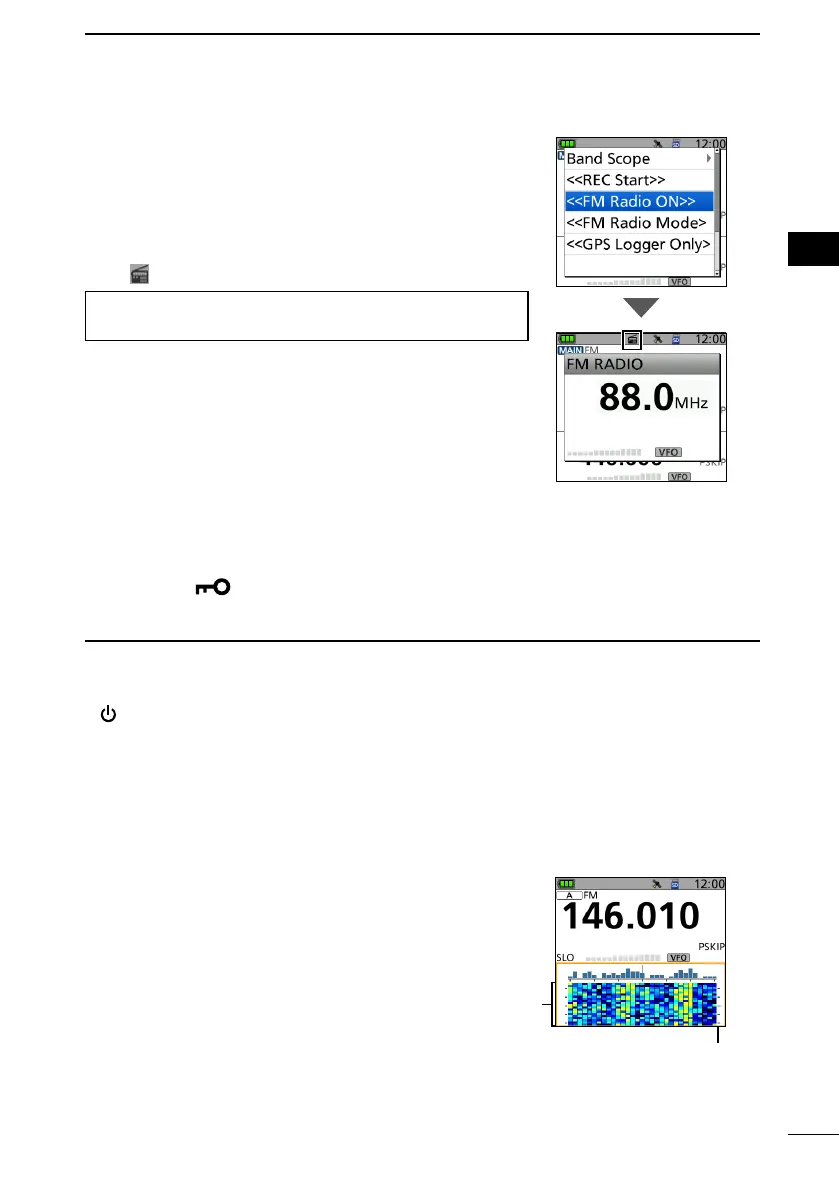
D Turning ON the FM Radio
1. Push [QUICK].
2. Select “<<FM Radio ON>>.”
• Returns to the standby screen, and the FM RADIO
window is displayed.
•
is displayed.
TIP: To turn OFF the FM Radio, push [QUICK], and then
select “<<FM Radio OFF>>.”
■ Lock function
Activate to prevent accidental frequency changes and unnecessary function access.
z Hold down [
] for 1 second to turn ON the Key Lock function.
• When the Key Lock function is ON, and the locked key or [DIAL] is pushed or rotated,
“LOCK ON” is displayed.
L Information
• To turn OFF the function, hold down [LOCK] for 1 second again (Until “LOCK OFF” is
displayed).
• [
], [PTT], [SQL], and [VOL] can be used even if the Key Lock function is ON.
• You can change the keys to be locked on the MENU screen.
([MENU] > SET > Function > Key Lock)
■ Band Scope function
Use the Band Scope function to visually search a specied
frequency range around the displayed frequency. You
can use this function to search for a signal, and see the
relative received signal strength level.
On the single band display, you can conrm the signal
strengths over time by the waterfall function.
See the Advanced manual for details.
1. Push [MENU].
2. Select “SCOPE.”
• Returns to the standby screen, and starts the
continuous sweep.
3. Push [CLR] twice to turn OFF the Band Scope
function.
Waterfall
zone
Band Scope zone
(with a line in orange)



 To Next Page