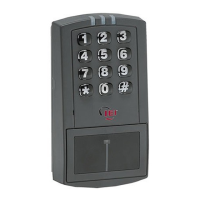
prox.pad Installation/Programming Manual
3.3.7 Enabling/Disabling Audio Keypress Feedback
Audio Keypress Feedback refers to the sounder beeping momentarily each time a key is pressed. This feedback indicates the key was
pressed hard enough for the prox.pad to acknowledge and recognize which key you pressed. By default this option is enabled, but if
you need to change it, use the following programming sequence:
1. Enter Program Mode.
Press: 99 # Master Code *
The yellow LED flashes slowly.
2. To enable this feature, press: 30 # 0 # 1 # **
The yellow LED continues to blink slowly.
To disable this feature, press: 30 # 0 # 0 # **
The yellow LED continues to blink slowly.
3. Exit Program Mode.
Press: *
The yellow LED stops flashing.
3.3.8 Enabling/Disabling Visual Keypress Feedback
Visual Keypress Feedback refers to the yellow LED flashing momentarily each time a key is pressed. This feedback indicates the key
was pressed hard enough for the prox.pad to acknowledge and recognize which key you pressed. By default this option is enabled, but
if you need to change it, use the following programming sequence:
1. Enter Program Mode.
Press: 99 # Master Code *
The yellow LED flashes slowly.
2. To enable this feature, press: 30 # 1 # 1 # **
The yellow LED continues to blink slowly.
To disable this feature, press: 30 # 1 # 0 # **
The yellow LED continues to blink slowly.
3. Exit Program Mode.
Press: *
The yellow LED stops flashing.
Document # 6055676, Rev 2.2, D4b Page 63 of 86


 To Next Page