44
ifm Operating Instructions IO-Link Master with EtherNet/IP interface StandardLine 8 Ports IP 65 / IP 67 (AL1122) 2017-05-31
Configuration
>
8.4.3 Configure AL1122
8019
The AL1122 is configured via the controller tags.
Requirements:
> AL1122 is correctly integrated in the EtherNet/IP project (→ Integrate the AL1122 into the EtherNet/IP network
(→ p. 43)).
1 Open controller tags
► In the Controller Organizer: Double click on [Controller Name_of_Project] > [Controller Tags]
> [Controller Tags] window appears.
► In the tree view: Click on [AL1122:C].
> Controller tags for the configuration of the device appear.
2 Configure AL1122
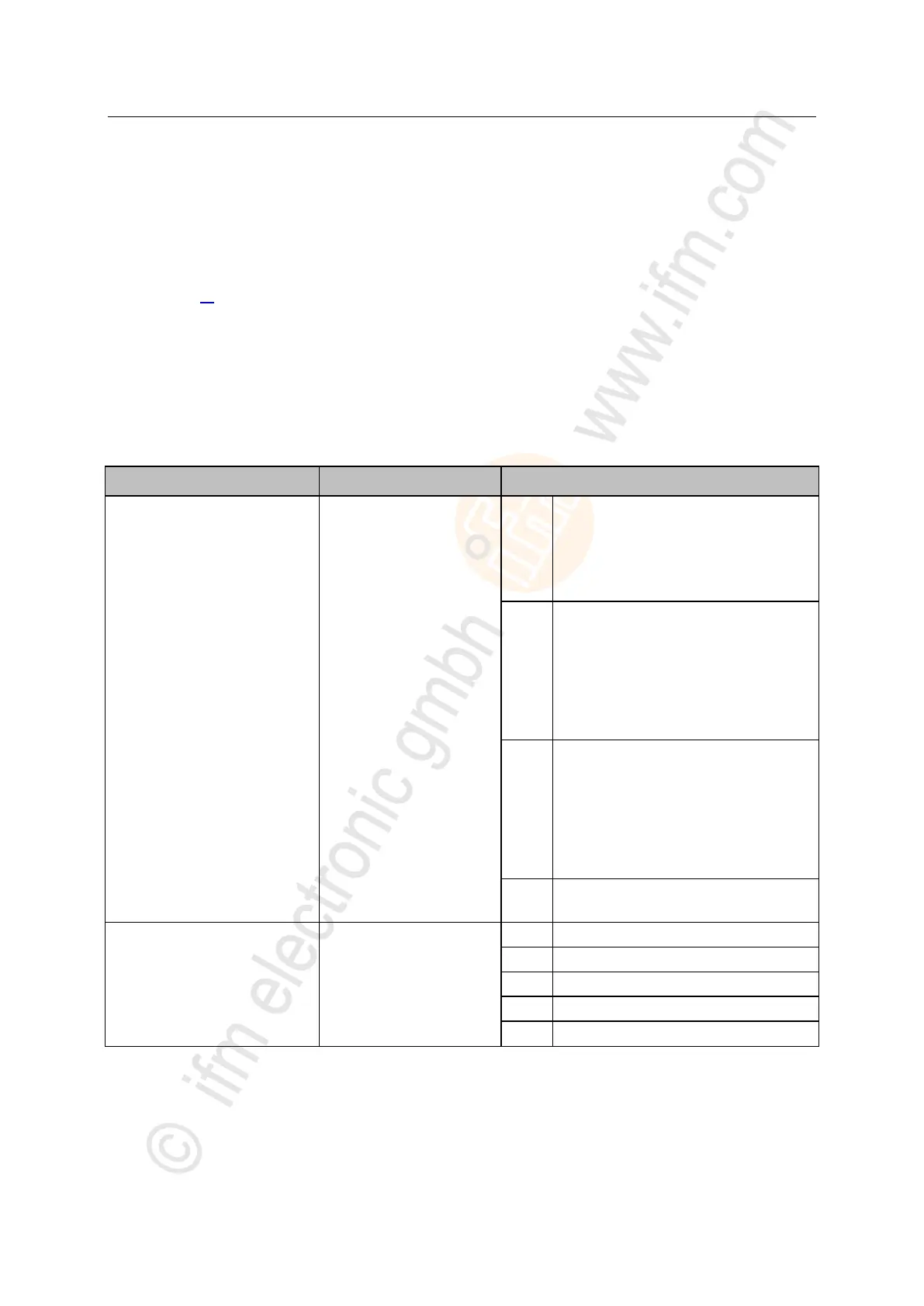
► Set the following controller tags as required:
[AL1122:C.Communication_Profile]
The access rights to the
parameter data, process data
and events/diagnostic
messages of the IO-Link
master and the connected
IO-Link devices
<Feldsbus> + LineRecorder
EtherNet/IP and LR DEVICE have read
and write access rights to parameters and
process data
EtherNet/IP and LR DEVICE have read
access rights to events/alarms
EtherNet/IP + LineRecorder (ro)
EtherNet/IP has read and write access
rights to parameters and process data
EtherNet/IP has read access rights to
events/alarms
LR DEVICE only has read access rights to
parameters, process data and
events/alarms
EtherNet/IP only
EtherNet/IP has read and write access
rights to parameters and process data
EtherNet/IP has read access rights to
events/alarms
LR DEVICE has no access rights
(parameters, process data, events/alarms,
web interface, firmware update)
Continue in Use Case
previous setting is valid
[AL1122:C.Port_Process_Data_Size]
Length of the process input
data and process output data
2 bytes input, 2 bytes output
4 bytes input, 4 bytes output
8 bytes input, 8 bytes output
16 bytes input, 16 bytes output
32 bytes input, 32 bytes output
► Save EtherNet/IP project


 To Next Page