18
Carry out a tank adjustment with empty tank, if possible, to cover any
possible interfering sources� In this case:
► Select the max� adjustment distance (L - 250 mm)�
If the tank cannot be emptied, adjustment to a partly filled tank is possible�
In this case:
► Observe the safety distance (b)�
Only if data storage is required in an IO-Link application:
The tank adjustment is not saved via IO-Link� After a replacement it must
be carried out again�
More information about data storage: (→ 16.2)�
7.2 Probe installation
The probe is not supplied (→ 3 Items supplied).
7.2.1 Attaching the probe
Do not damage the surfaces of the process connection and the probe�
► Use suitable tools with plastic surfaces�
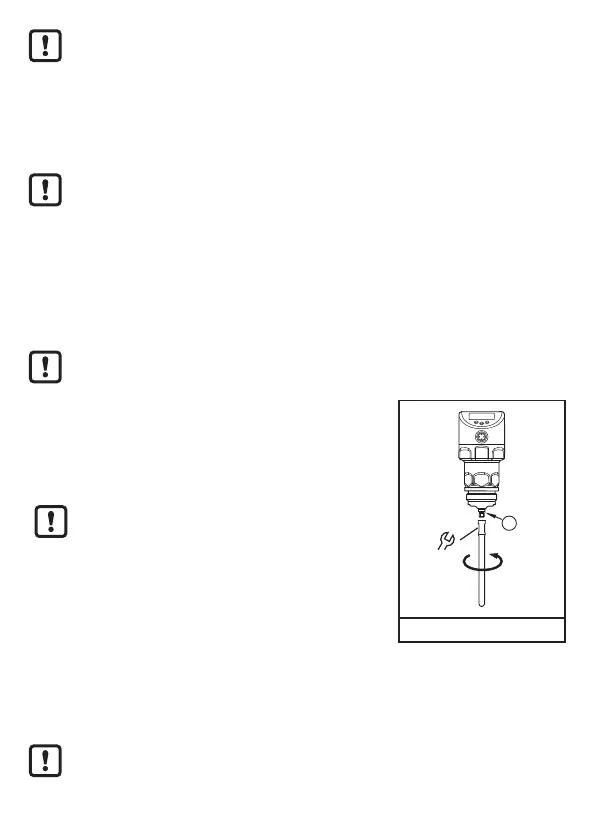
Fixing of the probe:
► Remove the protective cover / protective devices
from the unit and the probe�
► Screw the probe to the unit and tighten it�
Recommended tightening torque: 6�5 Nm�
► Check the correct position of the O-ring at the probe
attachment point (1)� Replace if damaged�
1
8
(1) O-ring
For secondary processes:
In case of high mechanical stress (strong vibration, moving viscous media) it
may be necessary to secure the screw connection, e�g� by a screw retaining
compound�
Substances such as screw retaining compounds may migrate into the
medium�
► Make sure that they are harmless�






 To Next Page