31
11 Parameter setting
During parameter setting the device remains in the operating mode internally�
It continues its monitoring functions with the existing parameters until the
parameter setting has been completed�
11.1 Parameter setting in general
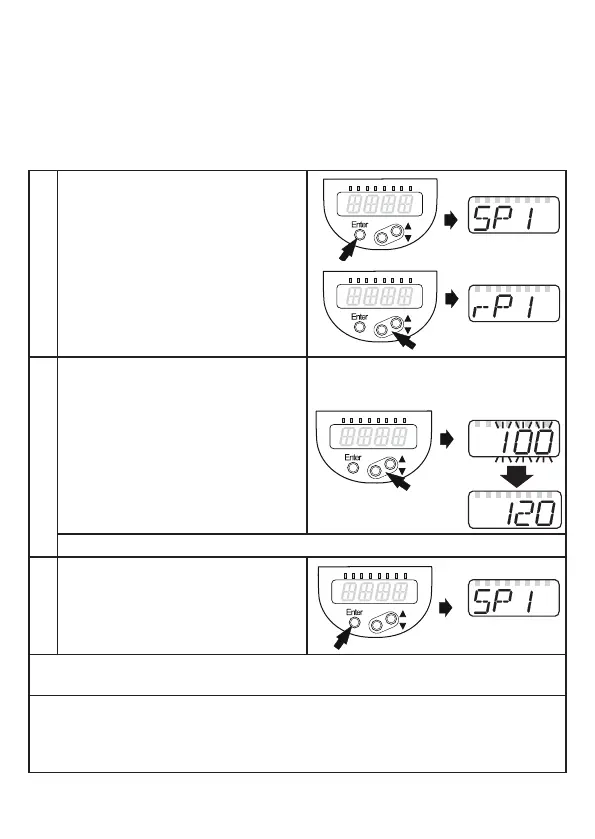
3 steps must be taken for each parameter setting:
1
Select parameter
► Press [Enter] to get to the menu�
► Press [▲] or [▼] until the required
parameter is displayed�
2
Set parameter value
► Press [Enter] to edit the selected
parameter�
► Press [▲] or [▼] for at least 1 s.
> After 1 s: Setting value is changed:
incrementally by pressing the button
once or continuously by keeping the
button pressed�
Numerical values are incremented continuously with [▲] or decremented with [▼]�
3
Acknowledge parameter value
► Press [Enter]�
> The parameter is displayed again�
The new setting value is saved�
Set other parameters
► Press [▲] or [▼] until the required parameter is displayed.
Finish parameter setting
► Press [▲] or [▼]
several times until the current measured value is displayed or wait for
30 s�
> The unit returns to the process value display�






 To Next Page