26
When operating voltage is applied to the unit for the first time, the probe
length must be entered first (→ 11.2.1)� Only then is the unit ready for
operation�
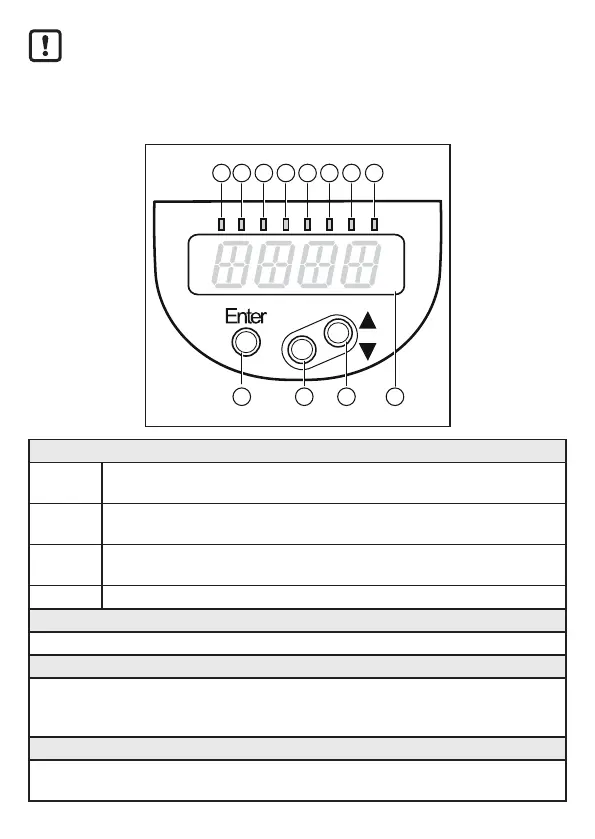
9 Operating and display elements
321
9 10
4 5 6 7 8
12
11
1 to 8: Indicator LEDs
LEDs
1 - 3
Selected unit of measurement�
LEDs
4 - 6
Not connected
LED 7 Only active if the switching output [ou2] = [Hn�] or [Fn�] is selected; then:
Switching status OUT2 (on if output 2 is switched)�
LED 8 Switching status OUT1 (on if output 1 is switched)�
9: [Enter] button
- Open the user menu, edit and confirm the parameter values�
10 to 11: Arrow keys up [▲] and down [▼]
- Selection of the parameters
- Setting of the parameter values (scrolling by holding pressed, incrementally by pressing
once)�
12: Alphanumeric display, 4 digits
- Display of the current level�
- Indication of the parameters and parameter values�






 To Next Page