40
12.5 Read set parameters
► Briefly press [Enter] to open the menu
► [▲] or [▼] scrolls through the parameters.
► Briefly press [Enter] to indicate the corresponding parameter value for about 30
s� Then the unit returns to the process value display�
12.6 Change between length display and percentage
Length display: mm or inch (→ 11.3)
► Briefly press [▲] or [▼] in the operating mode.
> The selected unit is displayed for 30 s, the corresponding LED is on� With each
push of the button the display type is changed�
12.7 Error indications
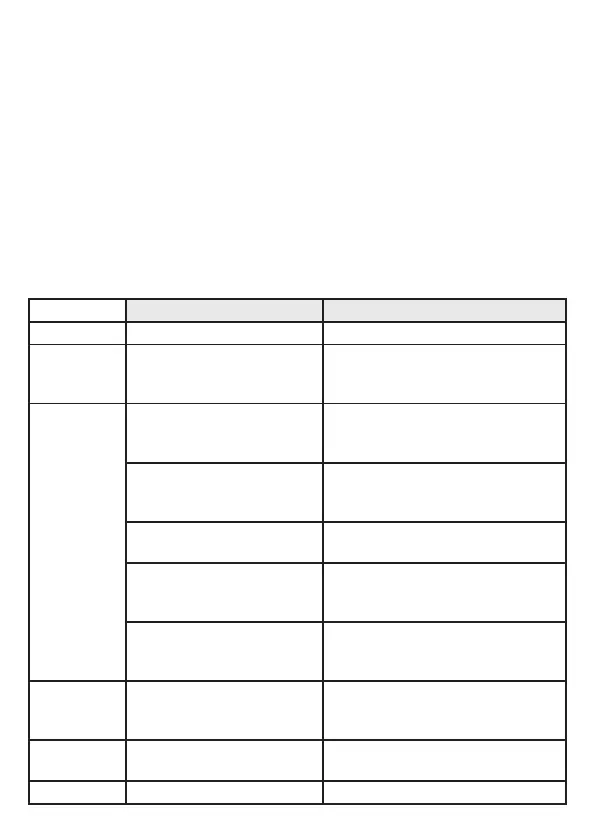
Possible cause Recommended measures
[Err] Fault in the electronics� Replace the unit�
[nPrb]
Probe detached from the unit;
possibly incorrect setting of the
rod length�
Check whether the probe is still
attached to the unit� Check the
parameter [LEnG]�
[SEnS]
Measurement disturbed
by heavy foam build-up or
turbulence�
• Install the unit in a still pipe or bypass
(→ 7.1)�
• Set or increment [dFo] (→ 11.4.11)�
Measurement disturbed by
separation layers
(e�g� oil layer on water)�
Remove the oil layer by suction, stir the
medium, verify the composition�
Probe or process connection
soiled�
Clean the probe and the process
connection�
Installation conditions were not
adhered to�
Observe the notes in "Installation"
(→ 7)� Carry out or repeat a tank
adjustment (→ 11.2.2)�
Probe length or sensitivity
(setting to the medium) is
incorrect�
Correct settings (→ 11.6), then carry
out a tank adjustment, if necessary
(→ 7.1.7)�
[SCx] + LED 7
[SCx] + LED 8
Flashing: short circuit in
switching output OUT1 or
OUT2�
Remove the short circuit�
[SC] + LED 7
+ LED 8
Flashing: short circuit in both
switching outputs�
Remove the short circuit�
[PArA] Faulty data set Restore factory settings (→ 11.5)�






 To Next Page