86 A20733 B0
Servicing
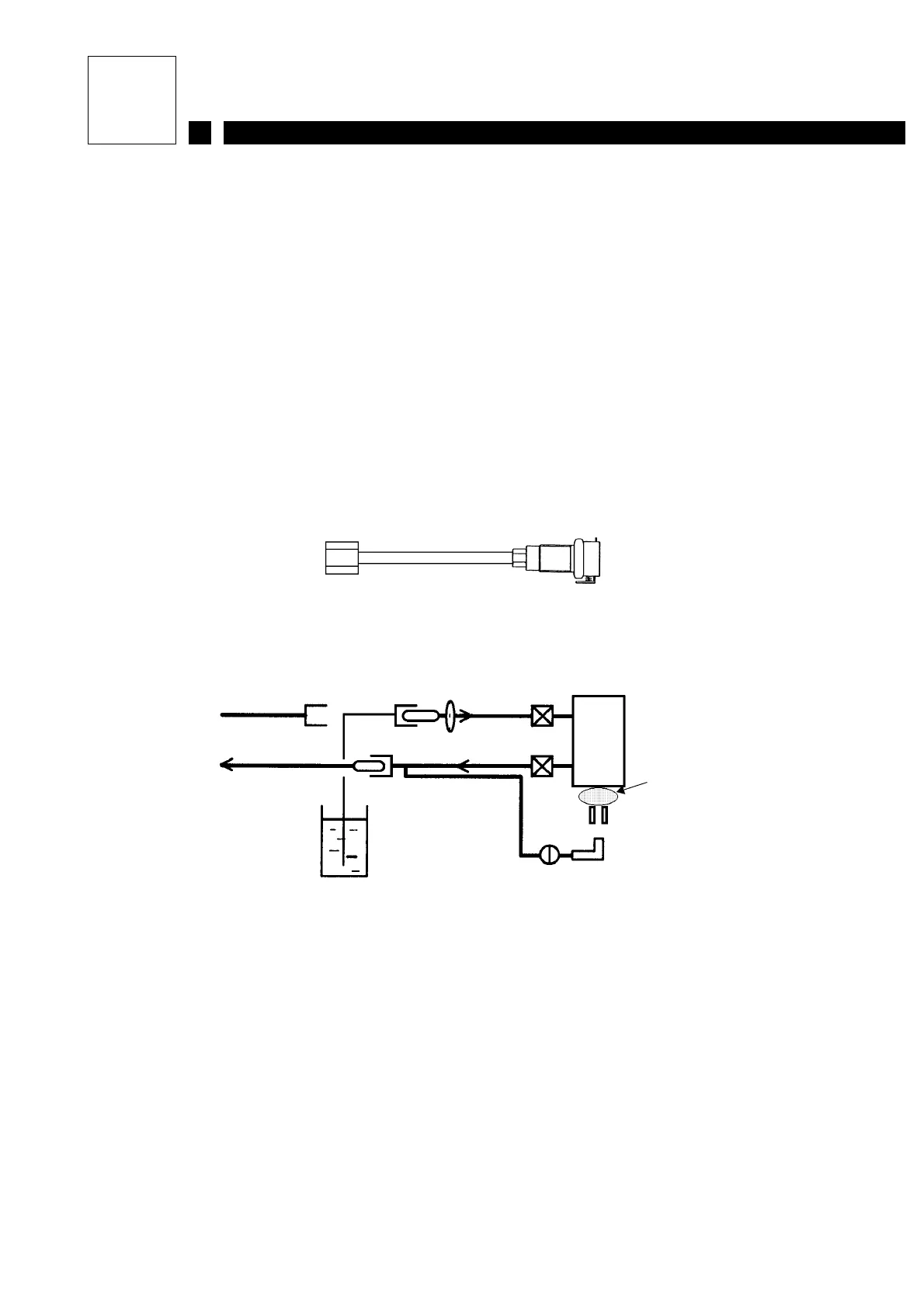
3.2.2 Rinse the conduit and head assembly
Circulating clean additive through all pipes in the head and conduit ensures that they are
perfectly clean and guarantees that the printer can be restarted easily after being shut down for
between one and two weeks.
The procedure is as follows:
1- With the printer running and the jet idle, make the machine take in additive from the
recuperation gutter for 20 seconds.
2- Stop the printer.
3- Close the recuperation gutter.
4- Uncouple the pressure connector in the hydraulic compartment.
5- Connect the rinsing connector (1) to the conduit pressure pipe next to the head filter.
6- Immerse the free end of the rinsing connector in a beaker of additive or in the printer’s
additive tank.
7- Block the nozzle with an anti-clogging protector.
8- Start up the printer and enable the [Refresh] function for around 30 seconds.
9- Enable the [Nozzle unblocking] function for around 20 seconds.
10- Shut down the printer and wait for it to stop completely.
11- Restore the initial hydraulic connections.
(1)
Ink circuit Pressure(1)
Drain
Cannon
Anti-clogging protector
Recuperation gutter
Beaker of additive or
printer additive tank
pressure



 To Next Page