94
INSTALLER
USERMAINTENANCE TECHNICIAN
TECHNICAL DATA
60
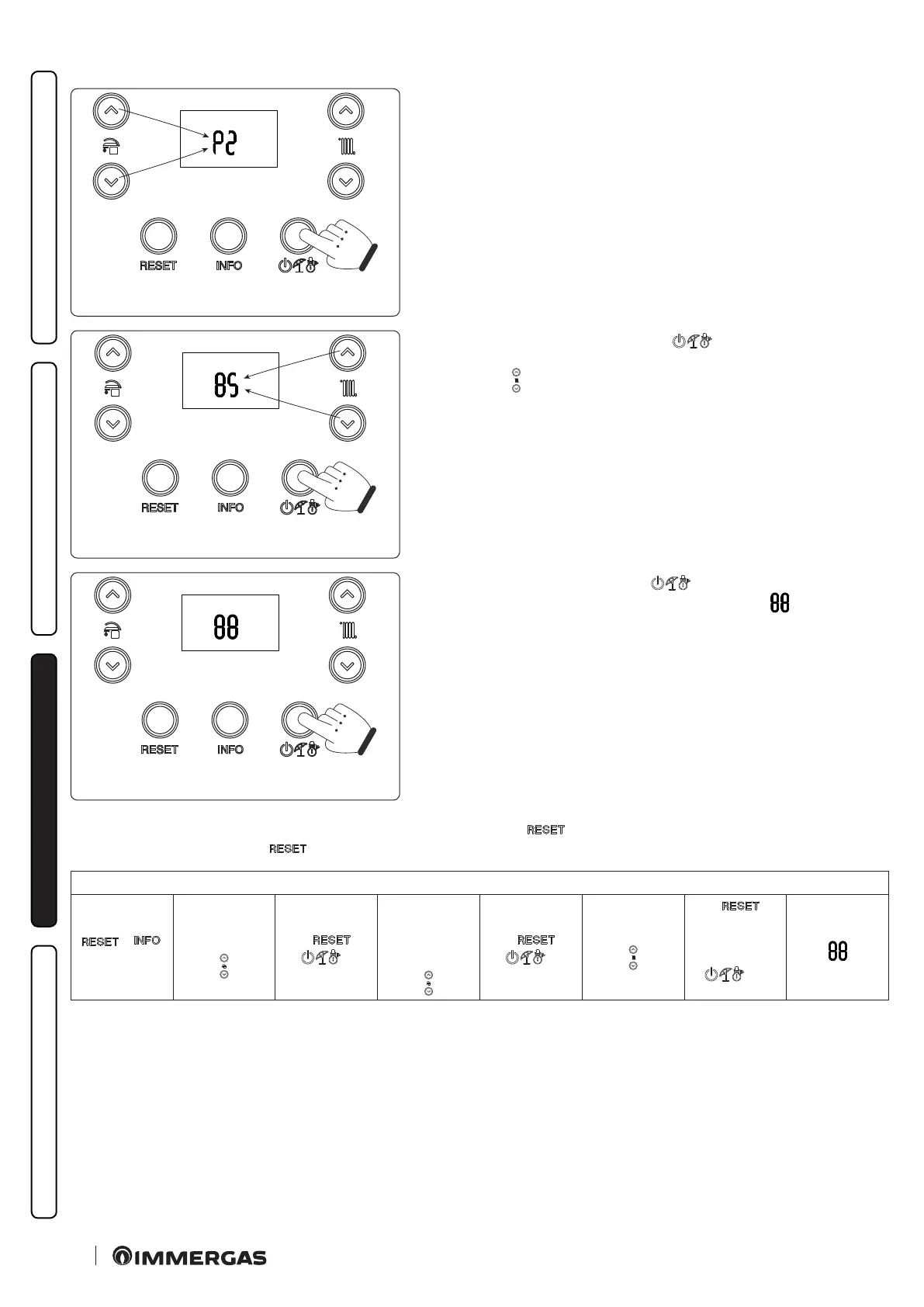
e rst digit of the central indicator (Fig. 52) shows the family of the param-
eter, while the second digit shows its number.
61
Pressing the mode of operation button “
” displays the value of the se-
lected parameter and by pressing the buttons to adjust the central heating
temperature “
” you can adjust its value.
62
Press the mode of operation button “
” for more than 1 second to store
the parameter value; conrmation is given by the word “
” which appears
for 2 seconds.
If you want to exit a parameter without changing its value, press the button “
”.
Wait for 15 minutes or press the “ ” button to exit programming mode.
Programming phase sequence
+
> 5"
Menu
"P", "t", "A", "S"
←
→
P0 - P5
t0 - t9
A0 - A6
S0 - S2
←
→
Parameter value
←
(without
memorising)
> 1’’
(Memorise)






 To Next Page