TechDoku_CC1000_VCC1000_CC3000_VCC3000_GenPM_GB_860
25010_86025110.doc
7.3.6 (V)CC Front panel below display
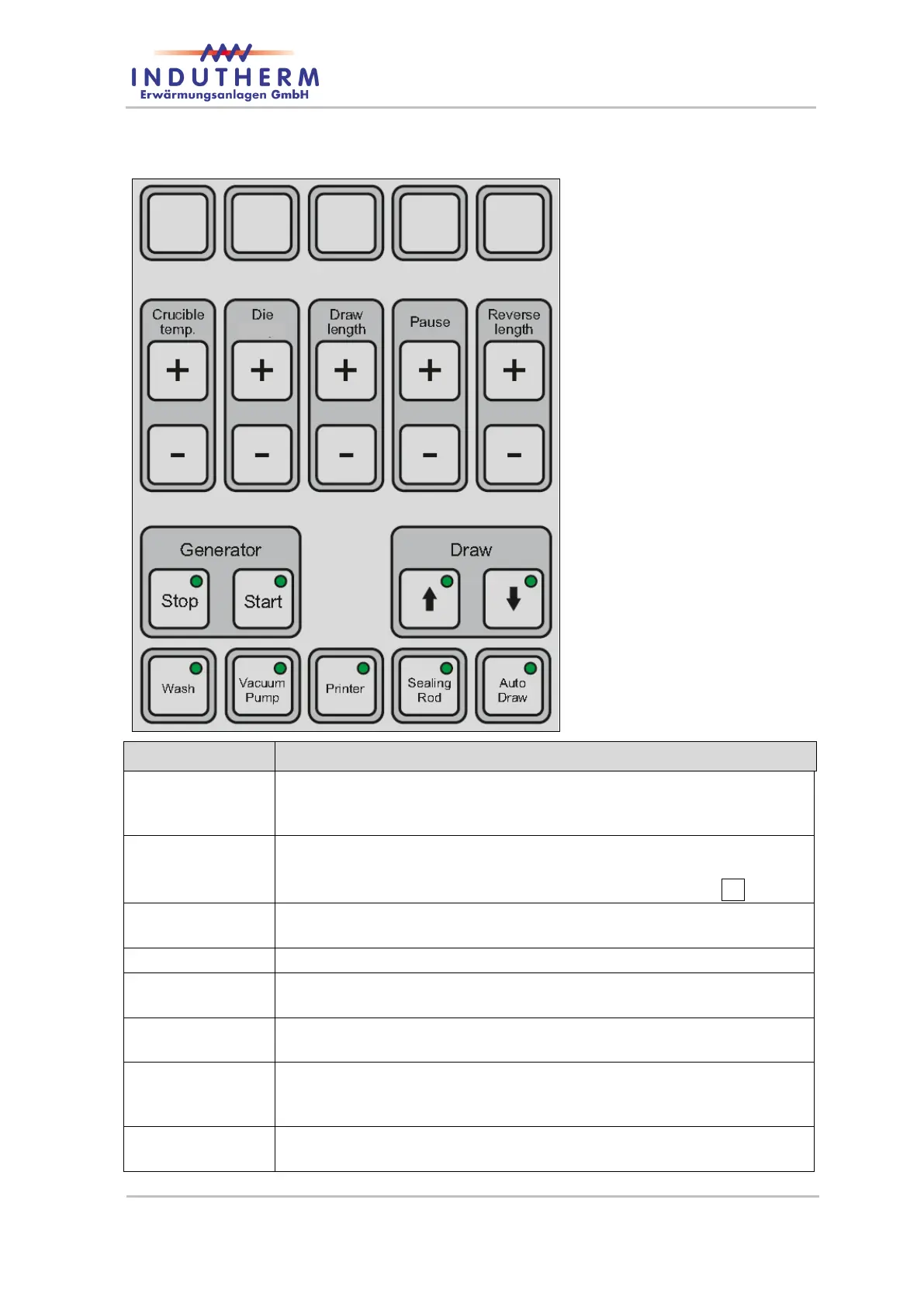
Figure 36: Front panel below display
The set temperature can be adjusted using the "+" or "-" keys. The
setting range is from 10 ° C to 1300 ° C when an N-type thermocou-
ple is used.
Change of the set temperature of the chiller or the water temperature
or the flow rate.
Use the "+" or "-" keys to adjust the selected die value via <>.
By this button you can start heating from generator. Switched on
generator regulate for the set temperature.
With the keys ‘+’ or ‘-‘ you can adjust the drawing length in 0.1 mm
steps from 0.1 to 9.9 mm.
With the keys ‘+’ or ‘-‘ you can adjust the pause time in 0.1 s steps
from 0.1 to 9.9 s.
With the keys ‘+’ or ‘-‘ you can adjust the reverse moving length in
0.1 mm steps from 0.1 to 9.8 mm. Note: The reverse length can’t be
equal or bigger than drawing length.
As long as you press this button the material will be drawn down-
wards.


 To Next Page