www.infocus.com
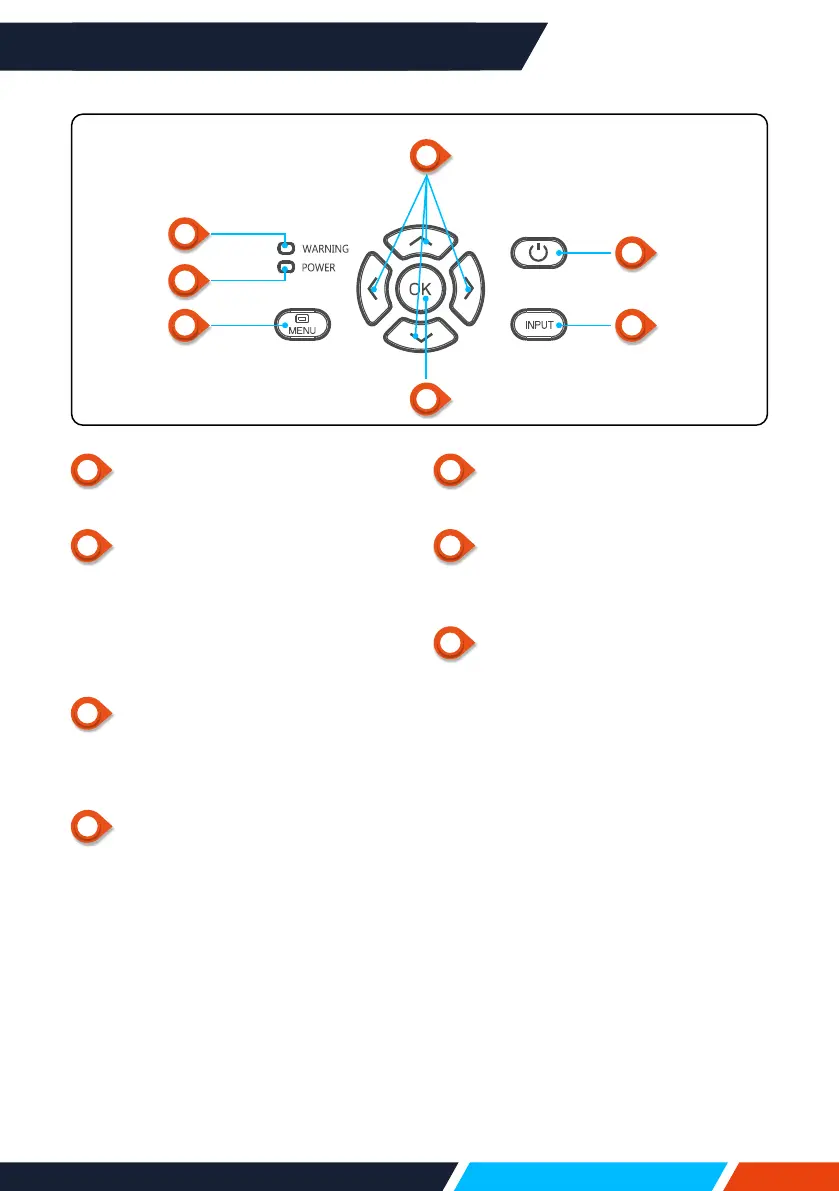
Name and function of your projector
19
1
POWER
Turnonorotheprojector.
2
Arrow
/UP/DOWN/VOL-/VOL+/
– Selectitemsoradjustthedatainthe
OSDmenu.
– Shifttheimageinthe"Digitalzoom
+/-"mode.
– Adjustthevolume.
3
WARNINGindicator
– Theindicatorisashingred,whenthe
internaltemperatureoftheprojector
exceedstheoperatingrange.
4
POWERindicator
– Thepowerindicatorturnssteadyred,
whentheprojectorisinstandbymode.
– Thepowerindicatorturnssteady
green,duringnormalprojector
operation.
– Thepowerindicatorisashing
green,whentheprojectorisinpower
managementmode.
– Thepowerindicatorisashingred,
whentheprojectorisincoolingmode.
– Thepowerindicatorturnssteady
greenyellow,whentheprojectorpower
isabnormal.
Keypad controls
and indicator lights
5
MENU
OpenorclosetheOSDmenu.
6
OK
– EntertheOSDmenu.
– SelectoptionsintheOSDmenu.
7
INPUT
OpenorclosetheINPUTmenu.
1
3
4
5
7
2
6









 To Next Page