www.infocus.com
Basic operation
38
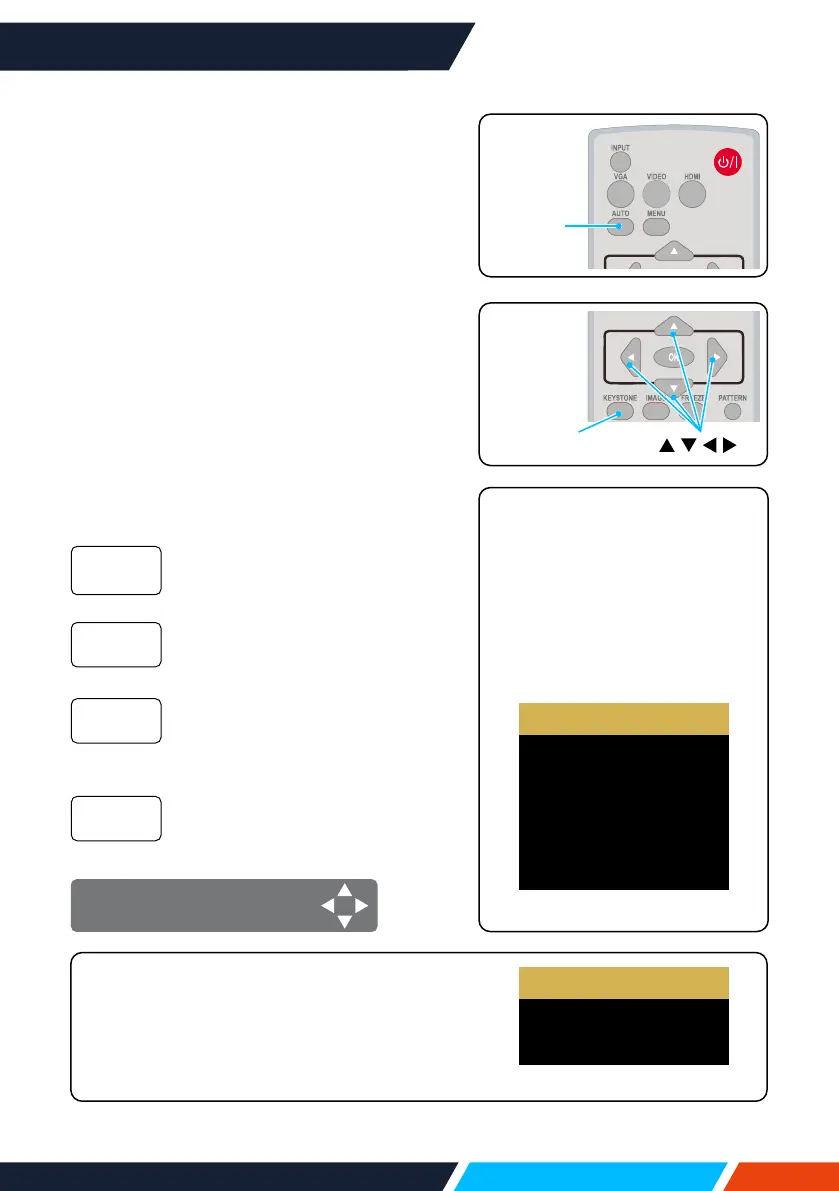
Auto setting function
PresstheAUTObuttononyourremotecontrol
toautoexecutesettingsgivenintheAuto
SetupontheExpandmenu(includingInput
search,AutoPCadj.andAutokeystone).
Keystone adjustment
Youmayadjustkeystonedistortionofimage
inyourprojectorwiththeH/Vkeystone
adjustment.Followstepsbelowtoadjust
keystonedistortionofprojectedimage
manually.
PresstheKEYSTONEbuttononyourremote
control.Thekeystoneadjustmentdialogue
boxdisplays(includingH/Vkeystone,corner
correction,curvedcorrection,resetvalue),
press
buttontoadjustkeystone
distortion.
Adjusttheprojectedimagewhen
theprojectorisonthehorizontal
orverticalkeystonedistortion.
Adjusttheprojectedimage
whentheprojectoriskeystone
distortionoffourcorners.
Adjusttheprojectedimagewhen
theprojectorlinearityisuneven
ortheprojectedimagesbent
verticallyandhorizontally.
Thecorrectionvalueswillbe
restoredtothefactorydefaults.
H/V
Keystone
Corner
correction
Curved
correction
Resetvalue
H/VKeystoneadjust
Remote
control
KEYSTONE
Remote
control
AUTO
• Thearrowmarklookswhite
whenthereisnokeystone
adjustmentinexistence.
• Thearrowmarkindicatingthe
adjustmentdirectionturnsred.
• Thearrowmarkdisappears
whenthemaximumadjustment
limitreaches.
H/V Keystone
4-Corner correction
6-Corner correction
Curved correction
Grid Image Tune
Reset value
• ForWUXGAresolution
H/V Keystone
4-Corner correction
Reset value
• Thekeystonepromptboxwilldisappearif
youpressthekeystonebuttonagainwhenit
isdisplaying.Pressthe<OK>buttonagainto
switchthefourcorrectionitems.
• Theadjustablerangeissubjecttosourceof
signalinput.
• ForXGA&WXGAresolution









 To Next Page