www.infocus.com
Basic operation
39
Soundmenu
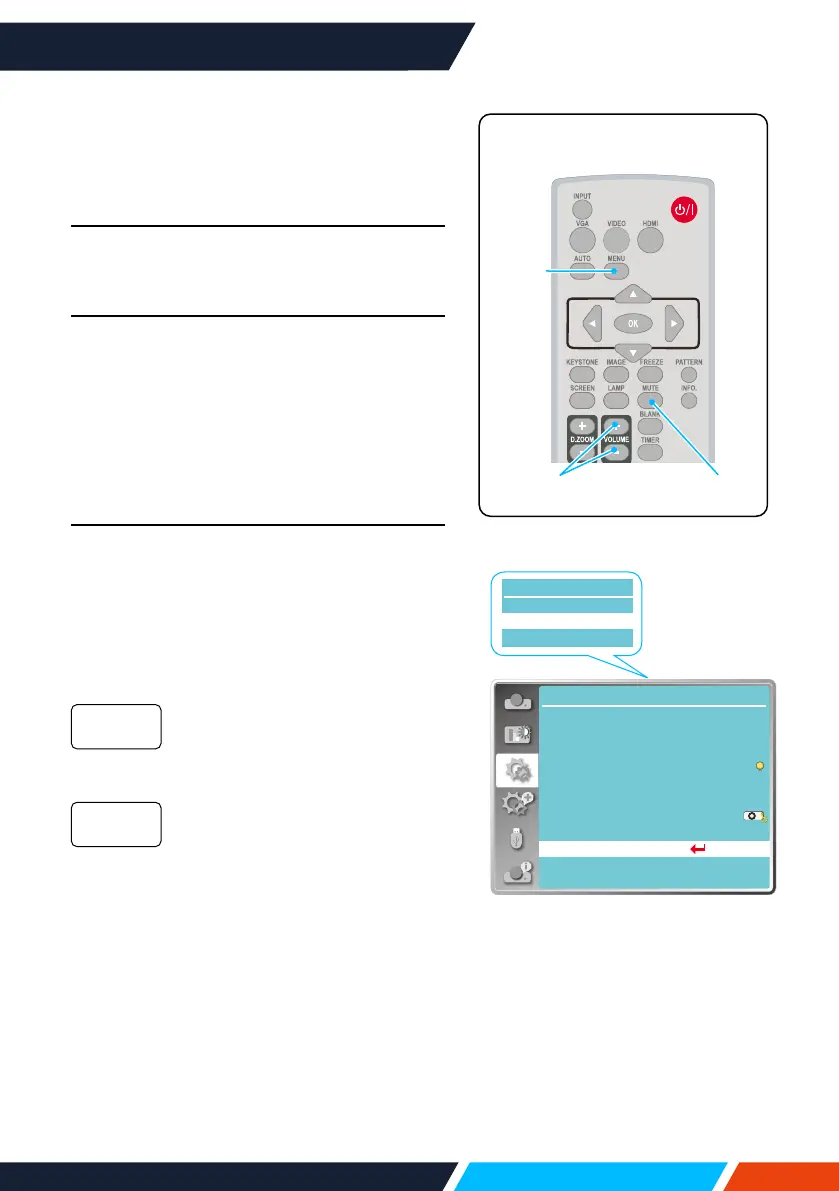
Volume adjustment
Forquickadjustmentofthevolumesettings
pleaseusetheremotecontrol.
Volume
PresstheremotecontrolVolume+/-buttons
toadjustthevolume.
MUTE
Pressthemutebuttonontheremotecontrol
toselect"ON",youcantemporarilyturno
thesound.Pressthemutebuttonagainto
select"O"orpresstheVolume+/-keysto
re-opentheaudioeects.
Mutefunctionisalsoeectiveforaudiooutput
interfaces.
Menu operation
1. PresstheMENUbuttononthetopcontrol
panelorremotecontrolandtheOSD
displays.Press
buttontoentersetting
menu,thenpress<OK>or
button.
2. Press
buttontoselectsound,press
<OK>or
buttontoenter.
3. Press
buttontoselectvolumeormute.
Press
buttontoincrease
volume.
Press
buttontodecrease
volume.
Press
buttontoswitchtoOn
orO.
4. Press<OK>buttontoselect.
Volume
Mute
Direct power on
Light source mode
...
Setting
Standby mode
High land
Cooling fast
Closed caption
Key lock
Iris
Sound
HDMI Setup
Off
Eco
Off
Normal
Off
On
Setting
Volume
Mute
Sound
Menu
Volume+/-
Mute
Remotecontrol









 To Next Page