www.infocus.com
Expand
61
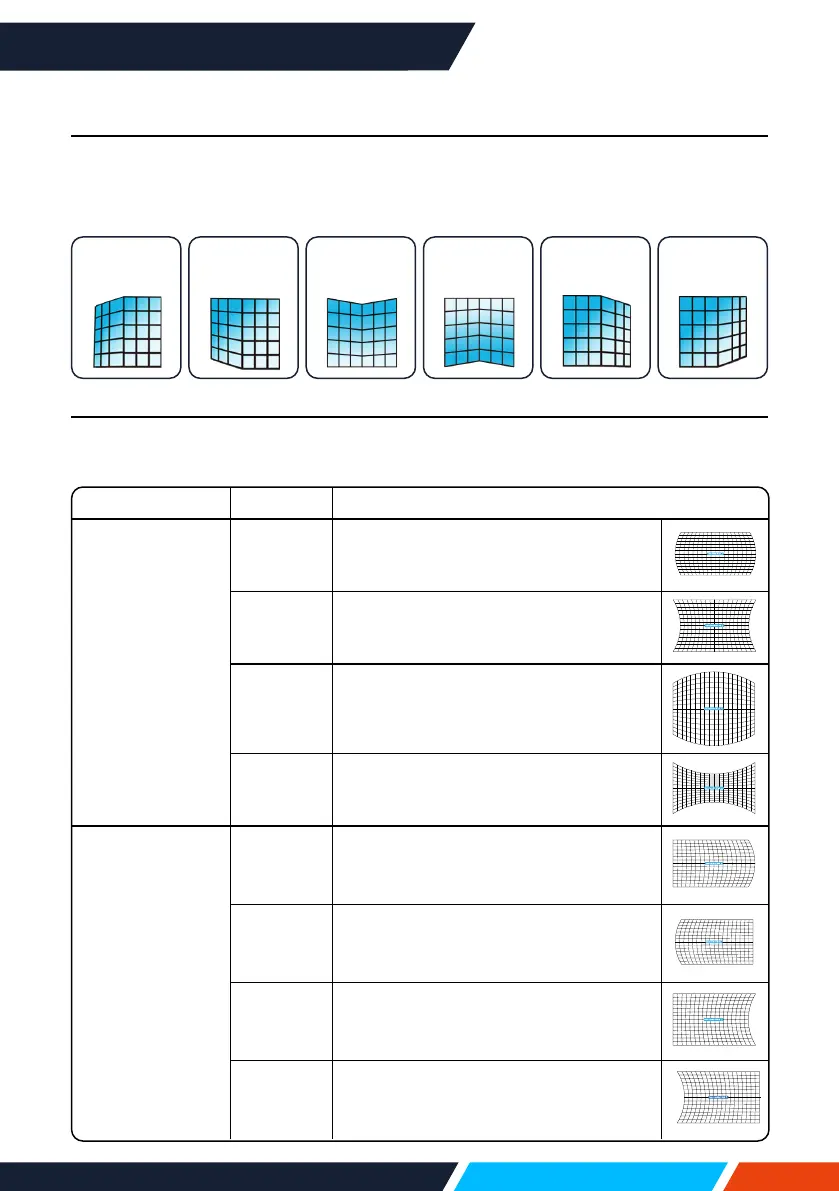
6-Conner correction (Only for WUXGA series)
Selectthisfunctiontocorrecttheprojectedimagesofsixcornersdistorted.
Press
buttontokeystoneatsixcornersofthescreen.Thesixcornersare
loopedinsequenceshownbelow:
Top
left
Top
right
Top
middle
Bottom
middle
Bottom
left
Bottom
right
Curved correction (Only for WUXGA series)
Selectthisfunctiontocorrecttheprojectedimageswithlinearityunevenorvertical
andhorizontalbendingdeformation.Press
buttontoadjustoptions.
Item Operation Adjustment
Curved
correction
X/Ygain
Press
Extendleftandrightvertically.
Press
Sagleftandrightvertically.
Press
Reachupanddownhorizontally.
Press
Sagupanddownhorizontally.
Curved
correction
Xoset
Press
Correcttheverticallinesontheleft.
Expandthetopanandbottomwhile
maintainingthecentralarea.
Press
Correcttheverticallinesontheright.
Expandthetopanandbottomwhile
maintainingthecentralarea.
Press
Correctthehorizontallineontheleft.
Expandthetopandbottomwhile
maintainingthecentralarea.
Press
Correctthehorizontallineontheright.
Expandthetopandbottomwhile
maintainingthecentralarea.









 To Next Page