www.infocus.com
Maintenance and cleaning
91
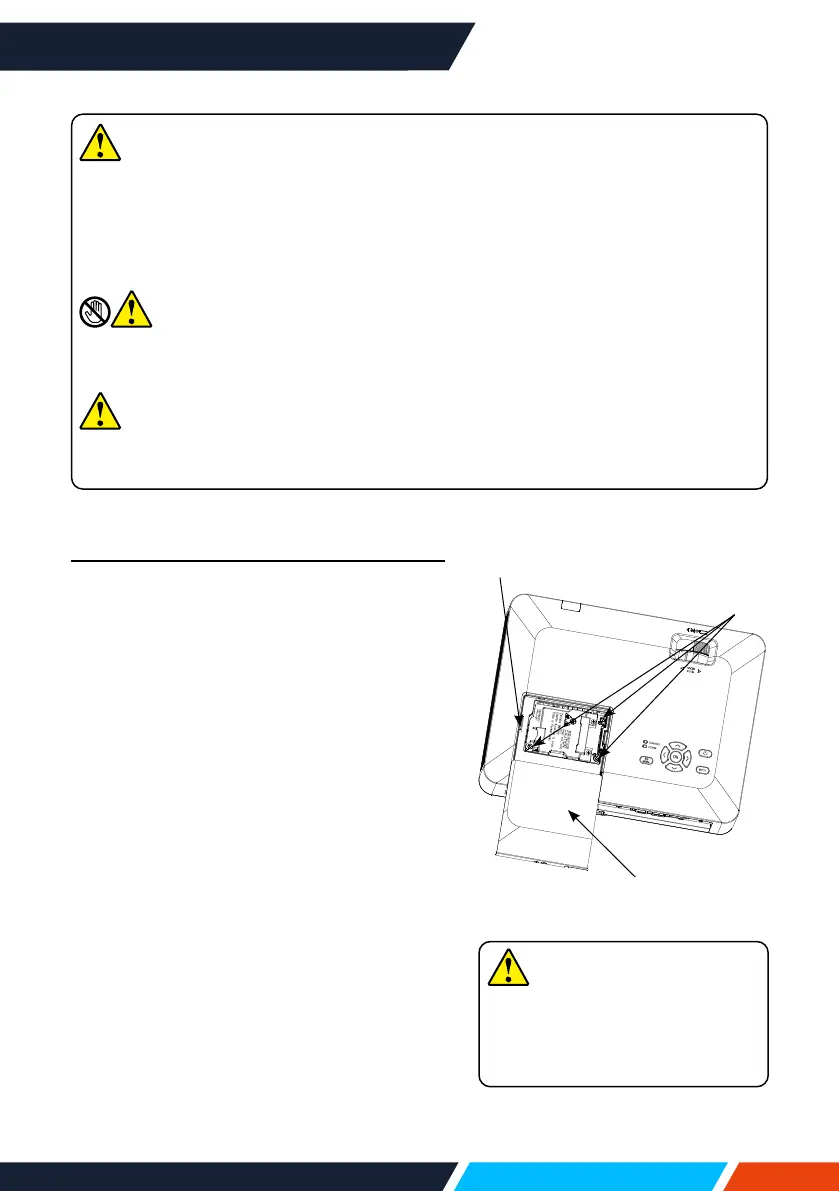
Follow steps below to replace the lamp:
1. PoweroyourprojectorandunplugtheAC
powercord.Letitcooldownforatleast45
minutes.
2. Openthelampcoverafterremovingscrews
holdingthecover.
3. Looseall3screwsxingthelamp.Remove
thelampbyholdingitshandle.
4. Replacewithanewlampandtightenall
3screws.Makesurethelamphasbeen
installedcorrectly.Closethelampcover
andtightenthescrew.
5. ConnectyourprojectortoanACpower
sourceandpoweriton.
Note
Donotreplacethelampafteritwentdarkasitmaybebroken.Alwaysassumethe
lampofaceilingmountedyourprojectorisbrokenwhenreplacingit.Standbeside
thelampcoverinsteadofbelowit.Removethelampcovergently.Smallpiece
ofglassdebrismayfalloutwhenopeningthelampcover.Consultwithadoctor
immediatelyifthereisanyglassdebrisfellinyoureyesormouth.
Note
Letyourprojectorcoolforatleast45minutesbeforeopeningthelampcover,as
temperaturewithinyourprojectorishigh.
Note
Replacethelampwithanewoneofthesamemodeljustincase.Donotdropor
touchthelamp!Itmaybreakandleadtopersonalinjuries.
Note
Alwaysuseoriginalmanufactures
lampstoensureyourprojector
isnodamagedandoperates
accordingtodesign.
Lampcover
Handle
Screw









 To Next Page