User Manual for the Thermographic System VarioCAM
®
high resolution
8. Operation
30 © InfraTec GmbH 2013 User Manual
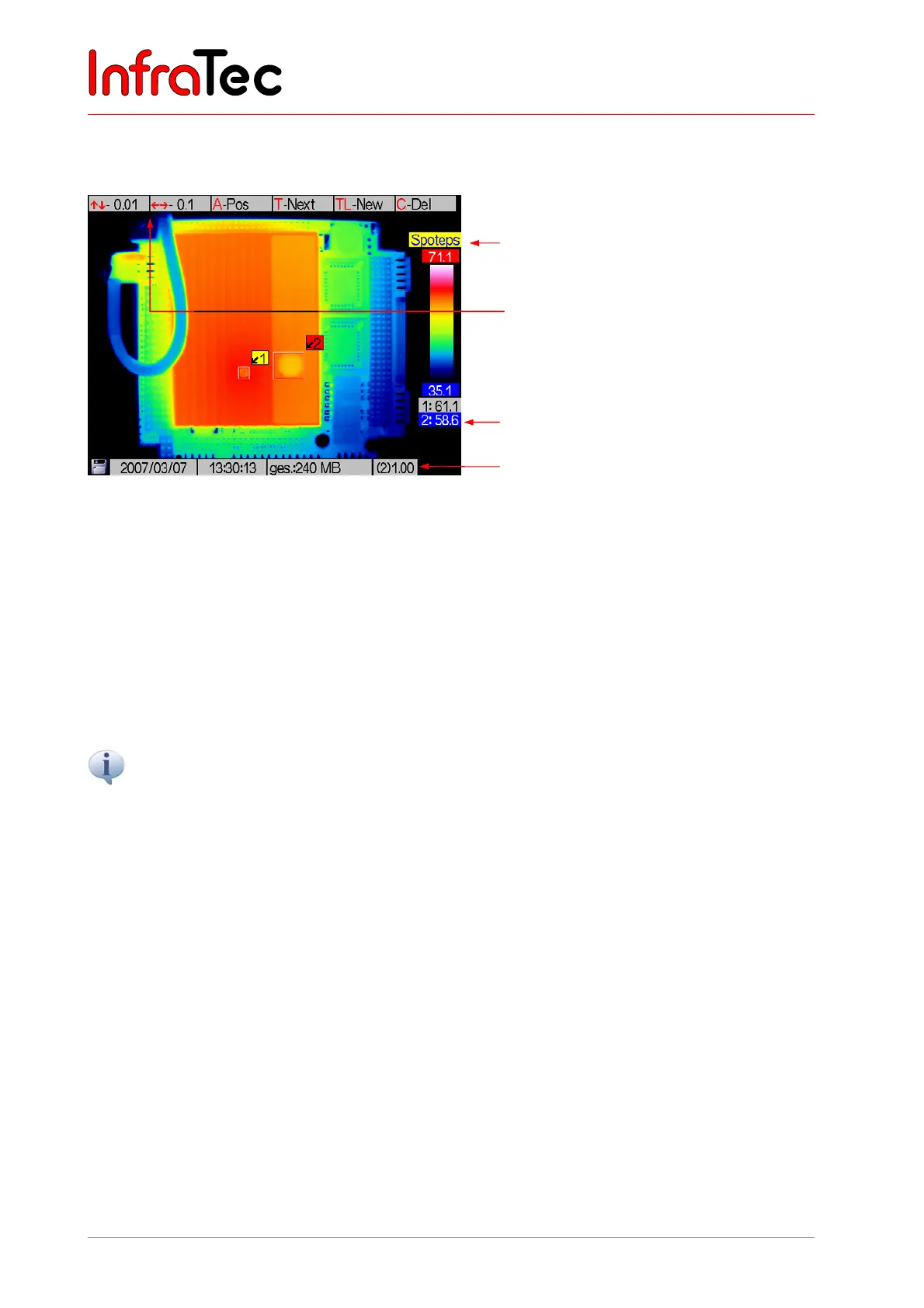
Status "Spoteps"
In the "Spoteps" status, the emissivity of a measuring area can be changed from 0.01 to 1.00.
Fig. 43 View of the spot editor in the "Spotdim" status
The emissivity of the respectively active ROI can be changed using the joystick. When pressed briefly,
joystick buttons , respectively reduce or increase emissivity by 0.1; joystick buttons , respectively
reduce or increase emissivity by 0.01. When pressing the joystick buttons for a longer time, emmissivity
may be adjusted faster by larger increments.
When generating an ROI, the globally valid emissivity is, first of all, adopted for this ROI (Menu "Measure
8.3.3, page 48). The emissivity is to be changed in Spoteps for each ROI individually. Differences
between local emissivity and the globally set value are shown by changes in the font colour of the
identifier of the respective ROI: It will then be purple (instead of black if global = local emissivity).
Emissivity settings will affect the temperature calculation within a measuring area.
Active ROI 2
Emissivity of ROI 2
Spot editor: “Spoteps”
Help for joystick movements for
changing the emissivity in
0.01/0.1 increments



 To Next Page