NV200 Family User Manual
<< Back to Contents
Copyright © Innovative Technology Ltd 2016 Doc: NV200 Family Manual
Version: 1.0
Page 21 of 119
4.3 Cashbox Removal
4.3.1 Standard Cashbox Removal
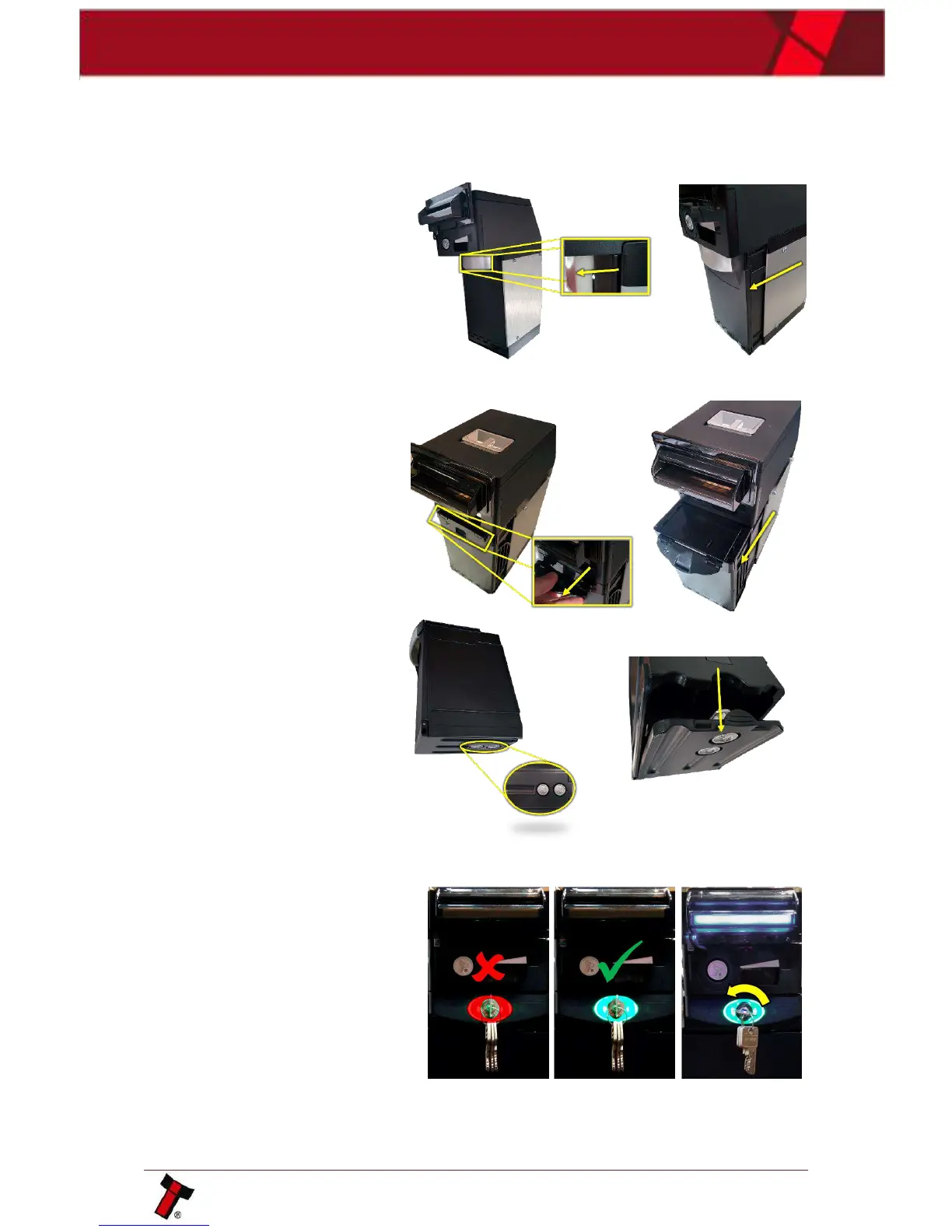
To remove the cashbox, pull
the handle away from the unit,
this will unlatch the cashbox
before allowing them to slide
out.
The NV200 may have to be unlocked
before removing the cashbox.
500n Cashbox:
1000n Cashbox:
When the cashbox has been
removed to access the money,
turn it upside down and open
the flap as shown in the
picture to the right.
There may be a further CAM lock at
the bottom of the cashbox.
4.3.2 TEBS Cash Bag Removal & Replacement
Unlike the traditional cashbox,
the TEBS has both a software
and hardware lock. Before the
cashbox can be removed the
software, lock must have been
enabled (when enabled the lock
is green).















 To Next Page