NV200 Family User Manual
<< Back to Contents
Copyright © Innovative Technology Ltd 2016 Doc: NV200 Family Manual
Version: 1.0
Page 64 of 119
9 SECOND LEVEL SUPPORT
Essential Tools:
▪ Relevant TEBS key
▪ ITL Diagnostic Tools
▪ Laptop
▪ USB A to B cable
▪ Calibration Paper (LB00149)
▪ IF17, cable and power supply
▪ 5mm Alan key
9.1 Clearing a Jam within the NV200
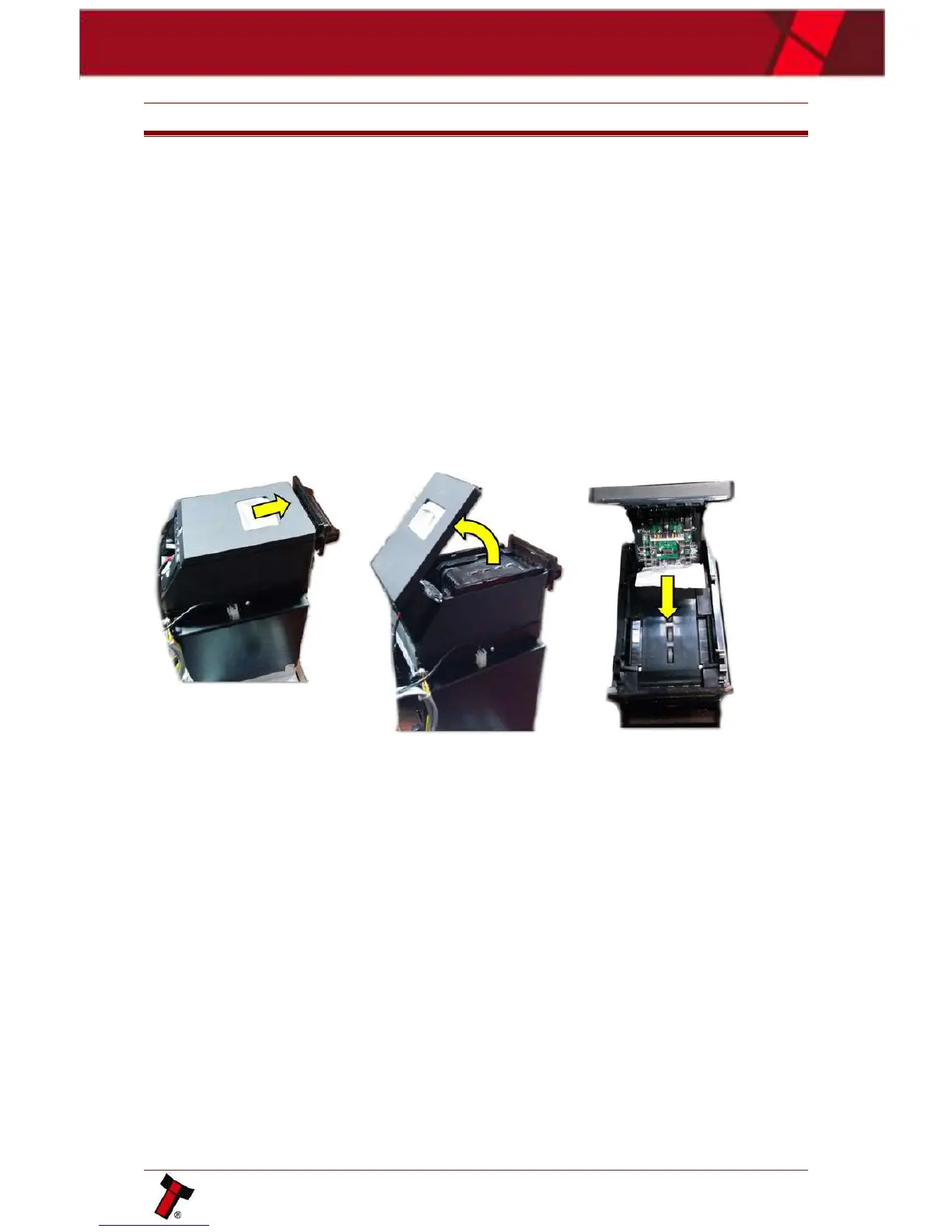
9.1.1 Note is in the note path
Open the note path by pulling the top catch forwards as shown below. Carefully pull
the note out of the unit. Shut the head, the unit will reinitialise indicating the jam
has been removed.
9.1.2 Note is visible once the NV200 has been removed
Disconnect power and remove the NV200 head, by lifting the silver catch bellow the
bezel and pull the validator forwards, when out of position the validator can be lifted
off the cashbox. This jam can be cleared by winding the drive gears on the left of
the unit and slowly pulling the note out. Replace the NV200 head and reconnect the
power.















 To Next Page