MEDIAJET – Operating instructions V09 Operation
45
www.integra-biosciences.com
4.10.2 Prepare tube filling process
Select the desired program in the TUBEFILLER menu using the arrow keys and
press START PROGRAM.
The dialogue window PREPARE FOR FILLING PROCESS appears.
Connect the tubing for the media source as described in “4.5.1 Connecting
the tubing set” on page 34. Especially consider the following important
points:
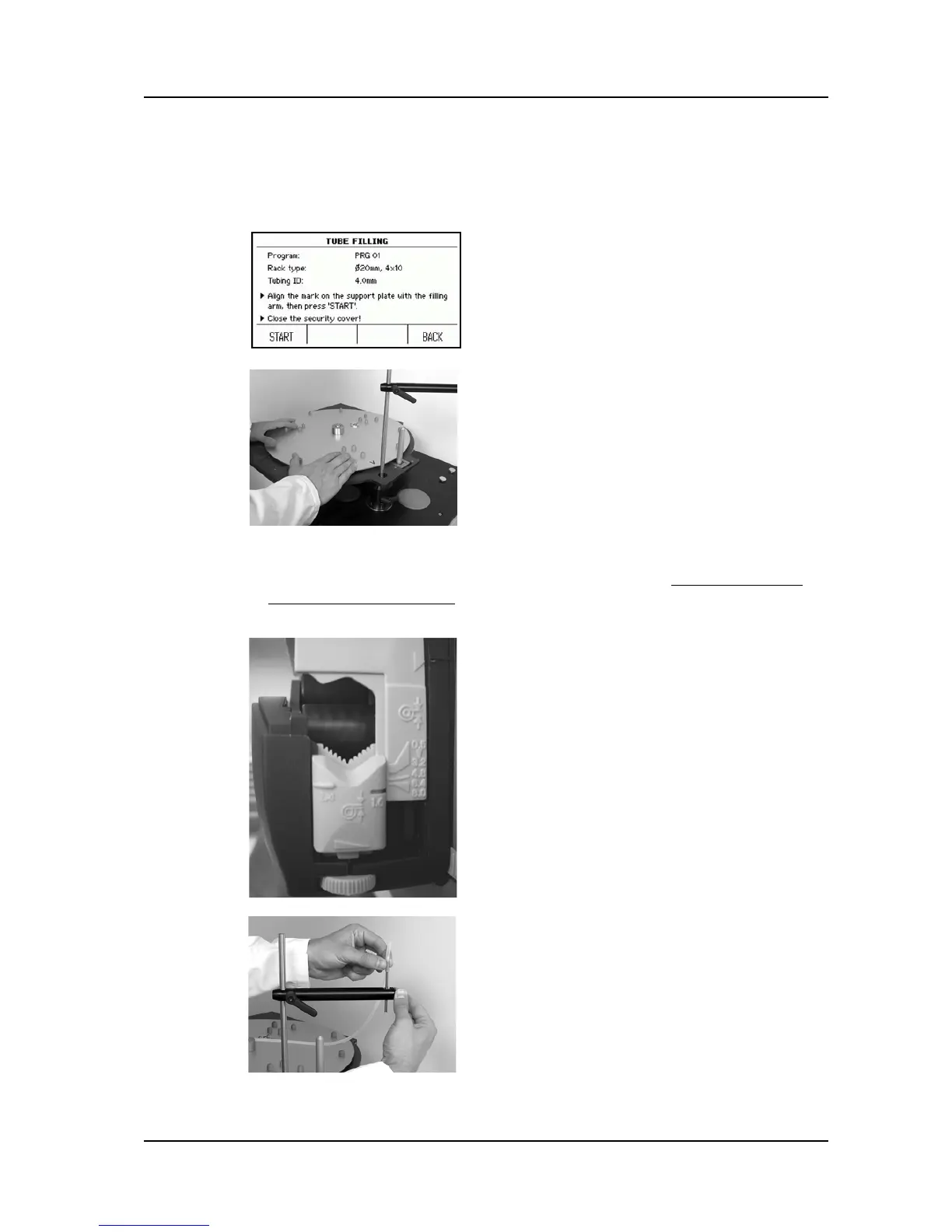
The dialogue window TUBE FILLING appears
again summarizing the most important settings
of the selected program.
Manually turn the support plate until the
arrow printed on the edge of the plate points
to the filling arm.
Close the safety cover.
Press START to execute the automatic
adjustment of the support plate.
The adjustment of the screws (1) on both sides
of the pump depends on the tubing type used:
For 2 mm ID tubing the 1.6 marking has to
be on a level with the 4.8 marking on the
pump head (2).
For 3 mm ID tubing the 1.6 marking has to
be on a level with the 6.4 marking on the
pump head (2).
For 4 mm ID tubing the 1.6 marking has to
be as low as possible (2).
Fix the dispensing tube, lying on the left
hand side of the pump, onto the front end of
the filling arm and firmly tighten the screw in
order to prevent the dispensing tube from
moving during the dosing process.



 To Next Page