MEDIAJET – Operating instructions V09 Operation
47
www.integra-biosciences.com
While the process is running, the program parameters can be adjusted at any
time by pressing the PAUSE button as described in “4.5.6
Altering program
settings of the filling process” on page 37.
4.10.4 End filling process
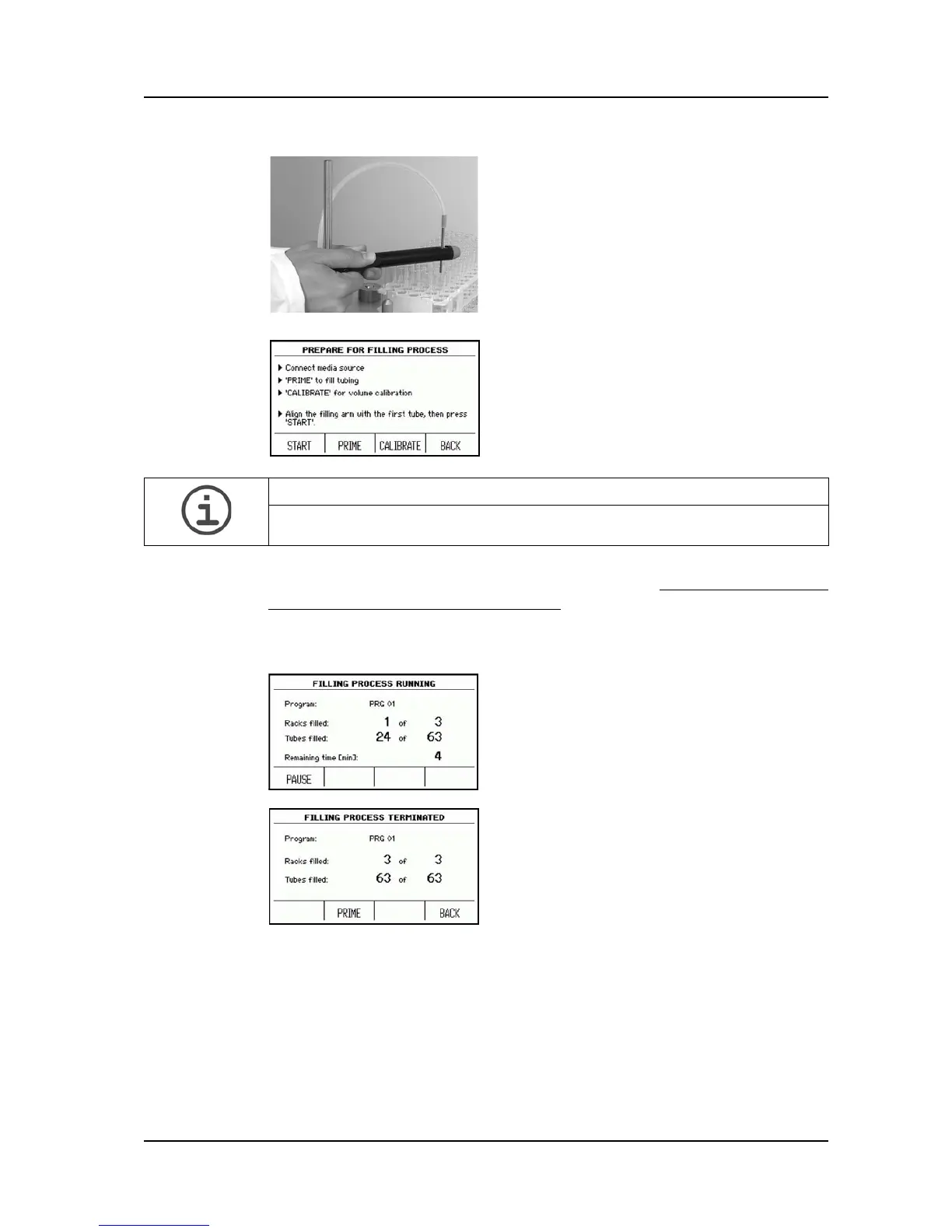
Manually move the filling arm to align the tip
of the dispensing needle with the first tube
all to the right in the rack position 1 on the
support plate. Make sure that the
dispensing needle is exactly centred over
the tube to ensure a smooth filling process.
Press START in the PREPARE FOR
FILLING PROCESS window.
The status of the filling process will
continuously be displayed.
ASSISTANCE
If PUMP OPTIONS in SYSTEM PARAMETER is enabled, press first PUMP
OPTIONS and then PRIME.
The filling process can be stopped manually at
any time by pressing PAUSE followed by
ABORT PROCESS.
As soon as the desired number of racks are
processed, MEDIAJET will automatically stop
and the dialogue FILLING PROCESS
TERMINATED will appear on the screen.
The PRIME function enables to empty or clean
the tubing.
With BACK you can return to the MAIN MENU.



 To Next Page