VIAFLO 96/384 – Operating instructions V11 Description of the device
www.integra-biosciences.com 11
2.2.4 Touch wheel
The Touch wheel is fully operational with only one hand. Rotational finger movements
translate into up and down cursor movement on the display. The Touch wheel is fully
functional with the use of latex gloves.
2.2.5 Left and right arrow buttons
2.2.6 PURGE button
During pipetting, you can interrupt the current pipetting protocol and purge all remaining
liquid currently in the GripTips. To do so, press PURGE (16
).
2.2.7 RUN key
Press and release the RUN key (17
) to initiate aspiration, dispense, mix, purge, and
special pipetting operations.
During dispense, you can press and hold the RUN key to perform a two-step blowout, see
“4.3.3
Blowout modes” on page 23.
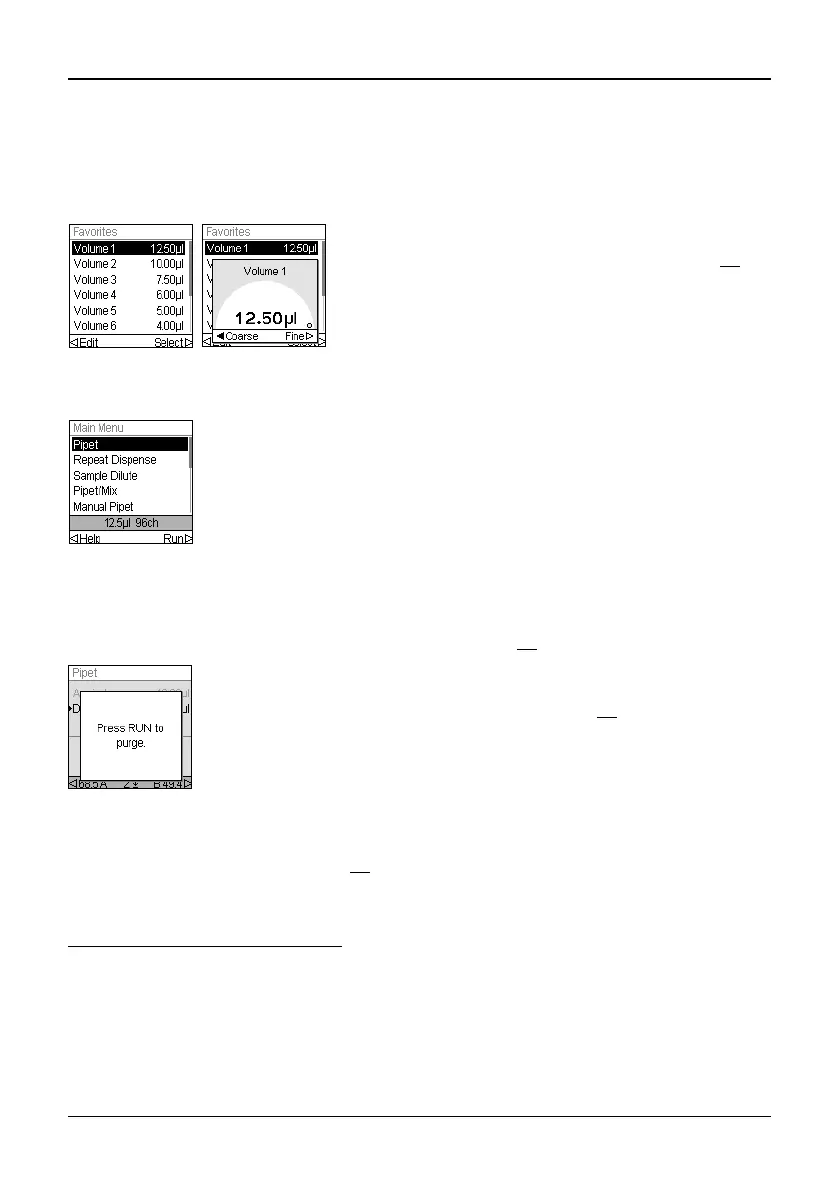
Move finger on the Touch wheel to choose (and
highlight) an option on the display. Press OK (14
) to
make the selection.
When a setting dial is displayed, spin the Touch wheel
to change the value and press OK.
At times, you will see and on a display screen. These buttons
are used to select options.
Press to select the option indicated with the left arrow (HELP, in
the example beside). Press to select the option indicated with the
right arrow (RUN, in the example).
The pipette will display a prompt.
To proceed, press and release the RUN key (17
). Upon completion
of the dispense, the first step in the current program will be
displayed.


 To Next Page