VIAFLO 96/384 – Operating instructions V11 Operation
www.integra-biosciences.com 25
4.4 Pipetting options and settings
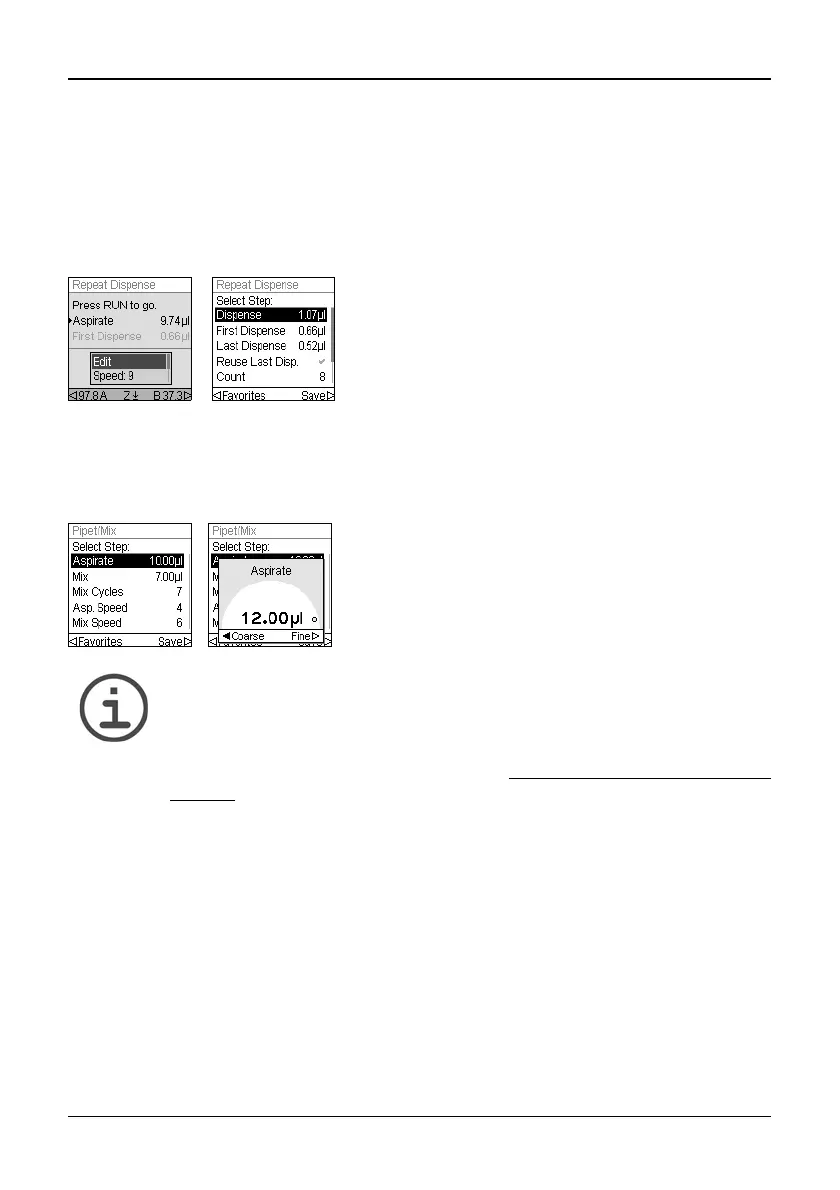
4.4.1 Edit option
The Edit option is available for each mode. It enables you to access the variables that you
can adjust for a pipetting mode. These variables include Speed, Volume, Pace, Count, Mix
Cycles, Rows and Direction. Additional steps include First Dispense, Last Dispense, Air
Gap, Aspirate Speed, Dispense Speed, etc..
4.4.2 Volume selection
To change a volume select the Edit option and press OK. The adjustable volumes are
displayed.
N
OTE
Use the arrow buttons to change the volume in coarse or fine increments.
Select Coarse to change the volume in larger increments. Select Fine
to change the volume in smaller increments. The increment sizes vary based
on the pipetting head, as shown under “7.4
Pipetting specifications” on
page 54.
Select a pipetting mode. Then, select Edit on the list
of options and press OK. A list of associated steps is
displayed. For example, if selecting Edit on the
Repeat Dispense screen, the modifiable steps
associated with Repeat Dispense are displayed.
Use the Touch wheel to highlight the volume you
want to change (Aspirate, Dispense, Mix, or Air Gap).
Press OK and a Volume setting “dial” is displayed.
Use the Touch wheel to change the volume. Press
OK to confirm your volume selection and to save.



 To Next Page