VIAFLO 96/384 – Operating instructions V11 Pipetting modes
www.integra-biosciences.com 41
5.3 Custom step-based programming mode
Application: Use the Custom program mode to create personalized pipetting protocols.
Up to forty programs can be stored.
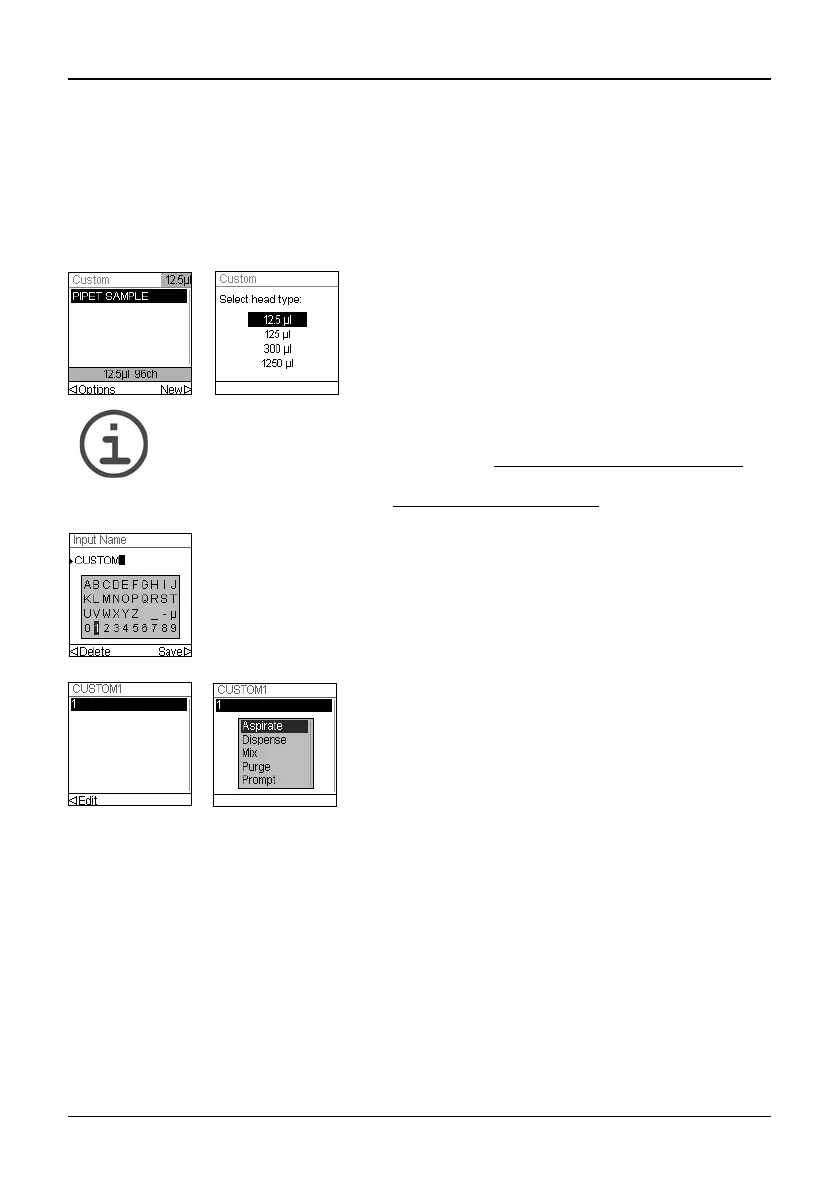
Select “Custom” to create a personalized protocol. Programs can contain up to 98
individual steps based upon the following basic operations: Aspirate, Dispense, Mix,
Purge, Prompt, Set Z Height, Tip Align and Loop.
N
OTE
The program type can only be selected if “Automatic” is activated under
Toolbox - Preferences - Main Menu, see “3.4.4
Preferences” on page 16.
We recommend creating automatic custom programs on a PC with the
VIALINK software, see also “5.4 VIALINK” on page 46.
After adding the first step, the selection should now be on the second line. Press OK again
to define the second step. Continue adding steps until your entire pipetting protocol is
defined.
Press to create a new program. Select the
pipetting head and the type of the new custom
program, i. e. Manual or Automatic.
Next, your are prompted to enter a name.
Use the Touch Wheel to select characters and press
OK. Once finished, press to save the name.
The first step is highlighted, press OK.
Use the Touch Wheel to select the first step from the
menu, e. g. Aspirate. Press OK. Define the required
parameters and press OK to add the step.



 To Next Page