VIAFLO 96/384 – Operating instructions V11 Operation
26 INTEGRA Biosciences AG
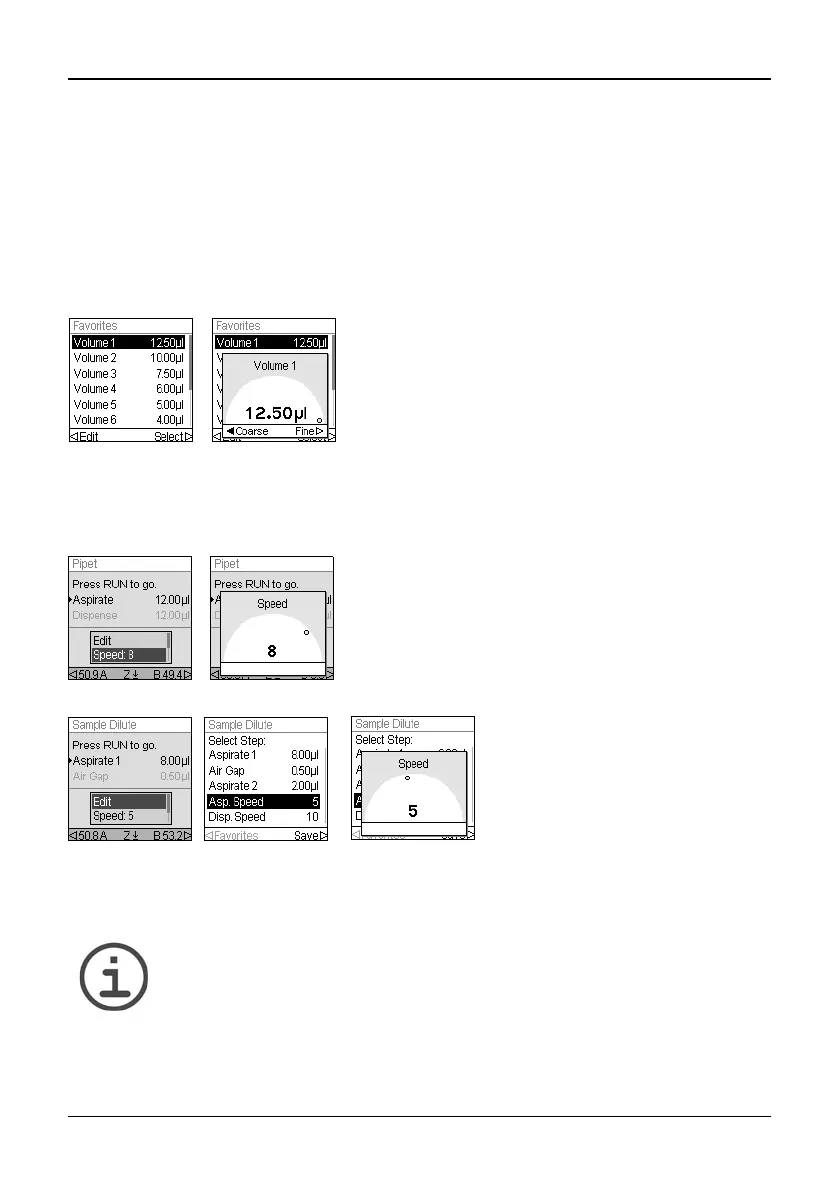
Define and select favorite volumes
You can define, save, and select up to ten favorite volumes for quick access. These
volumes can only be within the pipetting head volume range.
There are two ways to access and customize the list of favorite volumes:
• When in Pipet mode, use the Touch wheel to highlight Favorites and press OK.
• When in other modes, select the Edit option and press OK. The steps with volumes to
be adjusted are displayed. Use the Touch wheel to highlight the desired volume and
press Favorites to display the list of favorite volumes.
4.4.3 Speed selection
The speed option controls the speed at which liquid is aspirated, dispensed, or mixed in
each mode. Speed can be set as a value from 1 (slowest) to 10 (fastest).
The speeds selected in each mode (i.e., Pipet, Repeat Dispense, etc.) are stored for that
mode only.
Speeds can be set independently for each operation (Aspirate, Dispense, Mix).
N
OTE
Viscous samples should be aspirated and dispensed at the slowest speeds
to ensure accurate pipetting.
To dispense liquids with low viscosity and high vapor pressure, such as
ethanol, use relative fast pipetting speeds and avoid prolonged pauses for
aspiration.
Use the Touch wheel to highlight the desired volume
and press Select. Alternatively, modify a volume
by pressing Edit.
Save your setting .
When in any pipetting mode, use the Touch wheel to
highlight the Speed option and press OK. Select the
speed and press OK to save your setting.
Speed may be changed in most
Edit menus. Scroll to the Speed and
press OK. Choose the speed,
press OK, and press to save
your selection.



 To Next Page