www.intermatic.com
20
MultiWave Control System Programming and User Guide
Remoting the Antenna
If OUT OF RANGE appears on the controller, you must relocate
the antenna. Follow this procedure to move the antenna.
1. Remove power at the breaker before removing antenna.
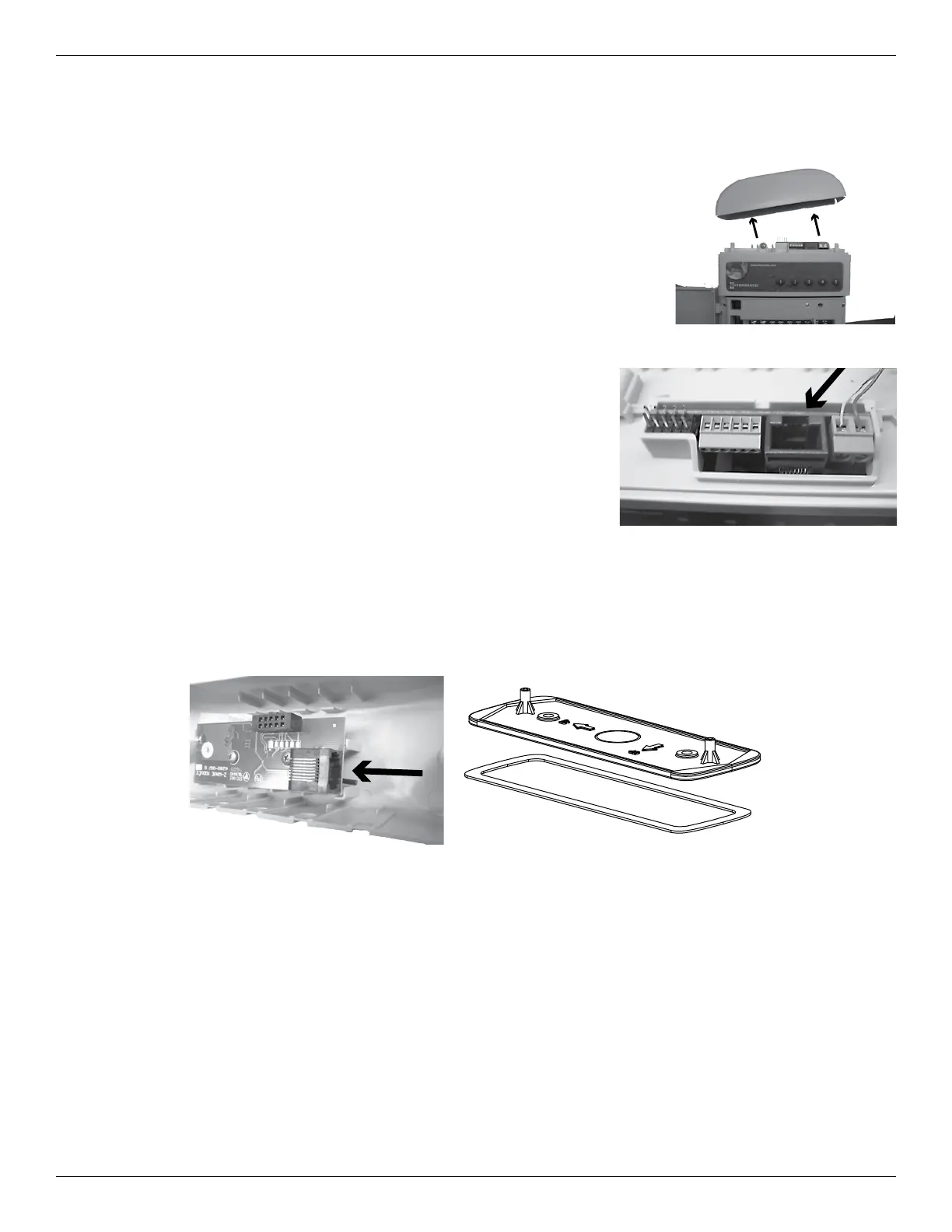
2. Remove the two screws that attach the antenna cover to the
receiver. Set aside the screws for re-use.
3. Pull the antenna cover straight away from the receiver.
4. Relocate the antenna assembly to a location that is in direct line of
sight from the area of operation and 5-6 feet above ground where
the user will operate the hand-held controller.
5. Use a CAT 5 Ethernet cable suitable for outdoor use to
connect the antenna to the receiver.
6. Attach the mounting plate on top of the waterproof gasket
and then connect the assembly to the wall or post where
you plan to relocate the antenna.
7. Remove a knockout to enable the wire to pass through the
antenna cover.
8. Screw the antenna cap to the bracket with the screws supplied with the remote kit.
9. Remove a knockout for the wire to pass through the dummy cap.
10. Tighten the dummy cap to the top of the receiver with the screws set aside in step 1.
11. Re-apply power to the unit.










 To Next Page