www.intermatic.com
18
MultiWave Control System Programming and User Guide
Creating a Network
The controller must be synced with the receiver to create a network connection. Be sure to reset
the controller and receiver before synchronizing the two devices. Perform the following procedures:
Resetting the Controller, Resetting the Receiver, then Linking the Controller to Receiver.
Resetting the Controller
1. Press a button on the controller to activate it from idle.
2. Press P/S and ENTER simultaneously to access LEARN MODE.
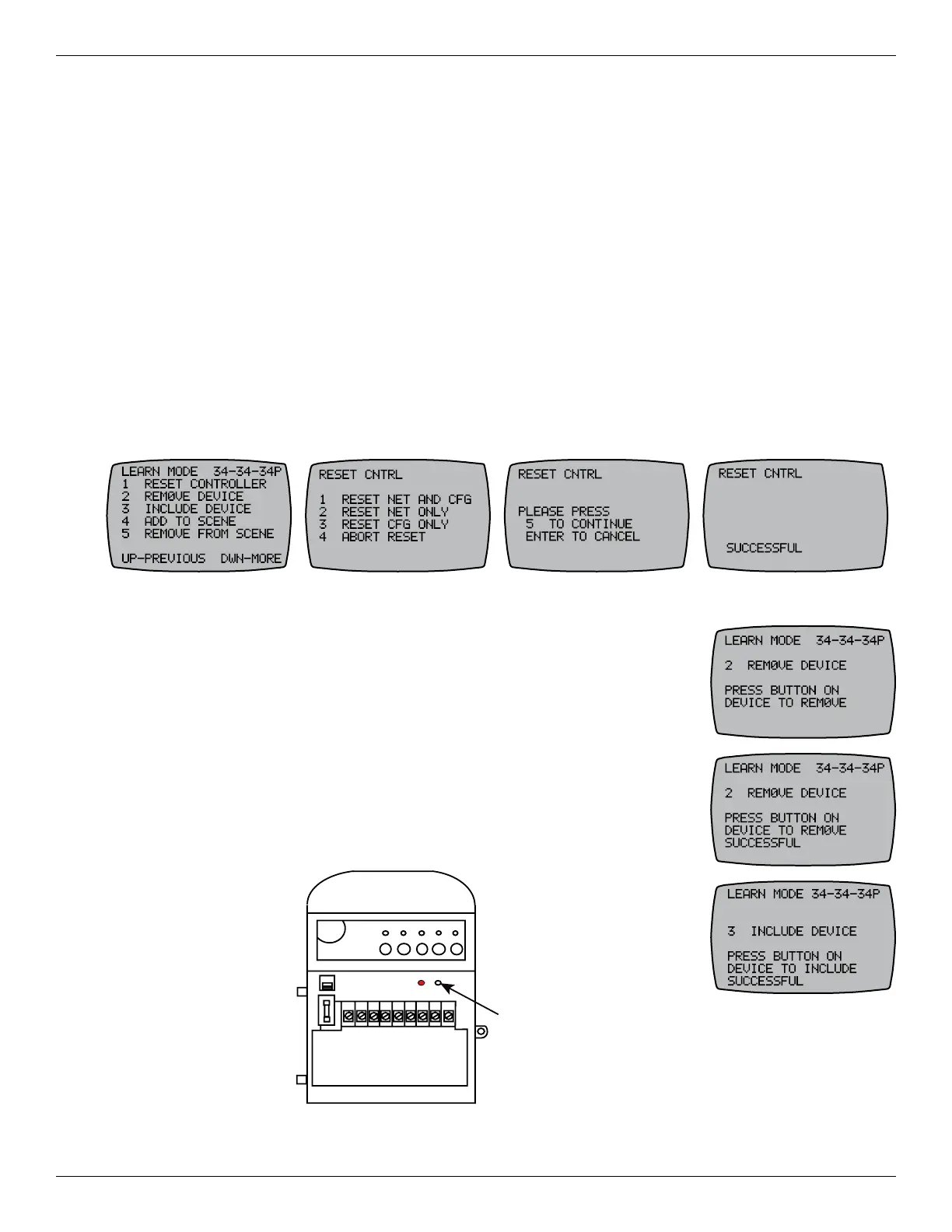
3. Press 1 to select RESET CONTROLLER. The RESET CNTRL screen appears.
4. Press 1 to select RESET NET AND CFG to delete existing network connections and any
programming entered in the controller.
5. Press 5 to select CONTINUE. The screen displays PLEASE WAIT followed by SUCCESSFUL. The
controller is reset.
Resetting the Receiver
1. Press P/S and ENTER simultaneously to access LEARN MODE.
2. Press 2 to select REMOVE DEVICE.
3. With a blunt object, press the INCLUDE button on the receiver. The
controller displays SUCCESSFUL, and then returns to the LEARN
MODE screen.
4. Press 3 to select INCLUDE DEVICE.
5. With a blunt object, press the INCLUDE button again.
6. Controller displays SUCCESSFUL, then returns to LEARN MODE.
INCLUDE
120 V
240 V
12345678 9
Include
Button
Figure 2-5. Include button on the receiver.










 To Next Page