31 Programming — Variable Speed Pump Options Screens
&RQÀJXULQJ3HQWDLU9DULDEOH6SHHG3XPS6SHHGV
Follow the procedure below to congure the Pentair variable speed pump settings in the controller.
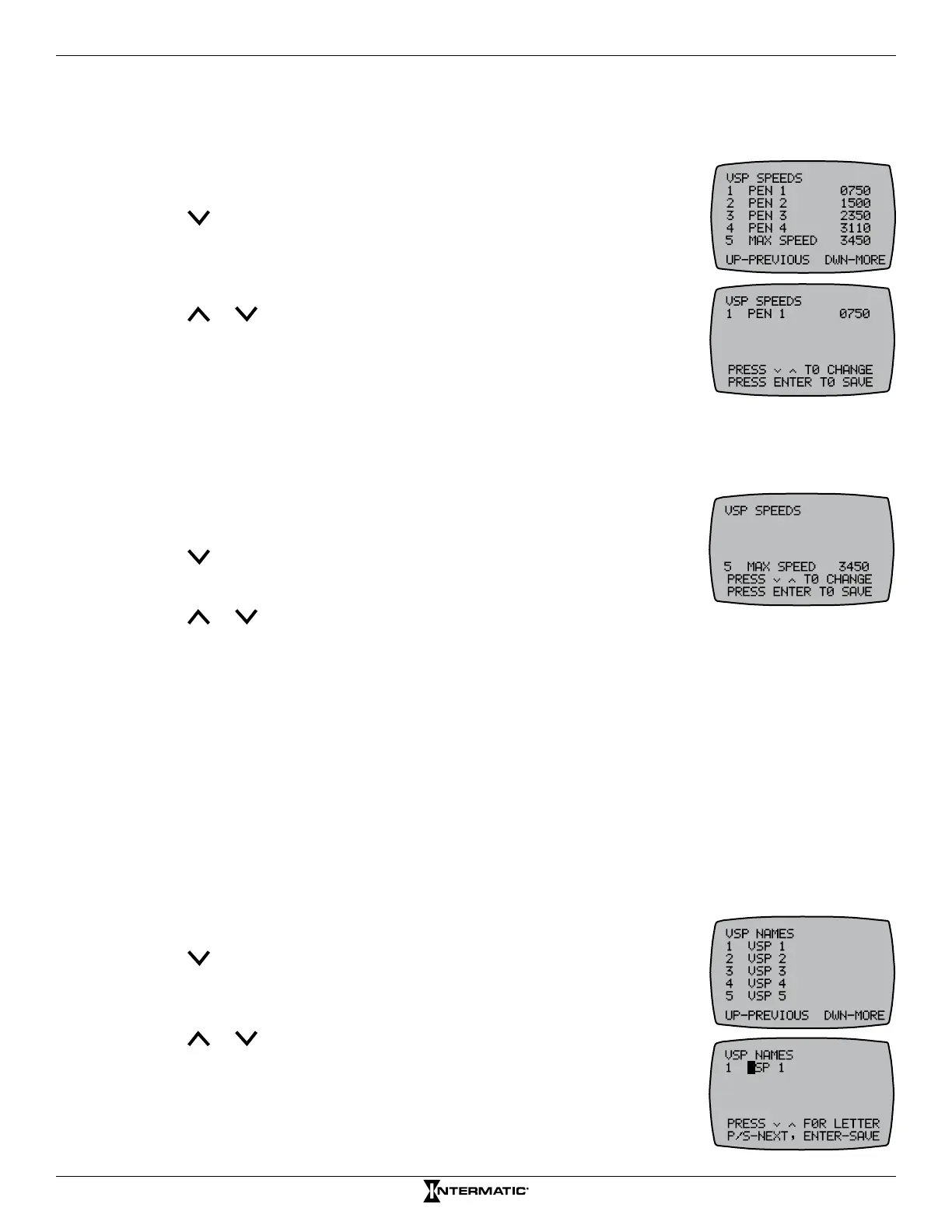
1. Press ENTER to display the VARSPD PEN screen.
2. Press P/S and ENTER simultaneously to access LEARN MODE.
3. Press to scroll to the VSP SPEEDS screen.
4. Press 1 to set the speed for that button. The screen displays that speed.
NOTE: To set another variable speed, press the applicable button (2-5)
that you want to add another speed.
5. Press or to increase or decrease the speed setting and press
ENTER to save and return to the VARSPD PEN screen.
6. Repeat steps 3 to 6 as necessary to congure a speed for each button.
6HWWLQJD3HQWDLU9DULDEOH6SHHG3XPS
0D[LPXP6SHHG
Follow the procedure below to set a maximum speed for a Pentair variable speed pump.
1. Press ENTER to display the VARSPD PEN screen.
2. Press P/S and ENTER simultaneously to access LEARN MODE.
3. Press to scroll to the VSP SPEEDS screen.
4. Press 5 to select MAX SPEED.
5. Press or to increase or decrease the speed setting.
6. Press ENTER to save.
Jandy
®
, Hayward
®
, Century
®
, Marathon
®
, and Speck
®
Variable
Speed Pump Options Screens
&RQÀJXULQJ2WKHU9DULDEOH6SHHG3XPS1DPHV
Follow the procedure below to congure the variable speed pump name settings in the controller for
Jandy, Hayward, Century, Marathon, and Speck variable speed pumps.
1. Press ENTER to display the VARSPD HAY (Hayward), VARSPDCEN (Century), VARSPDSPK
(Speck), VARSPDMAR (Marathon), or VARSPD JAN (Jandy) screen.
2. Press P/S and ENTER simultaneously to access LEARN MODE.
3. Press to scroll to the VSP NAMES screen.
4. Press a number button (1 through 5) for the speed you want to name.
The screen highlights the rst letter.
5. Press or to adjust the rst letter to the desired character (A-Z,
1-9, and SPACE) and press P/S to move to the next character.
6. Repeat step 5 as necessary to complete the variable speed name.
7. When the name is complete, press ENTER to save.
8. Repeat procedure to congure more variable speed names.










 To Next Page