www.intermatic.com
22
MultiWave Control System Programming and User Guide
Chapter 3:
Programming — PE653 Option Screen
Setting Pool Equipment Options
Follow the procedures in this section to congure the pool equipment accessed through the
PE653 OPTION screen.
¸ Conguring 1-Speed or 2-Speed Pump
¸ Calibrating Water, Air, and Solar Temperature Settings
¸ Conguring the Cleaner (Booster) Pump
¸ Conguring Pool, Spa, or Both in Controller
¸ Selecting a Spa Pump Default Speed
¸ Dening the Cool Down Period for the Heater
¸ Enabling/Disabling the Heater Safety Feature
¸ Enabling a Second Heater and Thermostat Contol
¸ Setting up a Solar Temperature System
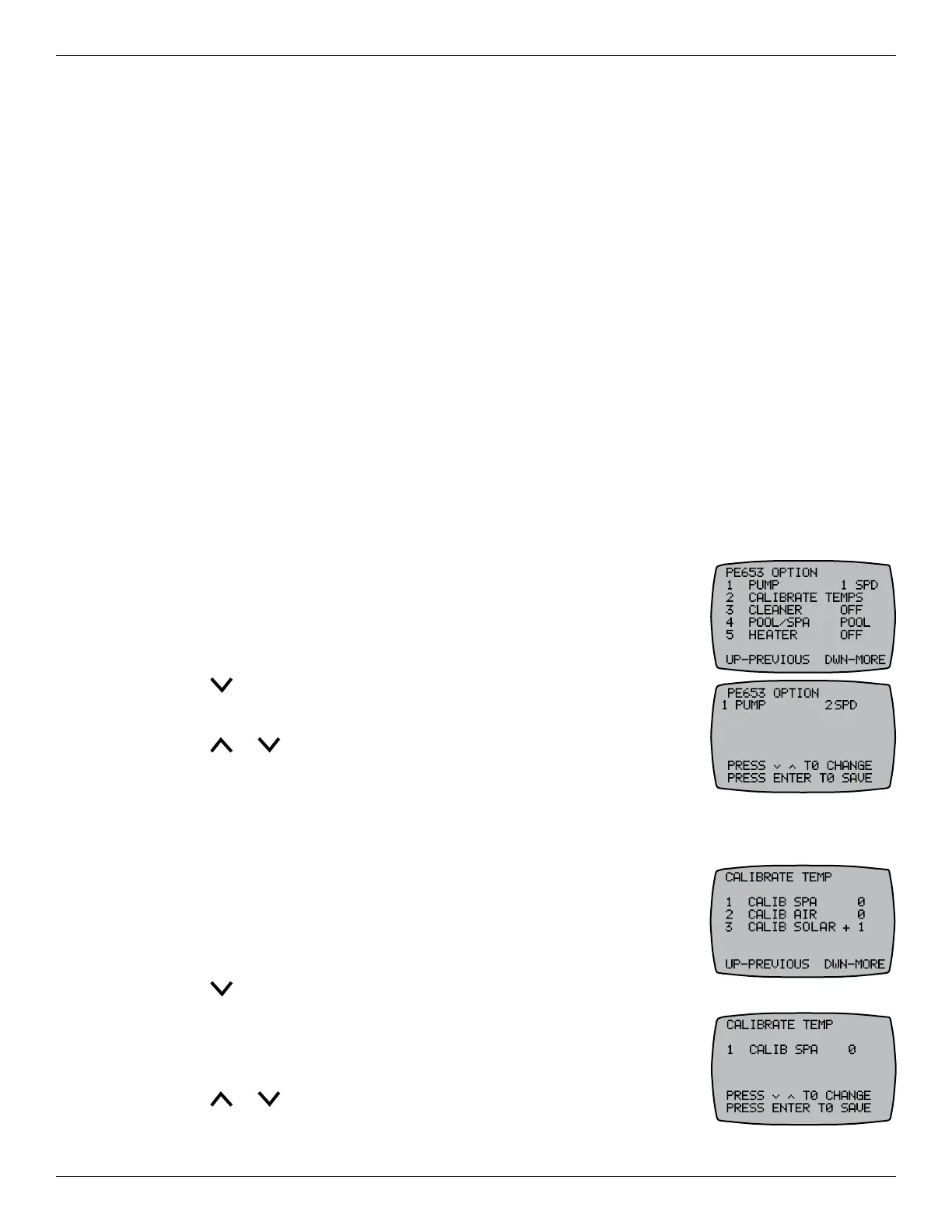
&RQÀJXULQJ6SHHGRU6SHHG3XPS
The controller is congured to control a single speed pump at the factory.
If you have a two-speed pump, follow this procedure to program a two-
speed pump in the controller.
1. Press P/S and ENTER simultaneously to access LEARN MODE.
2. Press to scroll to the PE653 OPTION screen.
3. Press 1 PUMP.
4. Press or to change from 1SPD to 2SPD and then press ENTER.
The controller displays SUCCESSFUL and returns to LEARN MODE.
&DOLEUDWLQJ:DWHU$LUDQG6RODU7HPSHUDWXUH6HWWLQJV
If there is a discrepancy between temperatures shown on the controller
and the thermometers used to measure the pool, spa, and air temperature,
follow this procedure to calibrate the controller temperature to match or
offset the thermometers’ temperatures.
1. Press P/S and ENTER simultaneously to access LEARN MODE.
2. Press to scroll to the PE653 OPTION screen.
3. Press 2 to select CALIBRATE TEMPS.
4. Press 1 CALIB POOL, 2 CALIB AIR, or 3 CALIB SOLAR to calibrate
the temperature setting up to ± 5° F.
5. Press or to adjust the displayed temperature and press ENTER
to save. The screen displays SUCCESSFUL, indicating the
temperature adjustment is saved.










 To Next Page