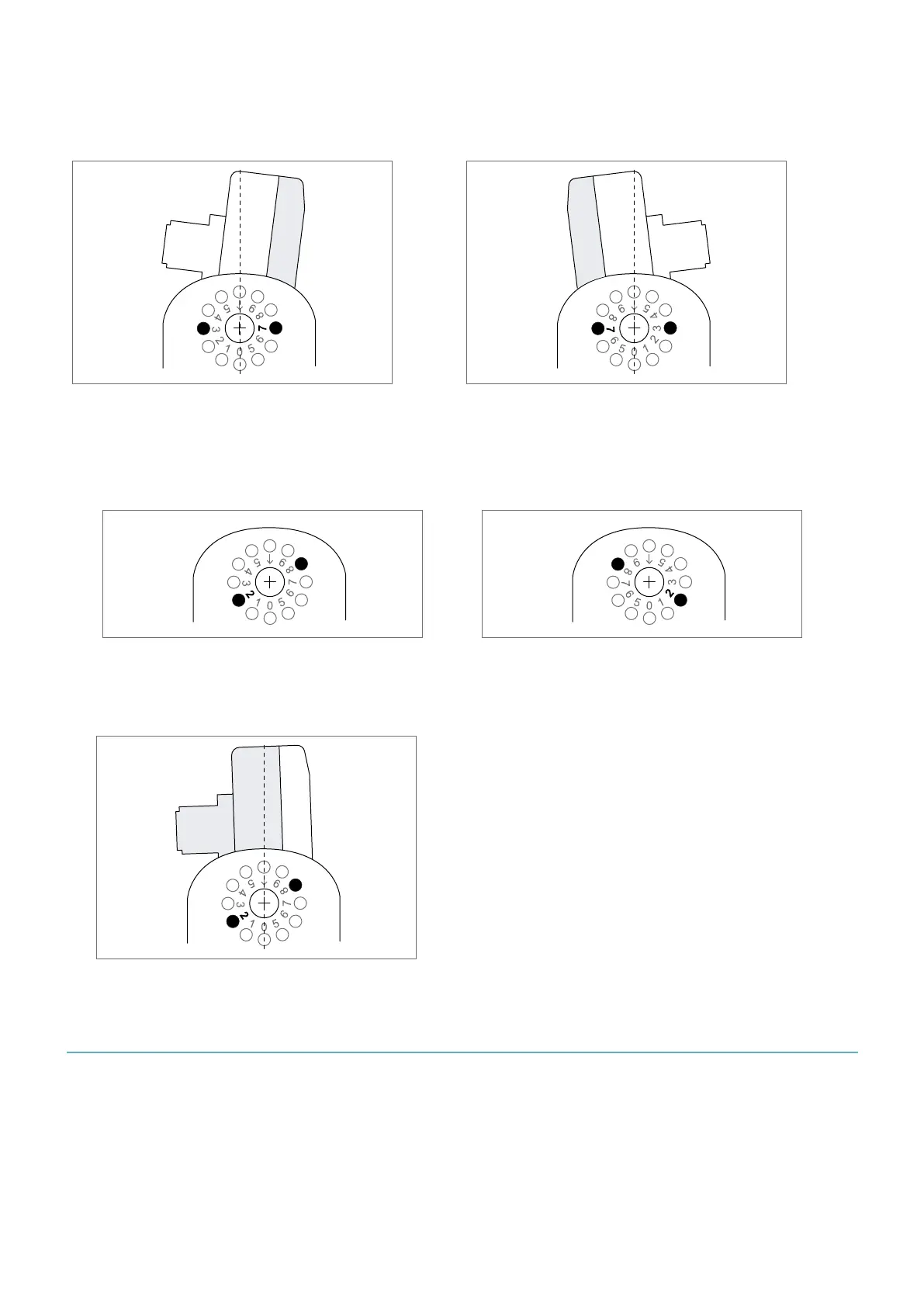
Example 2 (downward): -37°
In this example, the front of the case is facing the following angles: 5°, 6°, 7°, 8°, 9°.
Side 1 Side 2
8.3.4 Example: set the sensor inclination to +62°
1. Insert the adjustment ring in the hole corresponding to 2°.
Side 1
Side 2
2. Insert the sensor in the bracket with the rear of the sensor facing the 2° angle.
3. Tilt the sensor upward of six notches.
8.4 Configure Inxpect SRE 200 Series
8.4.1 Configure procedure
1. "Start the Inxpect Safety application".
2. "Define the area to be monitored".
3. "Configure the inputs and outputs".
4. "Save and print the configuration".
5. Optional. "Assign the Node IDs".
6. Optional. "Synchronize the control units".
8. Installation and use procedures
Inxpect SRE 200 Series | Instruction manual v1.5 DEC 2023|Inxpect SAF-IM-200S_5m_7_00047_en_v1.5|© 2021-2023 Inxpect SpA
75


 To Next Page