JABLOTRON ALARMS a.s.
Pod Skalkou 4567/33 46601 Jablonec n. Nisou
Czech Republic www.jablotron.com
||
|
JA-101K(-LAN)(-LAN3G) and JA-106K(-3G)
Security System Control Panels 65 / 110 MLJ51410
Note: The “Common segment x” item is only offered if more than two segments for section
control are connected to the module.
PG indicates /
controls
The segment can control a different PG output from the one it optically indicates. In this
menu the first parameter is used to select the PG output for indication and the other one
(supplementary) the PG output to control. The function is e.g. used to control a garage
gate with a PG output impulse while the control segment displays the actual status of the
gate obtained from the gate detector. A maximum 4 segments on one keypad can be
used when this function is selected.
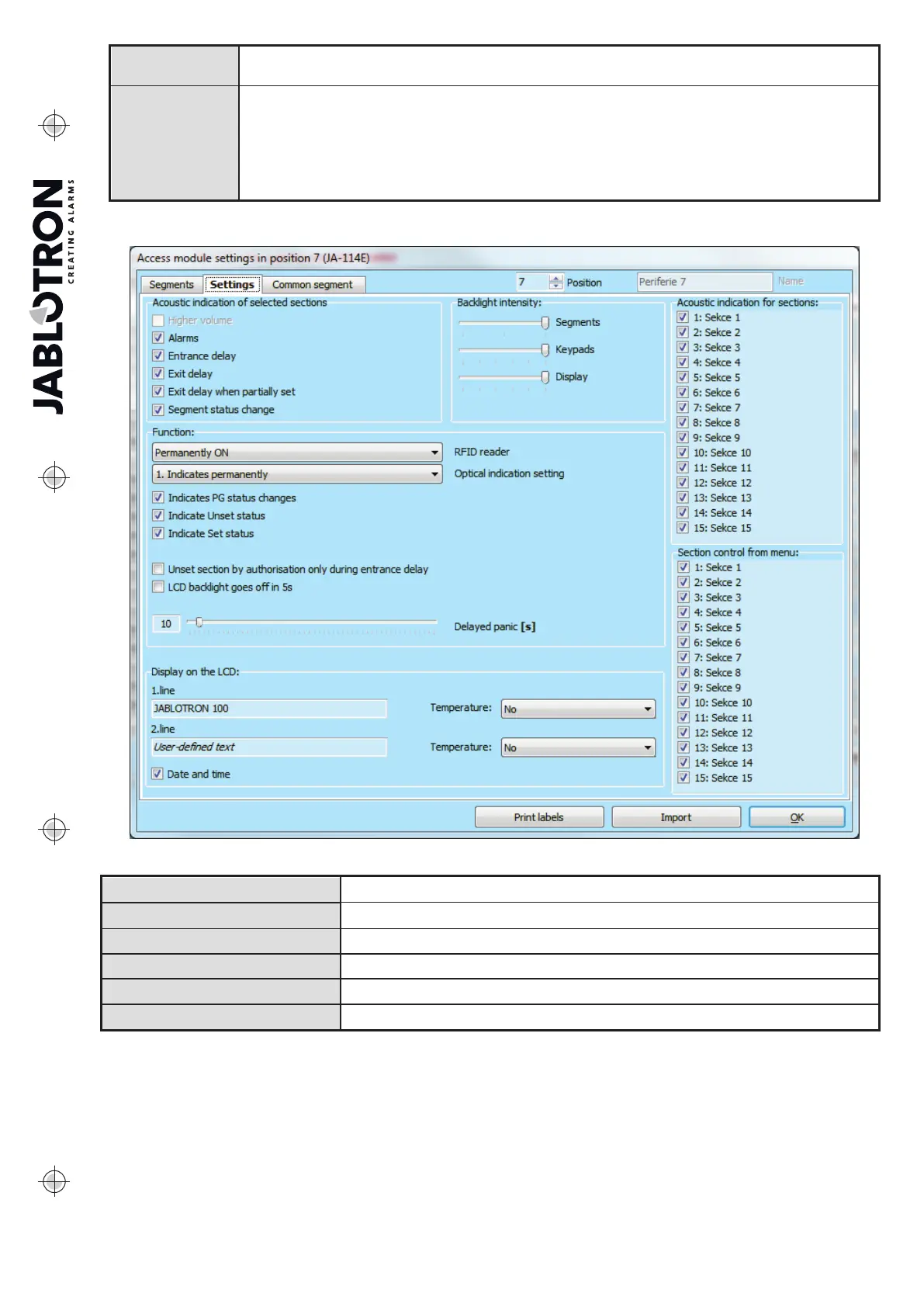
10.5.1.2 Settings tab:
Acoustic indication of selected sections:
Higher volume Setting of indication volume except for an alarm
Alarms acoustic output in case of an alarm (siren sound)
Entrance delay continuous whistling tone during an entry delay
Exit delay slow intermittent beeps (1/s)
Exit delay when partly set slow intermittent beeps (off by default)
Segment status change acoustic indication with one beep at a change


 To Next Page