JA-101K(-LAN)(-LAN3G) and JA-106K(-3G)
Security System Control Panels 92 / 110 MLJ51410
Channel* – informs about the BUS used by the device to communicate. Three directions are distinguished:
BUS 1, BUS 2 (only JA-106) and the RJ connector designed for the JA-11xR radio module. There is a special
column called Channel which displays via which bidirectional devices communication currently occurs.
11 Other F-Link options
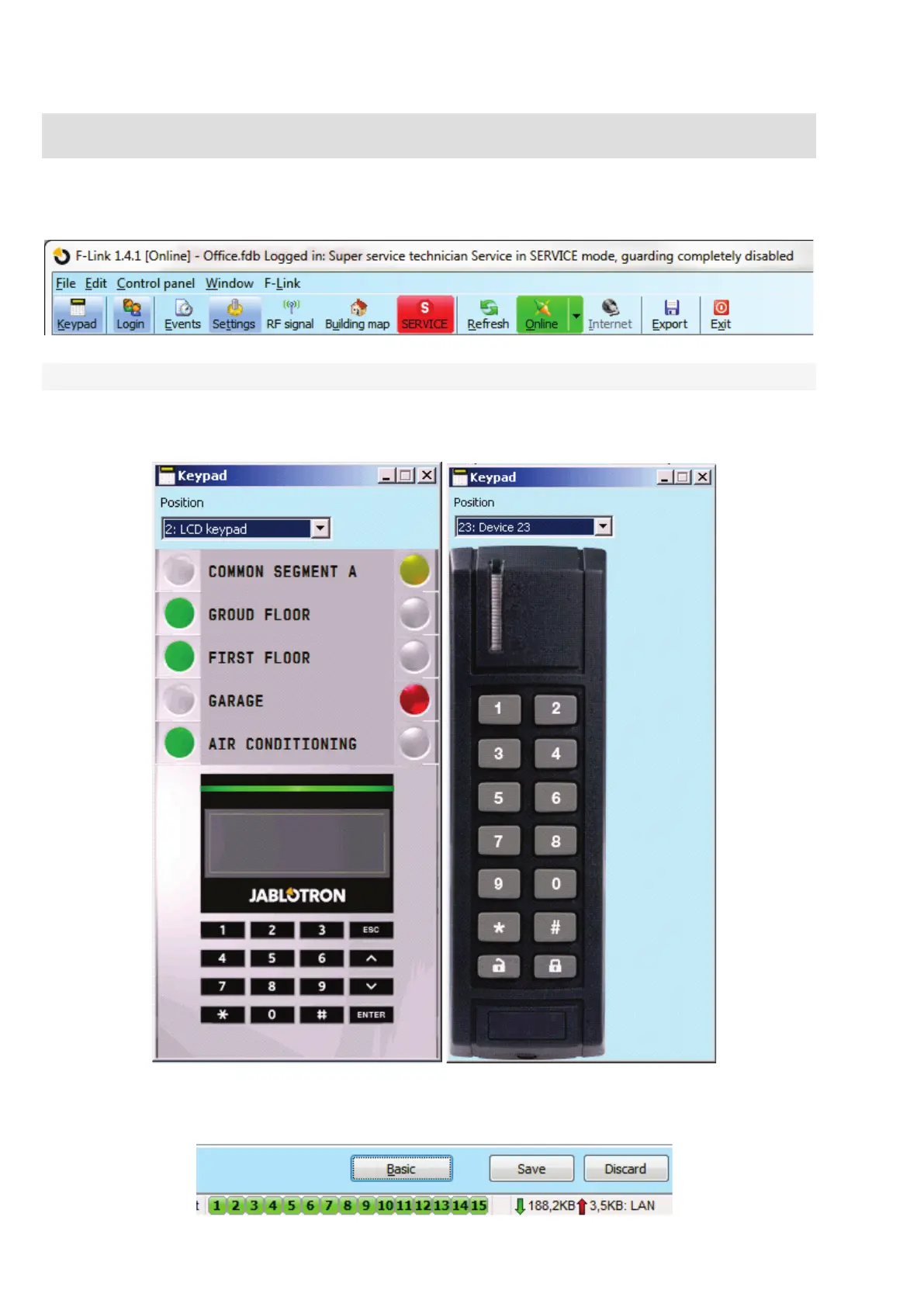
The F-Link version is always indicated in the top bar after the name.
The toolbar provides immediate access to virtual keyboards, system events, settings, RF signal of radio
modules, site map, mode changes, local and remote access to the control panel.
11.1 Keypad (virtual)
The virtual keypad in the F-Link (now in J-Link as well) for all types of control modules enables control
(of sections, PG outputs) with the use of segments (not numbered keys) of the person logged in to F-Link.
This means that codes cannot be entered.
The system can be controlled locally and also remotely (set and unset) by clicking on the icons representing
system status in the lower toolbar and in the Section tab by buttons there as well.


 To Next Page