JA-101K(-LAN)(-LAN3G) and JA-106K(-3G)
Security System Control Panels 84 / 110 MLJ51410
to operate the system can be installed in mobile devices with the Android, iOS (Apple) and Windows
Mobile systems. For this option it is necessary to use a LAN communicator or GSM communicator with
activated GPRS data communication (a SIM card with a suitable data tariff is necessary).
Register – The button serves for registering the system to CLOUD services such as MyJABLOTRON.
When you fill in the form and send the data for confirmation then it creates a registration request.
Confirmation of the filled in form will be done in a few moments.
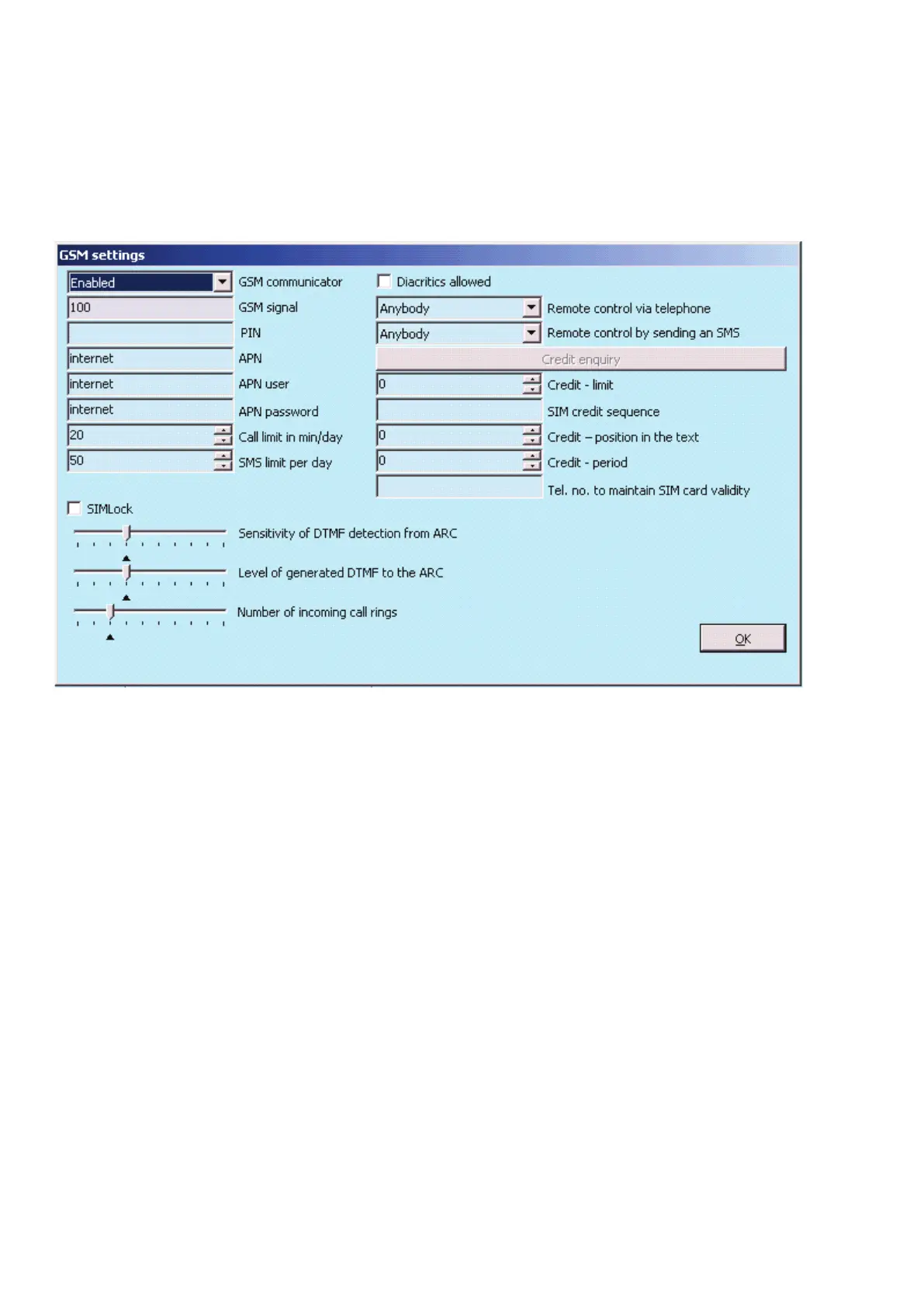
10.11.1 GSM Settings
The button is used to set parameters and behaviour of the GSM communicator.
* An item marked like this is set automatically after activation of the control panel if a functional SIM card was
inserted into it before activation (service of the Jablotron server)
GSM communicator – possibility to switch off the communicator.
GSM signal – information about the signal strength in percent (it is measured once every minute). For proper
function the signal should be at least 50%. If you encounter problems with GSM signal quality, you are
recommended to test a SIM card of another operator. You are not recommended to use a directional or gain
GSM antenna for the communicator (it only reduces connection of the module to 1 network cell = unstable
communication). You can also get information about the signal quality using the SMS command STATUS
(see 9.6 SMS commands).
SIM Card PIN – We recommend using a SIM card with the PIN code disabled.
Network APN* – GPRS data communication settings. Data communication provides access to services
of the Jablotron server, enables remote access of a service technician, communication with the ARC etc.
Besides the APN settings the used SIM card must support data transmission.
APN User* – name (do not enter one unless the network uses it).
APN Password* – password (do not enter one unless the network uses it).
Call limit min./day – limits the range of actual calling to 5 to 250 minutes a day.
SMS limiter – The limiter limits the number of SMSes sent per day from the control panel. It includes alarm
and also non-alarm events (alarm events - alarm, tamper, fault, report, … ; non-alarm – PG, service,…).
The range to be sent is from 5 to 250 SMSes. The system can send maximum 250 SMSes per day. This
maximum is split between the SMS limiter and the Alarm SMS limiter (F-Link automatically checks that setting
both limiters doesn´t exceed 250).
Alarm SMS limiter - The limiter limits the number of alarm SMSes per day from the control panel if the limit
of sent SMSes has already been reached (SMS limiter) It is related to alarm events (alarms, tampers, faults,
reports, ...). The range to be set is from 0 to 245 SMSes. Example: The limiter of sent SMSes is set to 30,


 To Next Page