JABLOTRON ALARMS a.s.
Pod Skalkou 4567/33 46601 Jablonec n. Nisou
Czech Republic www.jablotron.com
||
|
JA-101K(-LAN)(-LAN3G) and JA-106K(-3G)
Security System Control Panels 61 / 110 MLJ51410
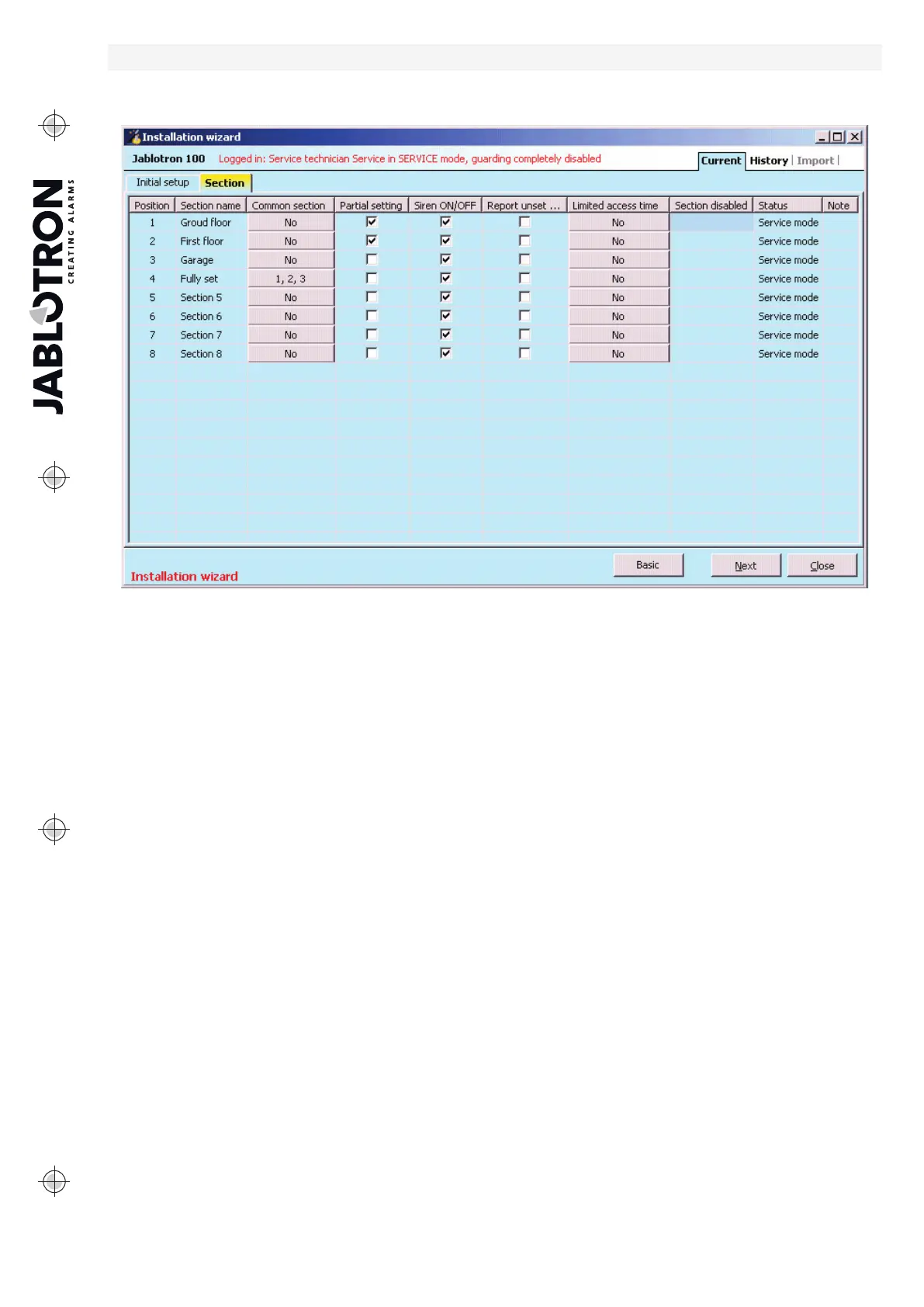
10.4 Sections tab
Used to configure parameters of independently controlled monitored sections (zones). To make changes
in this tab you do not need to be in the Service mode.
* Items described below marked * are only displayed if Advanced Settings view is enabled.
Section name – naming of sections is used to make textual event reports (SMS), showing on LCD keypad
and memory readout, for a better recognition when reported (e.g. Ground Floor, Store, ...)
Common section – allows you to select that a section is automatically set if all the sections for which
it is a common one are set (suitable for corridors, staircases and other common areas).
Warning of limitation of possible use of the keypad segment for the common section: if any of the sections has
been unset separately, the common section segment cannot
be used to unset the remaining sections.
These sections must be unset separately.
Partial setting* – allows you to set a section partly if somebody remains inside (detectors with selected
reaction of the Internal type will not be active – see chapter 8 System configuration). Without activation
of this parameter partial setting cannot be used in the section.
Siren ON/OFF* – possibility to disable acoustic alarm indication in a particular section. The system
distinguishes two types of alarms: EW (external warning) and IW (internal warning). In the settings of the sirens
you can determine which type of warning they should react to. For details of the activation of these outputs
- see chapter 8.5 Types of alarms. All sirens can also be disabled centrally for all sections in the Parameters tab
(e.g. while in service mode). Output devices of the relay type (output modules, indicators) react to either warning
type (EW / IW).
Report unsetting* – if a section is unset and no detector is activated in it during a pre-determined period,
the “Unset Section” report is used.” The time period is set in the tab Parameters / Report unset section after
(1 - 48hrs).
Limited access time* – allows you to set a weekly schedule permitting unsetting of a section for selected
users. More details see chapter 9.15 Time limited access for users.
Section disabled – disabling possibility to set section, (blocking a section means that all devices assigned
to the section are collectively disabled), indicated by a red dot. You cannot block the section that the control
panel is assigned to. A section may only be blocked by a service technician (through F-Link).
Status – indicates the current status of a section (Unset, Set, Exit Delay, Entrance Delay, Partially Set, Alarm,
Alarm Memory, Disabled, Service mode). By pressing the button the system can be controlled according
to the authorization given by your login (it changes the section state – set / unset / set…).
Note – it allows you to describe details of a section for easier orientation during annual inspections etc.


 To Next Page