28
JAKA Zu MiniCab v1.1
3. Remote switch on/off interface
The remote switch on/off interface on the integrated I/O port can be used for switch on/off operation. When
the external on/off machine button is used, the self-recovery/spring button switch shall be used, otherwise the
remote switch on/off operation may fail.
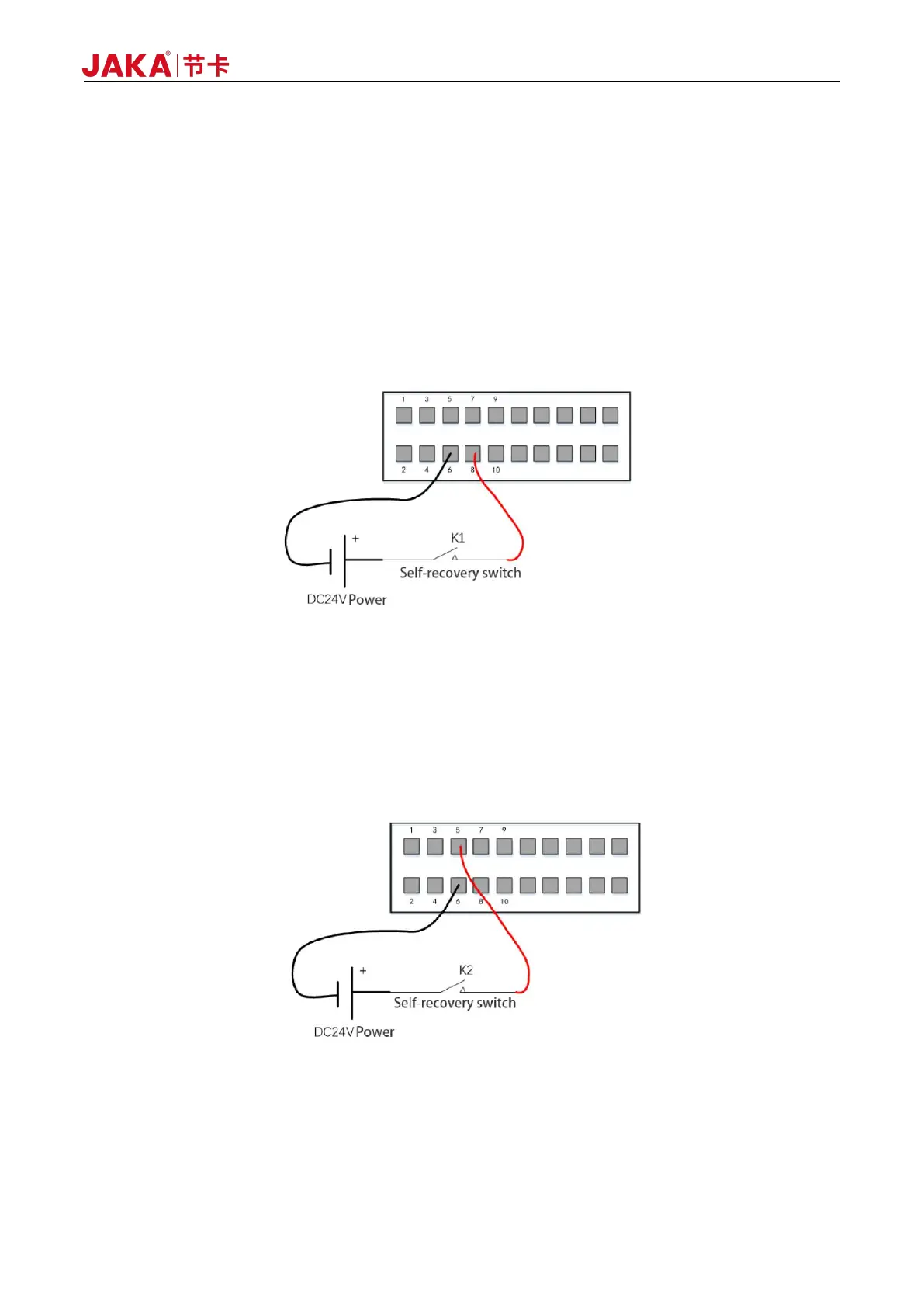
Power-on operation: Remote Power-on requires the user to separately provide external DC24V power
supply to connect the positive pole of power supply to PIN8 (Remote_ON) interface and the negative pole to
PIN6 (GND). The following is the wiring diagram of the remote switch. After pressing K1 for about 1s, it will be
released and the electric control cabinet will be turned on.
Figure 6-5 Remote_ON - Using External Power Source
Power-off operation: Remote shutdown operation requires to connect the positive pole of power supply to
PIN5 (Remote_off) interface and the negative pole to PIN6 (GND). External power supply or internal
UDIO_24V can be used. Long press K2 for more than 3s and release and the electric control cabinet will be
shut down.
Figure 6-6 Remote_OFF - Using External Power Source



 To Next Page