SM-18006
3-121
TROUBLESHOOTING
3.4.3 Test Run from Water Source Unit Side
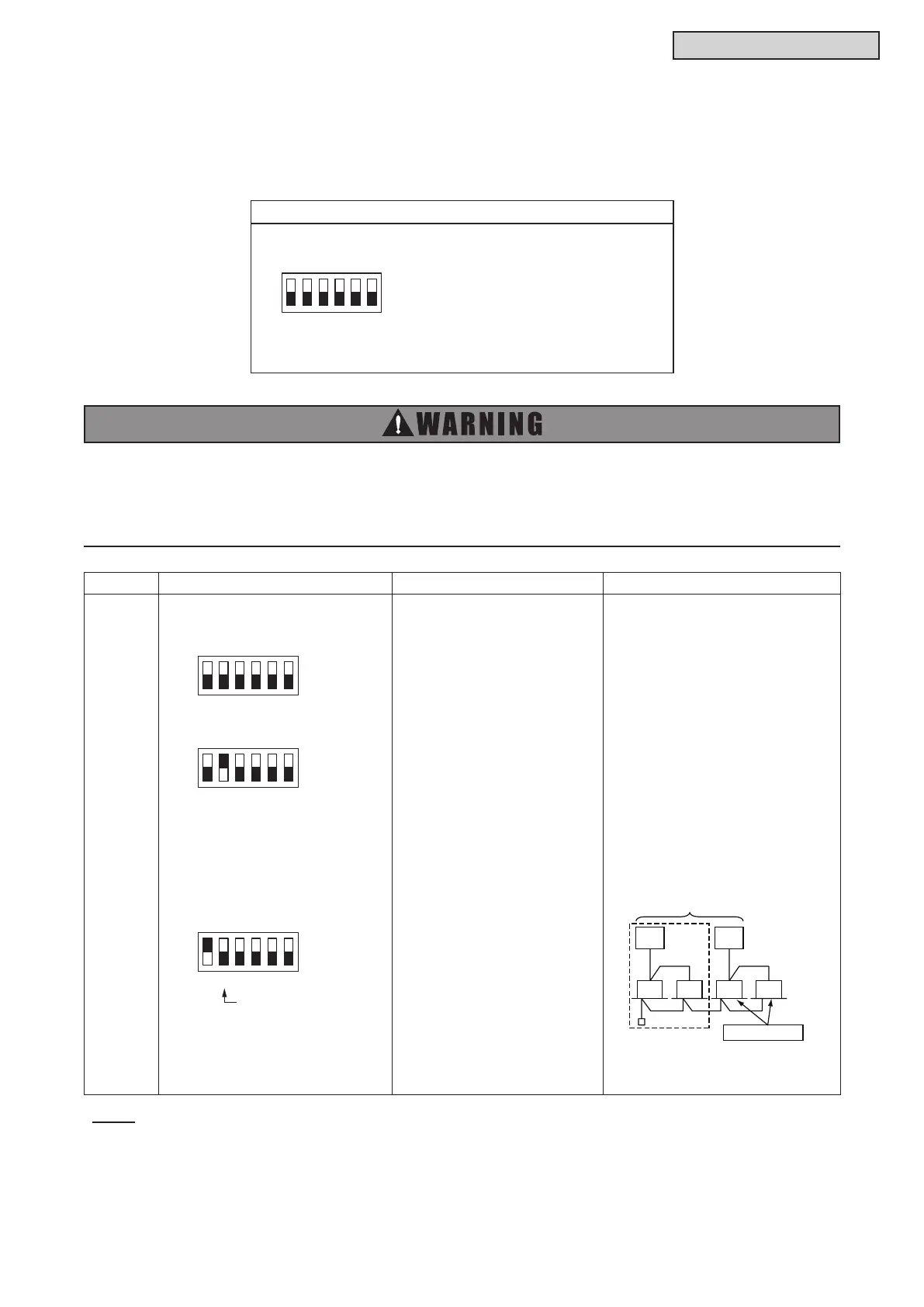
The procedures for the test run from the water source unit side are indicated below. Setting of this DIP
switch is possible with the power supply ON.
l
Do not touch any other electrical part when operating switches on the PCB.
l
Do not attach or detach the service cover when the power supply for the water source unit is
supplied and the water source unit is operated.
l
Turn all the DIP switches of DSW4 OFF when the test run operation is completed.
DIP Switch Setting Operation Remarks
Test Run
1. Setting of Operation Mode
Cooling: Set DSW4-2 OFF.
Heating: Set DSW4-2 ON.
2. Starting Test Run
Set DSW4-1 ON and the operation is
started after a few to 20 seconds.
1. The indoor unit automatically
starts operating when the test run
of the water source unit is set.
2. The ON/OFF operation can
be performed from the wired
controller or DSW4-1 of the water
source unit.
3. The operation continues for
two hours without Thermo-OFF.
* Note that the indoor units operate in
conjunction with the test run operation
of the water source unit.
* If the test run is started from the water
source unit and stopped from the wired
controller, the test run function of the
wired controller is cancelled. However,
the test run function of the water source
unit is not cancelled. Check to ensure
that the DSW4-1 of the water source
unit PCB is turned OFF.
* If multiple indoor units are connected
with one wired controller, perform the
test run operation individually for each
refrigerant system one by one. Then,
make sure to turn the power supply OFF
for the indoor units in other refrigerant
systems not included in the test run.
* The setting of DSW4 is not required for
the test run from the wired controller.
ON
OFF
ON
OFF
ON
OFF
If heating operation leave
DSW4-2 at ON.
Water Source Unit
Test Run
Power OFF.
Unit
Setting of DIP Switch (Factory Setting)
DSW4
Switch for Setting of Service Operation and Function
1. Test Run
2. COOL/HEAT Setting
(ON: Heating Operation)
3. OFF (Fixed)
4. Manual Compressor OFF
5. Function Setting
6. External Input/Output Setting
ON
OFF
NOTE:
Thermo-ON: The water source unit and some indoor units are running.
Thermo-OFF: The water source unit and some indoor units stay on, but don't run.



 To Next Page