4-2
SM-18006
MAINTENANCE
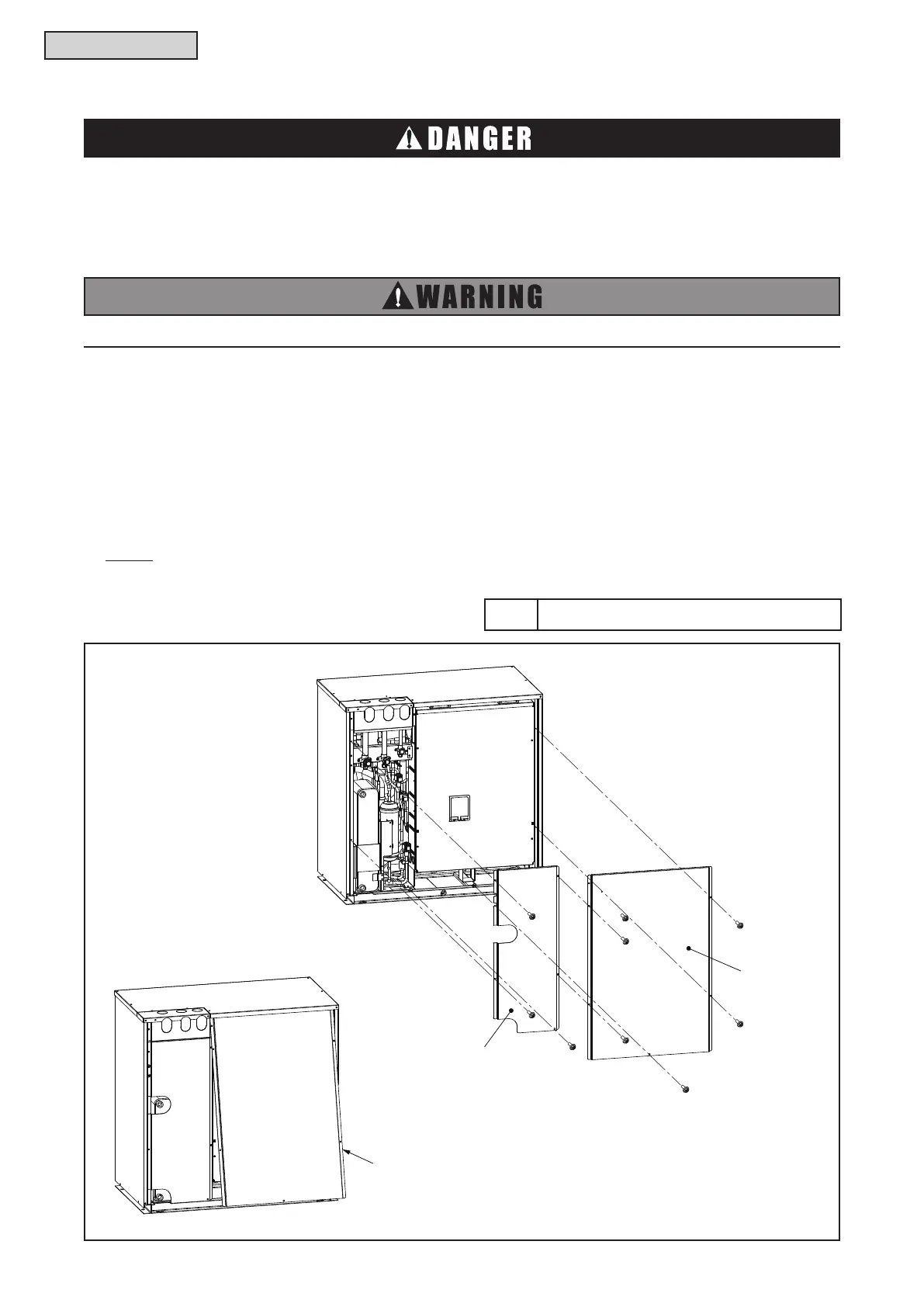
4.1.1 Removing Service Cover and Front Cover
(1) Removing Service Cover
(a) Remove six screws that attach the service cover.
(b) Put your hand on the groove at the bottom of the service cover.
Then, tilt the service cover as shown in the following gure and draw it out from the front lower part.
(2) Removing Front Cover
(a) Remove three screws that attach the front cover.
(b) Then remove it by pulling it to the front side.
TURN OFF all POWER supply switches.
Apply the specied non-ammable refrigerant (R410A) to the water source unit in the refrigerant
cycle.
Do not charge materials other than R410A into the unit such as hydrocarbon refrigerants (propane
or etc.), oxygen, ammable gases (acetylene or etc.) or poisonous gases when installing,
maintaining and moving the unit. These ammables are extremely dangerous and may cause an
explosion, re, and injury.
NOTE:
When attaching/removing the service and front cover, take special care to avoid injury from the sharp
edges.
Tool Phillips Screwdriver
4.1 Maintenance of Water Source Unit
Front Cover
Tilt the service cover when removing.



 To Next Page