5-14
SM-18006
EXTERNAL INPUT/OUTPUT AND FUNCTION SETTING
5.2.2 Function Setting
NOTE:
The setting should be performed during the water source unit stoppage.
WaterSourceunitAistheunittowhichthecommunicationcablebetweenthewatersourceunitandindoor
unit is connected.
● RefertoSection5.2“●SettingMethod”formodetransitionfunctions.
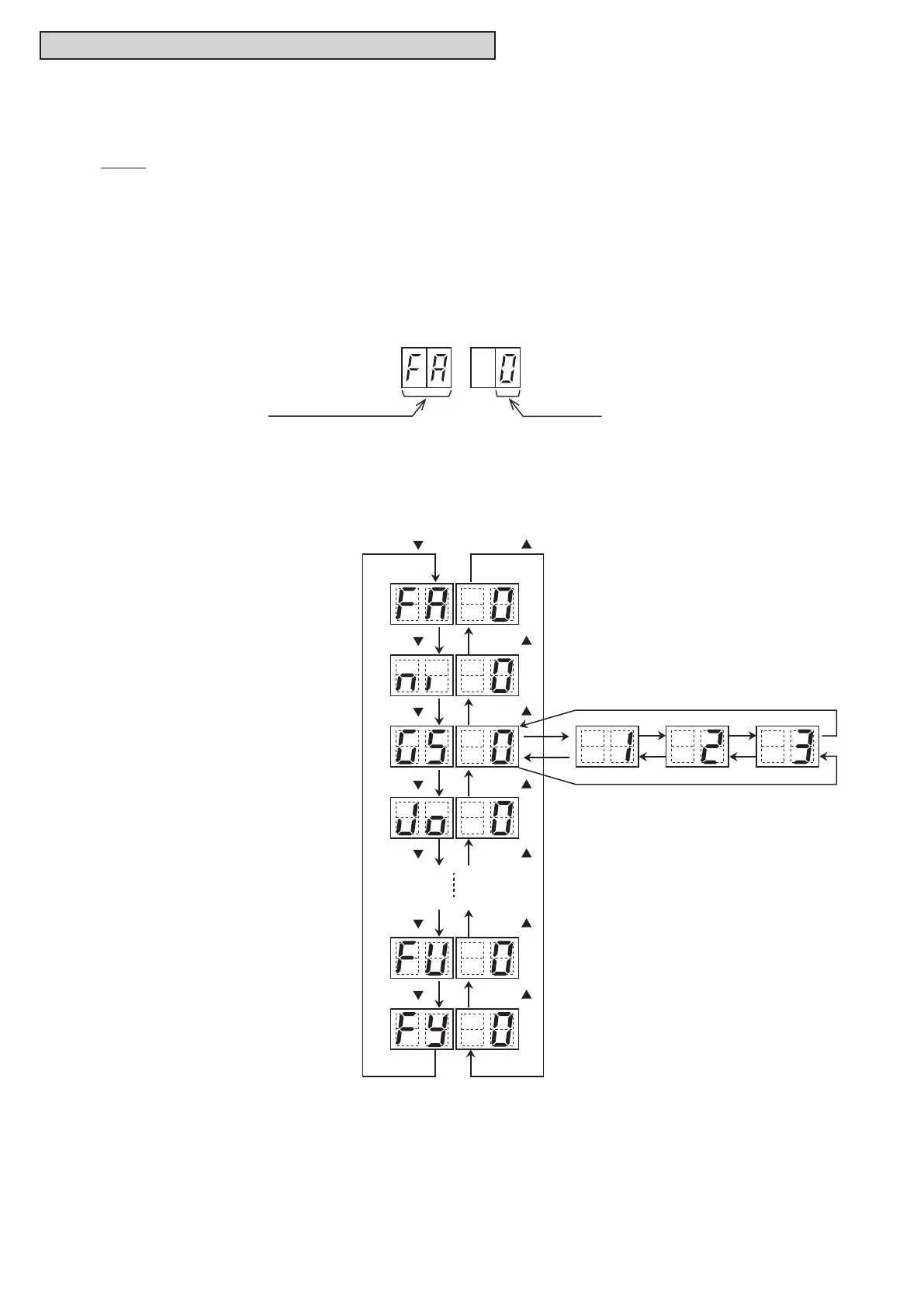
(2) By pressing PSW2 or PSW4, the function setting item is changed.
AfterselectingtheFunctionSettingItem,pressPSW3orPSW5,andthenchoosetheSettingNo.
The following shows the display changes when PSW is pushed.
(3) AfterselectingtheFunctionSetting,turnOFFDSW4-No.5.Thedisplaywillbebacktothenormal
operation.ThenturnOFFDSW4-No.4.ConrmifDSW4issettofactorysettings.
The selected data is stored in the water source unit PCB and the “Function Setting” is completed. The
stored data is maintained even when the power supply is cut OFF.
(1) By selecting “Function Setting”, the following appears on the 7-segment display.
(Thesettingshouldbeperformedduringanwatersourceunitstoppage.Also,setDSW4-No.4and
No.5 of the water source unit PCB to the “ON” side before performing the setting in order to prevent
the compressor activation.)
SEG2 SEG1
Function Setting Item Setting No.
PSW4 ( )
Setting Item (for setting item No.1)
is indicated.
Select a setting condition while setting items
are indicated. Press PSW3 (on the right side)
to increase the setting condition number.
*The setting condition for other functions can
also be selected in the same way.
Press PSW5 (on the left side) to decrease the
setting condition number.
Setting Item (for setting item No.2)
is indicated.
Setting Item (for setting item No.3)
is indicated.
Setting Item (for setting item No.4)
is indicated.
Setting Item (for setting item No.N-1)
is indicated.
Setting Item (for setting item No.N)
is indicated (N: the last item).
PSW2 ( )
PSW4 ( ) PSW2 ( )
PSW4 ( ) PSW2 ( )
PSW4 ( ) PSW2 ( )
PSW4 ( ) PSW2 ( )
PSW4 ( ) PSW2 ( )
PSW4 ( ) PSW2 ( )



 To Next Page