SM-18006
4-59
MAINTENANCE
4.1.15.2 Removing Inverter PCB
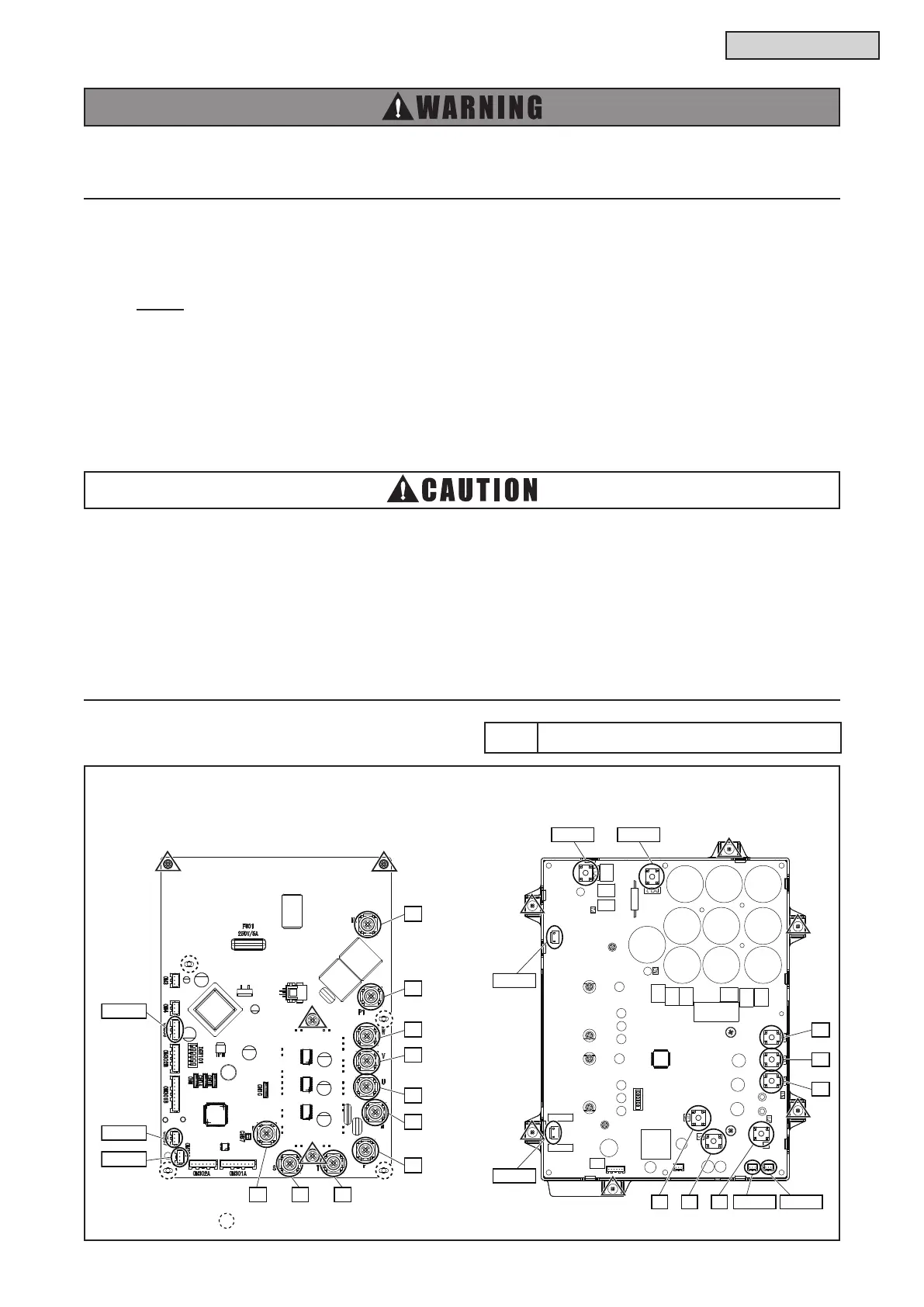
(1) Disconnect all wiring with following connectors from the Inverter PCB.
For 208/230V Type: CN206, CN207 and CN303
For 460V Type: PCN2, CN206, CN207 and PCN331
NOTE:
CN206 and CN207 may not be connected to same models.
(2) Disconnect all wiring from terminals on the Inverter PCB.
For 208/230V Type: R, S, T, U, V, W, N, P, N1 and P1
For 460V Type: DCL1, DCL2, U0, V0, W0, R, S and T
(3) After removing screws (Δ places), remove the inverter PCB.
For 208/230V Type: four screws
For 460V Type: six screws
Tool Phillips Screwdriver
(H,Y)VWH(P,R)072 - 216B32S (208/230V) (H,Y)VWH(P,R)072 - 216B42S (460V)
Turn OFF all POWER supply switches.
Do not touch any electrical components while LED (Red) on Inverter PCB is ON.
Current may be owing through the components and cause electric shock.
● Do not touch any electrical components while the following LEDs on the PCB are ON. Current may
be owing in the components and cause electric shock.
For 208/230V Type: LED501 (Red) of main power PCB (MPB)
For 460V Type: LED401 (Red) of inverter PCB (INV)
● When reassembling the electrical components, match the terminal numbers with the marked
numbers. If incorrectly connected, malfunction may occur or the electrical components may be
damaged.
● When closing the PCB stay for control PCB for reassembly, protect the wiring from catching on
the plate edges or electrical components.
CN303
CN207
CN206
R S T
N1
P1
W
V
U
N
P
U0
W0
V0
PCN331
PCN2
R S T CN206 CN207



 To Next Page