3-74
SM-18006
TROUBLESHOOTING
l
TheRUNindicator(red)ashes.
l
The indoor unit number (refrigerant cycle number - address number), the alarm code, the model code
1
,
the model name
1
and the number of connected indoor units are displayed on the LCD. The indoor unit
number and the alarm code are displayed on the 7-segment display of the water source unit PCB.
Note 1: Except for some models.
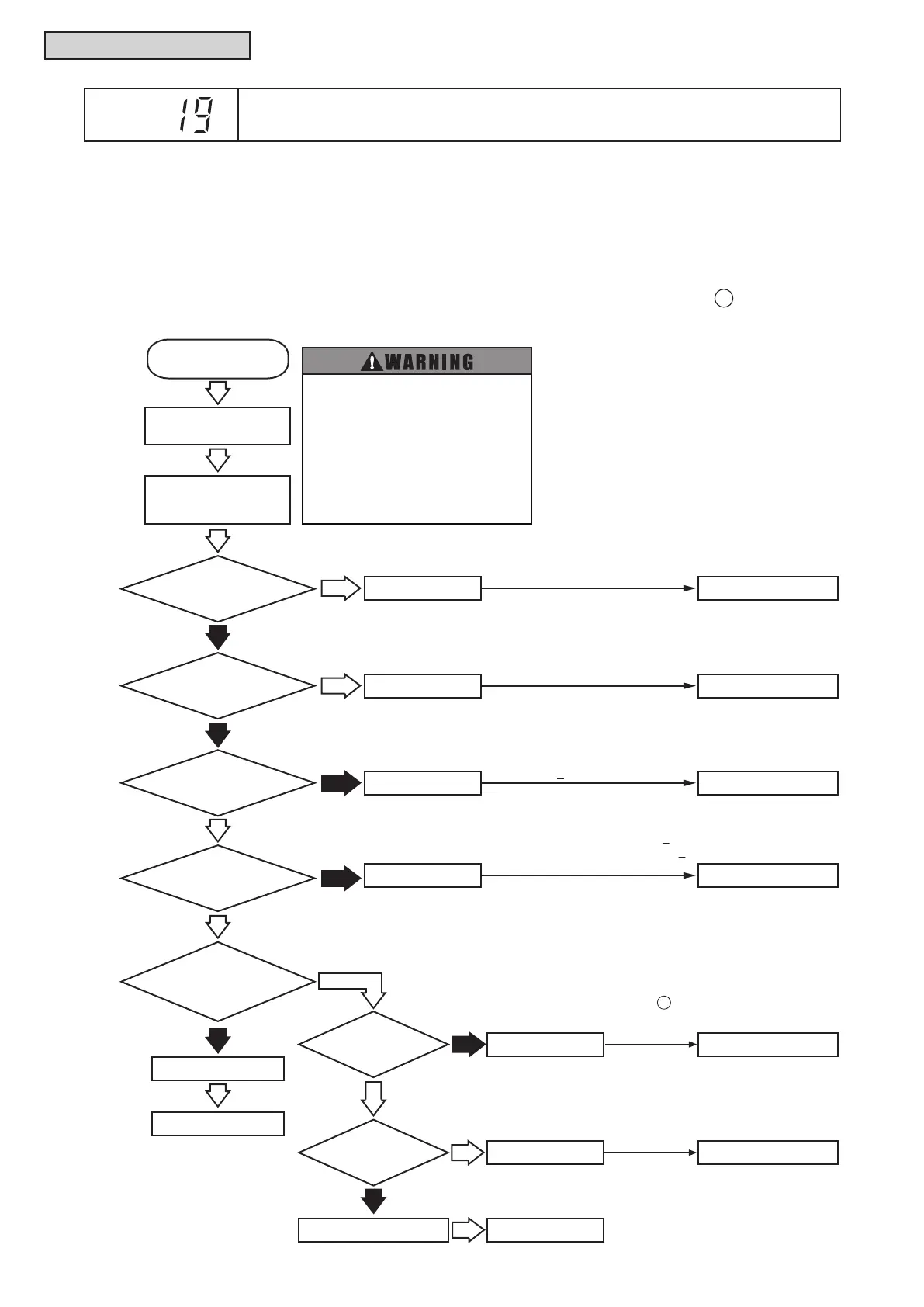
Thisalarmcodeisdisplayedwhentheindoorfanmotorrotatesatlessthan70rpmforveseconds(for
40 seconds during auto swing operation) three times in 30 minutes during the operation. (
A
)
Alarm
Code
Activation of Protection Device for Indoor Fan Motor
(Wall Mount Type)
Failure of I.U. PCB
1: The electrical source for I.U. PCBis not supplied
when LED4 is turned OFF.
2: Abnormal voltage is supplied to
fan motor.
Is LED4 on
I.U. PCB OFF?
1
Is LED1 on
I.U. PCB OFF?
2
Check connectors PCN500
and PCN550 on I.U. PCB.
Yes
Replace I.U. PCB.
No
No
No
No
Failure of I.U. PCB
Replace I.U. PCB.
Is fan motor
speed control command to
fan motor sent correctly?
5
Yes
Yes
Failure of I.U. PCB
Failure of I.U. PCB
Failure of I.U. PCB
Is DC power
output of I.U. PCB
normal?
3
Replace I.U. PCB.
Replace I.U. PCB.
Replace I.U. PCB.
3:
Measure the voltage between VCC15 and
VDC (15V+10%) with a tester.
Yes
Yes
No
Occurrence of
Alarm Code “19”
4:
Measure the voltage of the following check points with a tester.
Between VCC05 and GND: 5V+4%
Between VCC13 and GND: 13.1V+10%
(Normal Voltage: DC280V)
No
Failure of Fan Motor Replace Fan Motor
Yes
Failure of I.U. PCB
Failure of Fan Motor
Is speed pulse
signal to I.U. PCB
sent correctly?
6
Replace I.U. PCB.
Replace Fan Motor.
No
Does Fan
Motor run?
Yes
5
6
6:
Start the operation with PCN550 on I.U. PCB connected.
It functions normally if several volts are generated between
No.2 pin of PC4 and VDC- (check point).
(NOTE)
Even if the operation is stopped, approx. 0.2V can be generated.
Yes
Check that 208/230V is
applied between
L1 and N of TB1.
5:
Start the operation with PCN550 on I.U. PCB disconnected.
It functions normally if more than 1V is generated between No.4
pin of PCN550 and VDC- (check point) for approx. 10 seconds
after start of operation.
(NOTES)
1.
Even if the operation is stopped, 0.3 to 0.4V can be generated.
2. To perform the operation “ ”, no voltage is generated
sequentially 10 seconds after start of operation.
Is DC power
output of I.U. PCB
normal?
4
A
● Perform the following check after
setting the airflow volume to “HIGH”.
● High voltage is applied to electrical
parts. Perform the check carefully to
prevent an electrical shock.
● Turn OFF the power supply completely
before checking connector. Otherwise,
it may cause a DC fan motor failure.
(Built-in PCB for the DC fan motor may
be damaged.)



 To Next Page