– 36 –
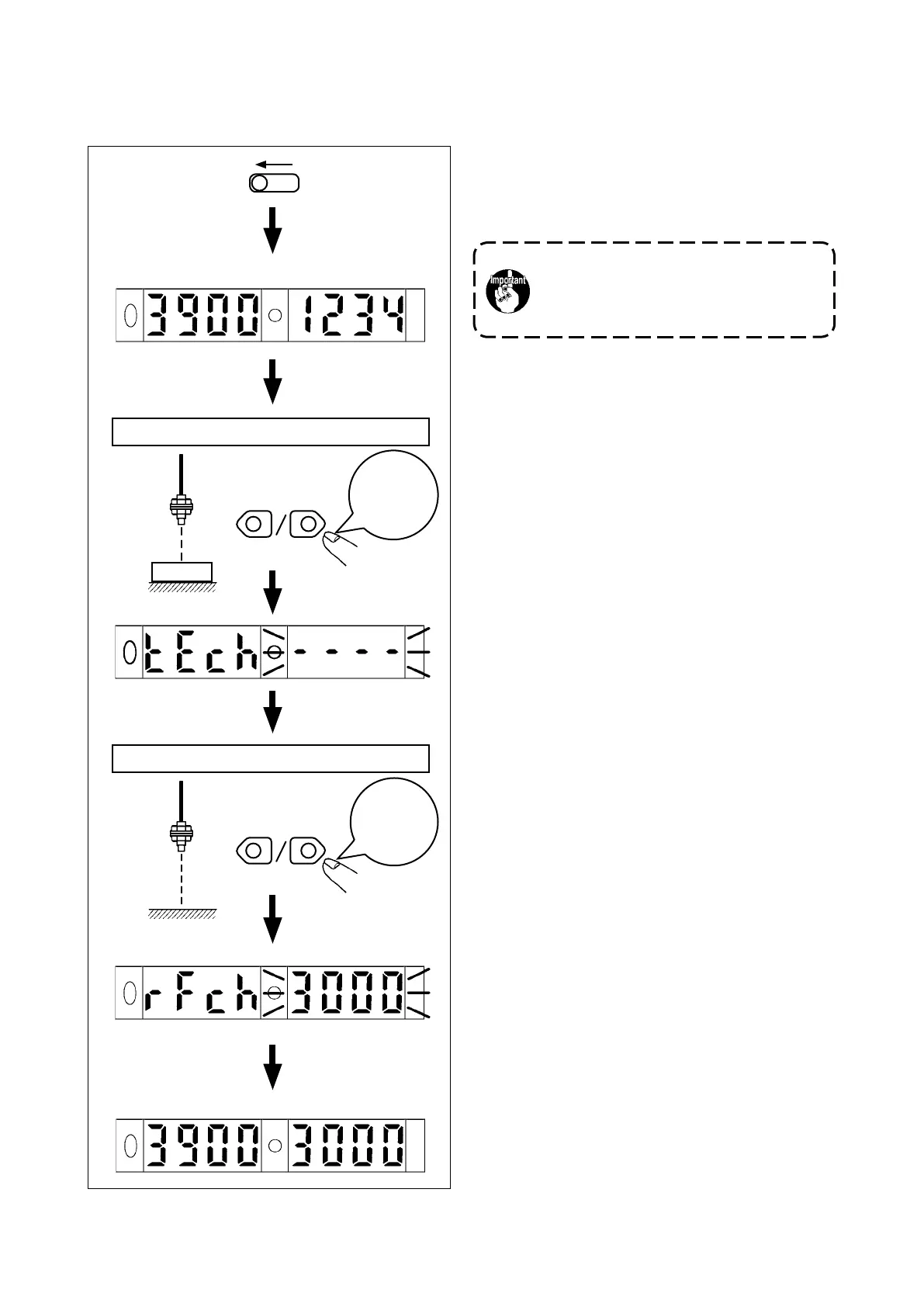
(2)Settingthresholdsforthestartsensorandcurvesensor
1)
Adjust the clearance provided between the cloth
guide and cloth plate to 5 mm before starting
adjustment.
Turn on the power to the machine.
2) Open the sensor amplier cover.
3) Place the SET/RUN changeover switch in SET.
4) Place a sheet of white paper (substitute for the
material) at the sensor irradiating position locat-
ed between the cloth guide and the cloth plate.
5) Press either UP or DOWN for one second.
("----" ashes on and off.)
6) Remove the white paper. Press either UP or
DOWN for one second with nothing placed at
the sensor irradiating position.
7) The threshold set ashes on and off twice to
complete the setting procedure.
8) Place the SET/RUN changeover switch in RUN.
9) The setting procedure is completed and the
indication returns to the one given before the
operation.
Close the sensor amplier cover.
10) Insert the material into the cloth guide unit.
Check to be sure that the amount of light re-
ceived do not exceed the threshold.
Press one
of them
for one
second.
DOWN
TECH
----
Amountoflight
received
Threshold
Thewith-workpositionandthewithout-workpositioncanberespectivelydetectedtosetthethresh-
oldfortheamountoflightreceived,tothemiddlepointbetweenthetwoposition.
SET
UP
Material
Press one
of them
for one
second.
DOWN
UP
RFCH Threshold
With-materialstate
Without-materialstate
Amountoflight
received
Threshold
Be sure to carry out adjustment under the
machinesettingmodeinordertoprevent
accidents caused by abrupt start of the
machine.


 To Next Page