67
2.4 CDI Group
2.4.1 System check
Check the system.
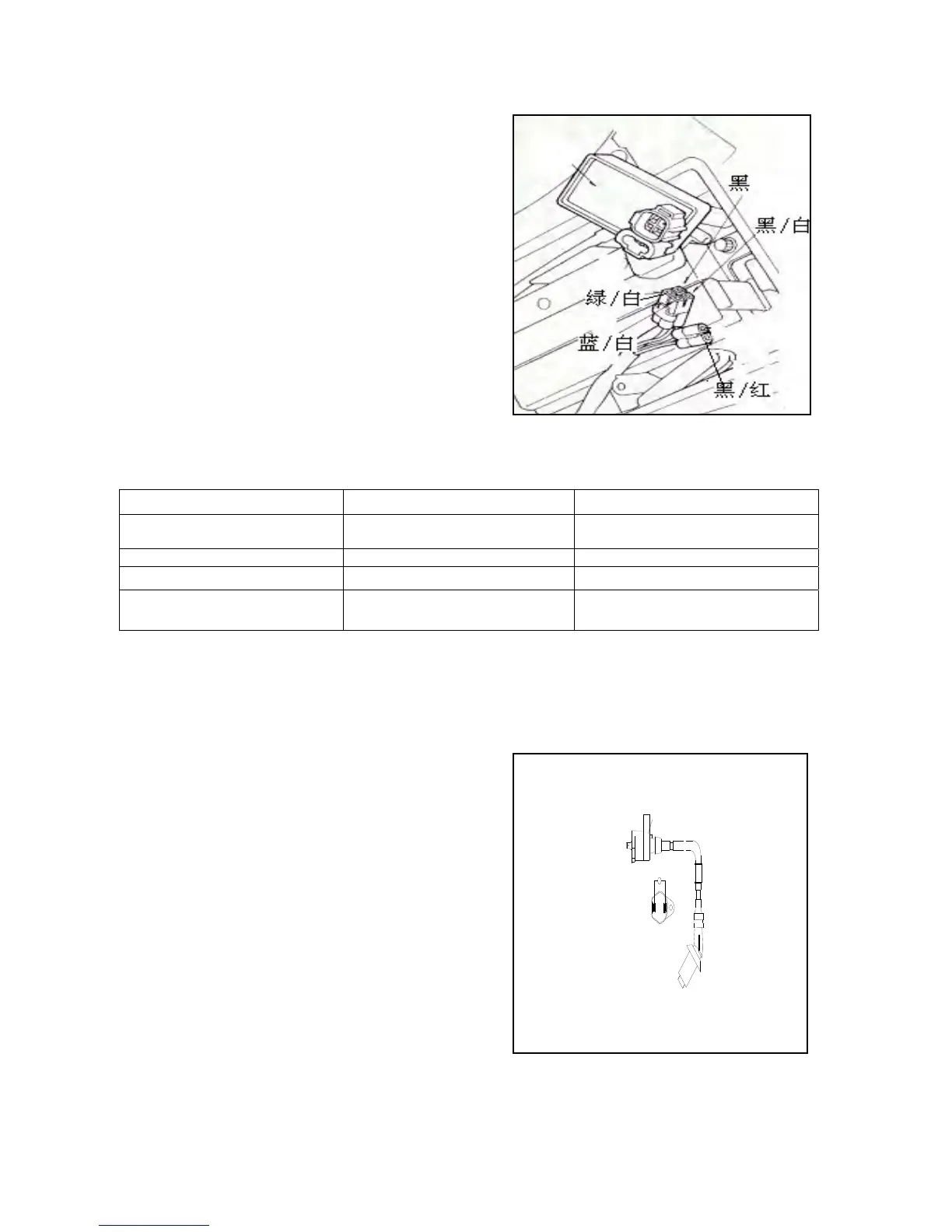
Remove the CDI Group, and check components of the ignition
system at the terminal.
(黑:black 红:red 白:white 绿:green 蓝:blue 墨绿:
blackish green
2.4.2 Check
Remove CDI Group and check whether the terminal is loose
or corrosive
Item Test terminal Standard (20)
Main switch Red--red/white Conduction when the main switch is
“OFF”
Trigger
Blue/white – white/green
100-500Ω
Primary coil of the ignition coil Black/white--black
0.6Ω±10%
Secondary coil of the ignition
coil
Black--spark plug cap(excluding
the spark plug)
0.5-5.5KΩ
2.5 Ignition coil
2.5.1 Disassembly
Remove the body guard.
Remove the spark plug cap.
Remove the primary lead of the ignition coil.
Remove the fixing bolts and then the ignition coil.
Install the ignition coil in reverse order.
* Note
Install the primary coil with black/white terminal.
2.5.2 Check the primary coil
Measure impedance between terminals of the primary coil.
Standard: 0.6Ω±10%(20)
It shows good if the impedance is within the range of standard
values.
Replace the primary coil if the impedance shows ∞ which (点火线图:Ignition Coil Drawing)
indicates that the coil breaks.
点火线图
Ω


 To Next Page
 Loading...