21
Table of ContentsSetting UpWi-Fi StreamingUsing KEF Connect AppFAQ and Troubleshooting
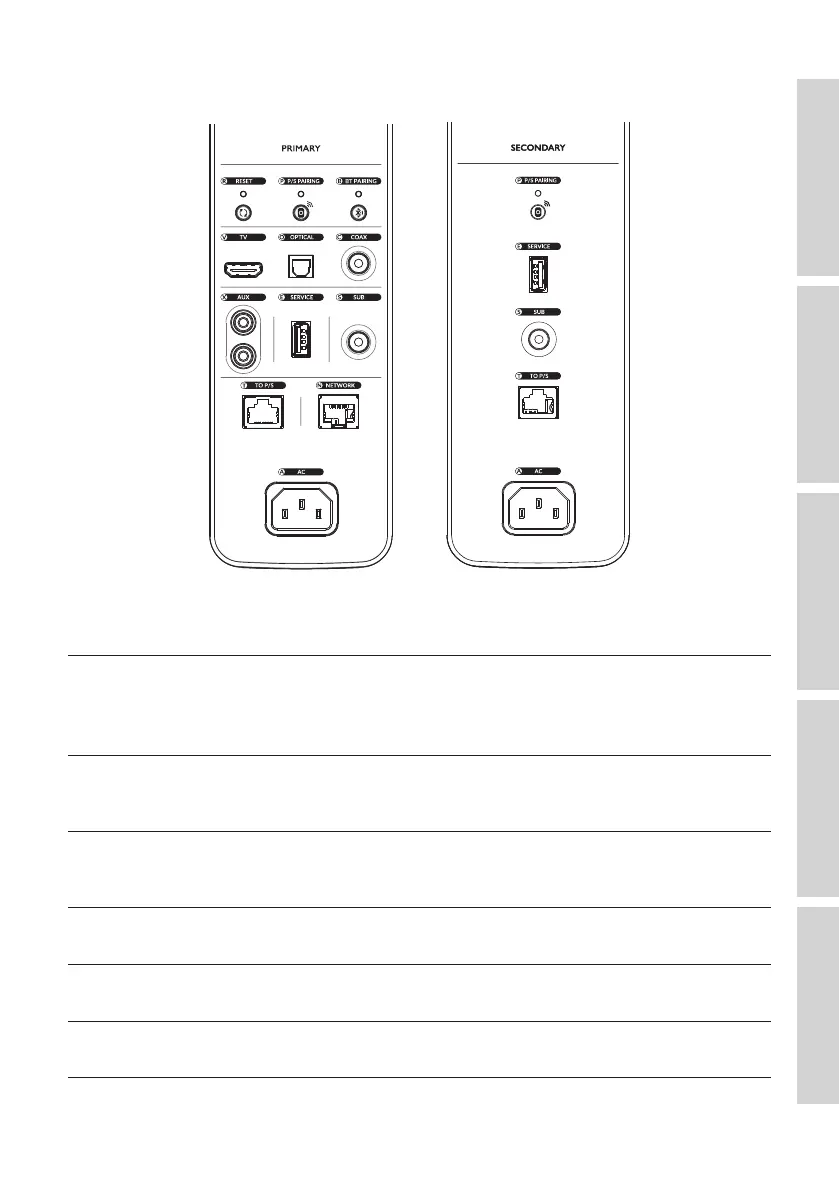
7.2 Back Panel
Controls and connections are found on the back panel of each speaker, marked as shown.
R
Factory reset button Resets the speakers to the factory defaults (including
network settings and all EQ and system preferences).
Press and hold the button until the indicator light
above the button blinks.
P
P/S pairing button Re-establishes the connection between the Primary
Speaker and the Secondary Speaker if the connection
is lost.
B
Bluetooth pairing button Enables Bluetooth pairing. The speakers will be ready
to pair with a new device. Any Bluetooth connected
device will be disconnected.
V
TV port Plays audio input from a source (e.g. eARC port of
television) through an HDMI cable.
O
Optical input jack Plays audio input from a source (e.g. Blu-ray player,
cable box) through an optical cable.
C
Coaxial input jack Plays audio input from a source (e.g. audio player)
through a coaxial cable.



 To Next Page