16
Table of ContentsSetting UpWi-Fi StreamingUsing KEF Connect AppFAQ and Troubleshooting
6.3.4 Using Android Devices without Google Play Service
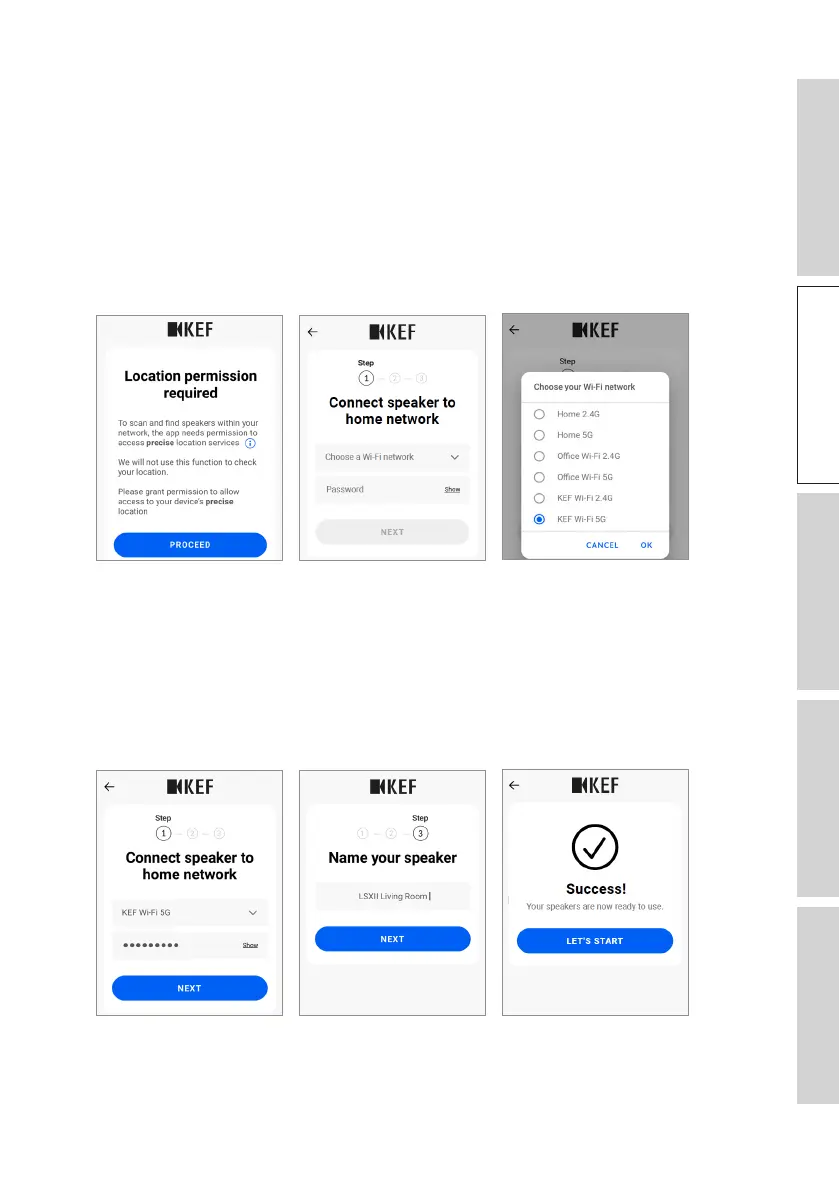
1. Make sure your mobile device is connected to your local Wi-Fi network.
2. Launch and login to the KEF Connect App on your mobile device.
3. Allow the app to access your device’s location when requested.
4. Tap “Choose a Wi-Fi network”.
5. Select your local Wi-Fi network and then tap “OK”.
[Step 3–5]
6. Input the password of your local Wi-Fi network and then tap “Next”. The
connection process will be done automatically.
7. If preferred, create a new name for the speakers and then tap “Next”. This name
will be used for Wi-Fi and Bluetooth connections.
8. Tap “Let’s start” to enjoy your speakers.
[Step 6–8]



 To Next Page