29
Angle Adj. Locking Flip Up Extendable Armrest - Rogue XP
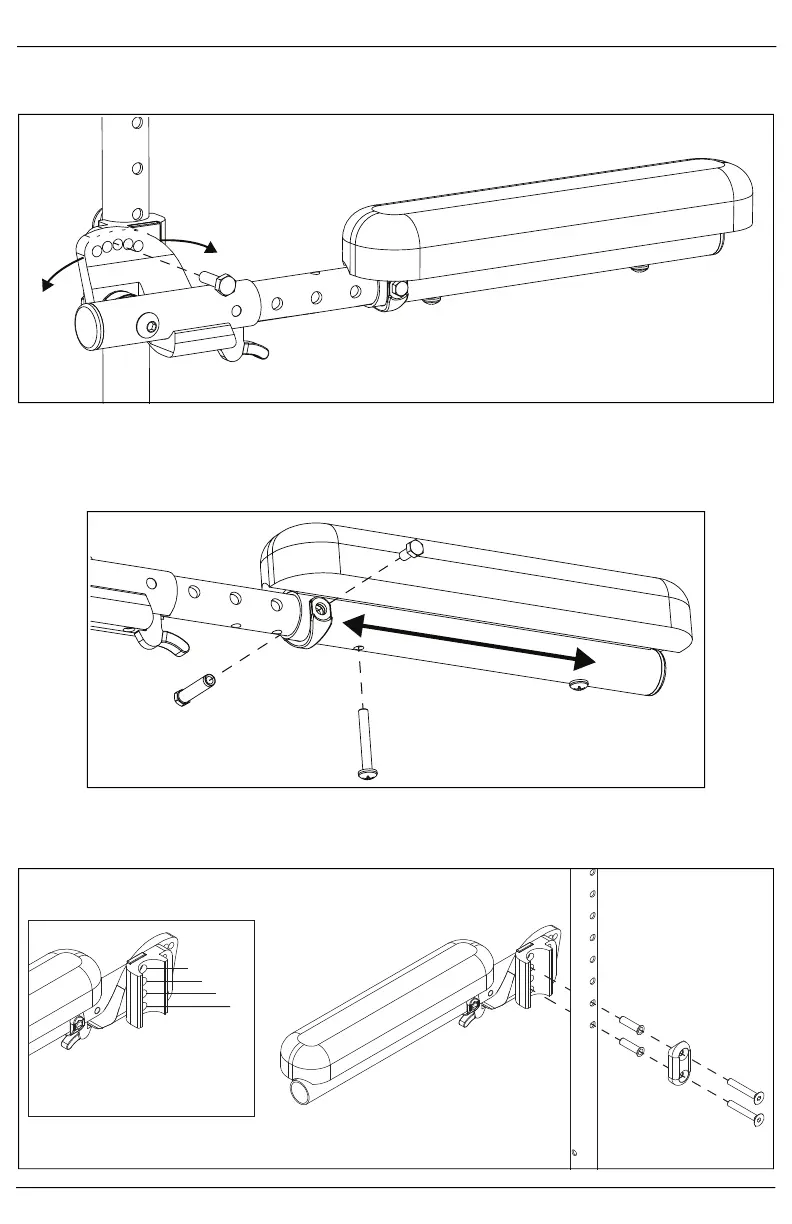
1. Set the angle of the armrest. Tighten the bolt once angle is set.
NOTE: There are 7 angle adjustments in 5° increments from -5° to 25°.
2. Set the length of the armrest. To adjust the length, remove the bolts and spacer on the tube and the
screw closest to the back of the chair. Slide the armrest to desired length available by the predrilled
holes and reinstall the screw and bolts.
NOTE: The armrest can extend up to 4" in 1" increments.
3. Set the height of the armrest. There are four holes on the armrest that allow for two different height
settings for each set of holes on the back tube. Use the holes that provide the correct height setting for
the user. The two bolts pass through the spacer, sleeves, back posts and into the armrest.
Four bracket holes give two
location options per backrest
hole (Use 1 & 3 or 2 & 4).
1
2
3
4



 To Next Page