M0290-01Model 4900
2-36 Rev. 8/19
TM
Machine Operation
BULK FILL TANKS - CLEAN OUT
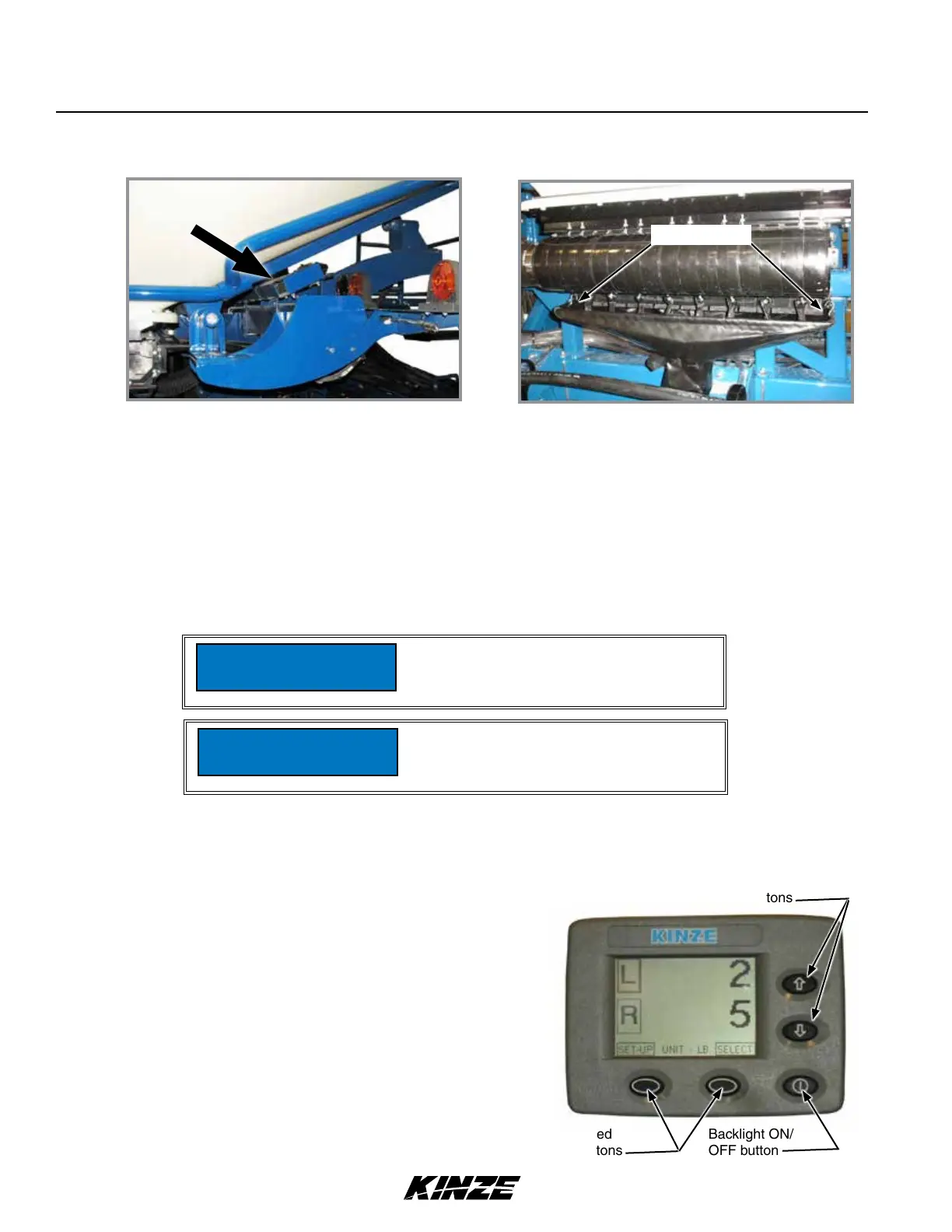
1. Remove bulk fill tank cleanout chute from storage location under L.H. bulk fill tank.
2. Position tube of chute under entrainer and attach hooks on each end of entrainment assembly.
3. Open cleanout doors and empty tank.
4. Close all cleanout doors and return cleanout chute to storage location.
Cleanout Chute Installed
Chute hooks
Cleanout Chute Storage Location
BULK FILL SCALE PACKAGE OPTION
• Provides seed weight or estimated acres remaining for each bulk fill hopper.
• Displays total (gross) seed weight or estimated acres remaining for both hoppers combined.
• Warns operator when seed goes below a pre-defined level (ISO display).
Operation of Bulk Fill Scale Package display is controlled
by buttons located on its face:
• Two screen-defined selection buttons.
• Backlight ON/OFF button.
• UP/DOWN arrow buttons.
• Screen position is changed by loosening thumb screw on
mount at back of monitor and repositioning screen.
Screen defined
selection buttons
Backlight ON/
OFF button
UP/DOWN arrow buttons
High-pressure water can damage display.
Remove display before power washing
planter.
NOTICE
Remove and store display at end of
planting season. Damage from sun and
weather exposure may result.
NOTICE


 To Next Page