4-3
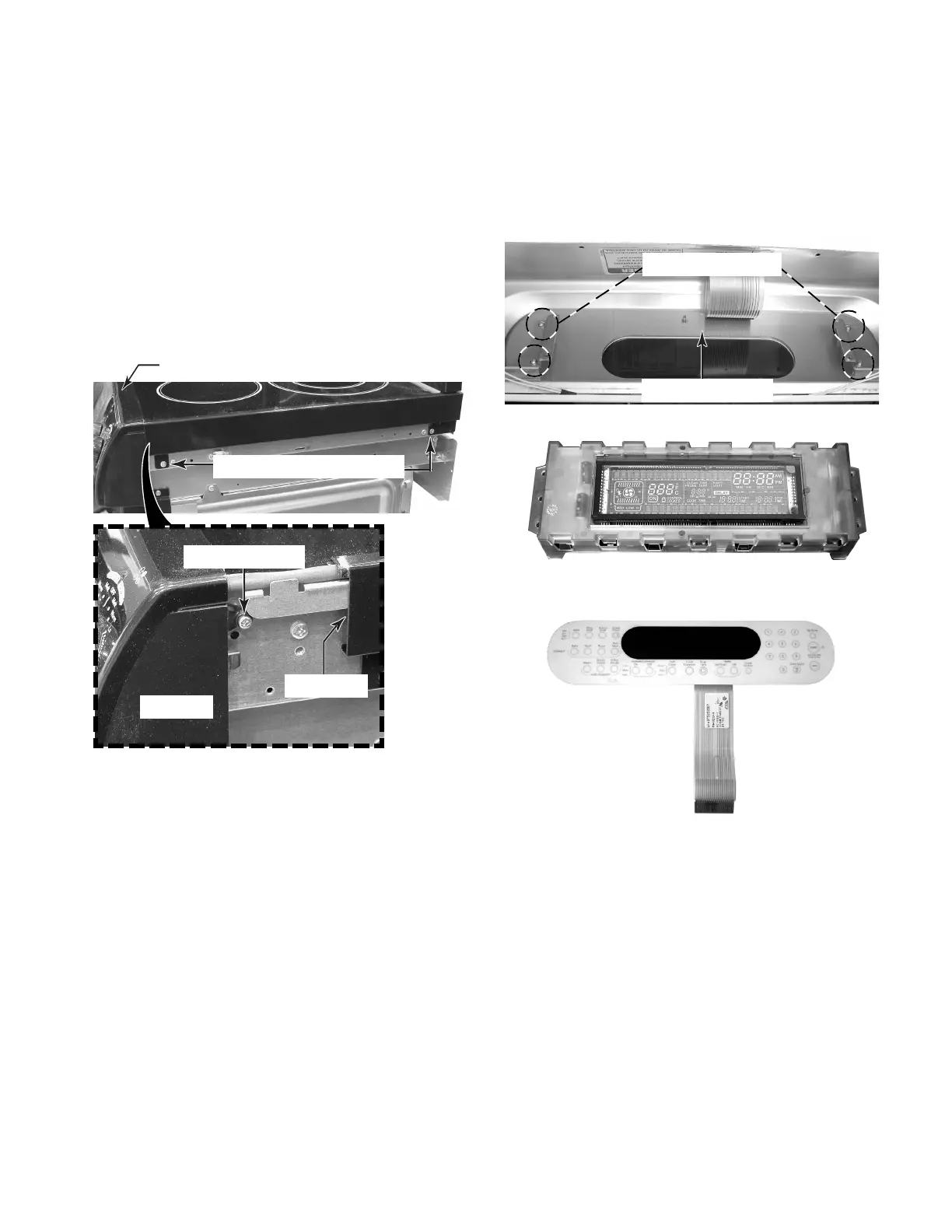
5. To remove the user interface:
a) Remove the electronic oven control
assembly (see steps 3 or 4).
b) Remove the four machine screws from
the EOC mounting brackets, and re-
move the user interface and its bracket.
4 Machine Screws
Interface Bracket
Electronic Oven Control (EOC)
User Interface
Slide Back
4. To remove the electronic oven control
(EOC) assembly on freestanding models:
a) Open the oven door, and remove the
screws from the bottom of the control
panel (see the photo in step 3b).
b) Remove the two cooktop trim screws.
c) Slide the cooktop trim back to expose
the end cap screw, and remove the
screws (1 on each side).
d) Perform steps 3c, 3d, and 3e on page
4-2 to remove the EOC assembly.
Cooktop Trim & 2 Screws
End Cap Screw
Control Panel
End Cap




 To Next Page