4-19
REMOVING THE WARMING DRAWER
TEMPERATURE SENSOR AND ELEMENT
1. Unplug range or disconnect power.
2. Remove the oven door (see page 4-22 for
the procedure).
3. Pull the warming drawer out as far as the
stop.
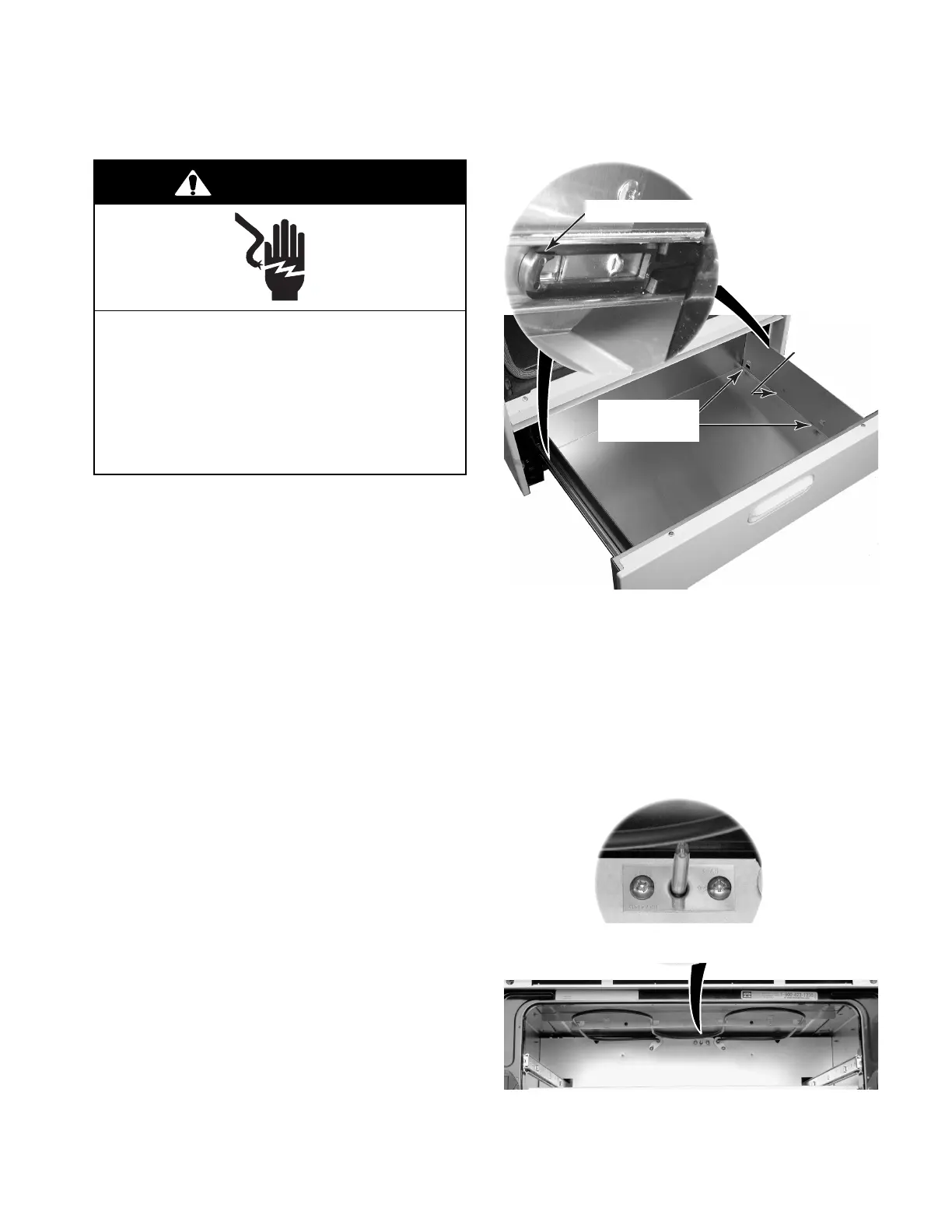
4. Pull the left and right release levers on the
sides of the warming drawer, and pull the
drawer out as far as it will go (see the
photos at the top of the right column).
NOTE:The back edge of the drawer should
clear the opening in the range.
5. Press in on the left and right drawer rail
locking tabs on the inside of the warming
drawer, and lift the drawer so the tabs are
clear of the slots. Remove the left and right
drawer rail hangers from the slots in the
sides of the drawer, and remove the drawer
from the range.
Electrical Shock Hazard
Disconnect power before servicing.
Replace all parts and panels before
operating.
Failure to do so can result in death or
electrical shock.
WARNING
6. To remove the warming drawer tem-
perature sensor:
a) Remove the two mounting screws from
the sensor.
b) Pull the sensor forward until the con-
nector is inside the warming drawer
area, and disconnect the sensor from
the wiring harness.
Pull Lever Forward
Right Drawer
Hangers
Right
Locking
Tab
Warming Drawer
Temperature Sensor
Continued on the next page.




 To Next Page