TP-6277 10/03 Scheduled Maintenance 17
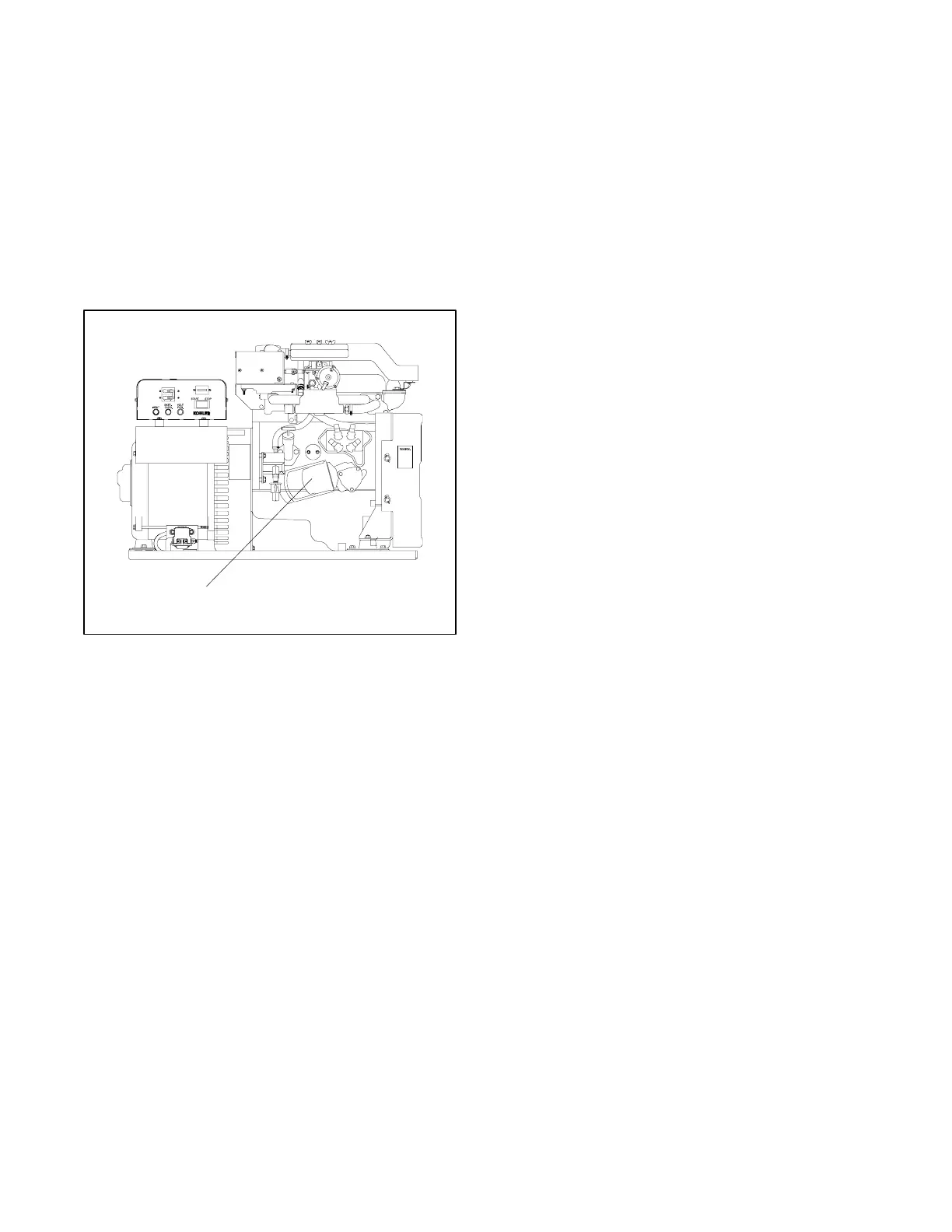
3.3.5 Oil Filter Change
Change the oil filter as listed in the service schedule.
Change the oil filter more frequently if the unit operates
under dirty, dusty conditions. See Figure 3-6 and use
the following procedure.
1. Loosen the oil filter by turning it counterclockwise.
Use an oil filter wrench if necessary. See
Figure 3-6. The oil filter is 76 mm (3 in.) dia. Use
rags to handle the oil filter and clean up spilled oil.
Remove the filter and discard it in a suitable
container.
1
1. Oil filter
ADV5661-C
Figure 3-6 Oil Filter Removal
Note: Replacement filters are longer than the
originally supplied oil filter.
2. Clean the contact surface of the oil filter adapter.
3. Lightly lubricate the gasket surface of a new filter
with fresh engine oil. Thread the oil filter on the
adapter until the gasket makes contact,
hand-tighten an additional one-half turn. Wash
hands after any contact with engine oil.
Note: To perform an oil change skip Steps 4 and 5
and go back to the Oil Change procedure
preceding.
4. Start the generator set and check for oil leaks.
5. Stop the generator set. Remove the dipstick and
wipe it clean. Reinsert it as far as possible, and
remove it to check the oil level. Add oil, as
necessary, to bring the level up to the MAX mark.



 To Next Page