77
JEITA Freq Resolution Setting
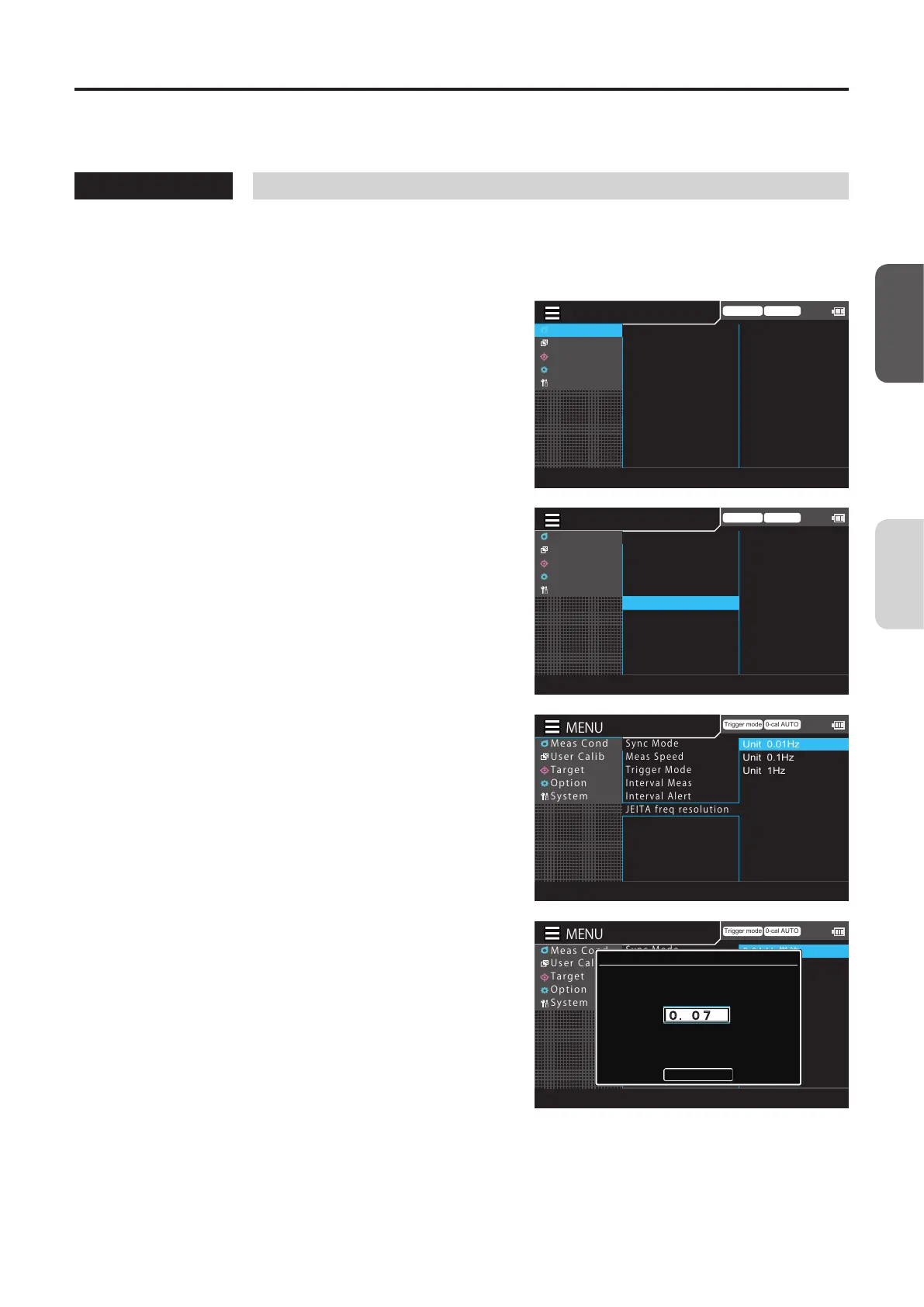
Set the frequency resolution for JEITA flicker measurements. The frequency can be set in units of 0.01 Hz, 0.1 Hz, or 1 Hz.
* Factory setting: 1 Hz
Operating Procedure
1
While the measurement screen is
displayed, press the [MENU] key.
The setting screen is displayed on the LCD screen.
2
Press the [UP] or [DOWN] key to select
[Meas Cond], and then press the [RIGHT]
or [ENTER] key.
Trigger mode 0-cal AUTO
MeasCond
UserCalib
Target
Option
System
NTSC
AUTO
OFF
OFF
OFF
0.07 Hz
SyncMode
MeasSpeed
TriggerMode
IntervalMeas
IntervalAlert
JEITAfreqresolution
3
Press the [UP] or [DOWN] key to select
[JEITA freq resolution], and then press
the [ENTER] key.
Trigger mode 0-cal AUTO
MeasCond
UserCalib
Target
Option
System
NTSC
AUTO
OFF
OFF
OFF
0.07 Hz
SyncMode
MeasSpeed
TriggerMode
IntervalMeas
IntervalAlert
JEITAfreqresolution
4
The screen for selecting a frequency
setting range is displayed. Press the [UP]
or [DOWN] key to select [0.01 Hz], [0.1
Hz], or [1 Hz], and then press the
[ENTER] key.
Trigger mode 0-cal AUTO
MeasCond
UserCalib
Target
Option
System
Unit 0.01Hz
Unit 0.1Hz
Unit 1Hz
SyncMode
MeasSpeed
TriggerMode
IntervalMeas
IntervalAlert
JEITAfreqresolution
5
Press the [UP] or [DOWN] key and the
[RIGHT]/[LEFT] keys to set a value, move
to [Complete], and then press the
[ENTER] key.
* The frequency can be set to between 0.07 to
10Hz.
If the entered value is out of the available range,
an alert screen is displayed. Press the [ENTER] key
to return to the previous screen and reset the
value.
Press the [ESC] key to cancel configuration of the
setting and restore the original value.
Trigger mode 0-cal AUTO
MeasCond
UserCalib
Target
Option
System
0.01 Hz
単位
0.1Hz単位
1Hz単位
SyncMode
MeasSpeed
TriggerMode
IntervalMeas
IntervalAlert
JEITAfreqresolution
JEITA Freq resolution
Set the freq. resolution
Complete
0.07 Hz
[Meas Cond] - [JEITA freq resolution]
CA-DP40
Measurement
Preparation














 To Next Page