VS-42UHD - Protocol 3000 59
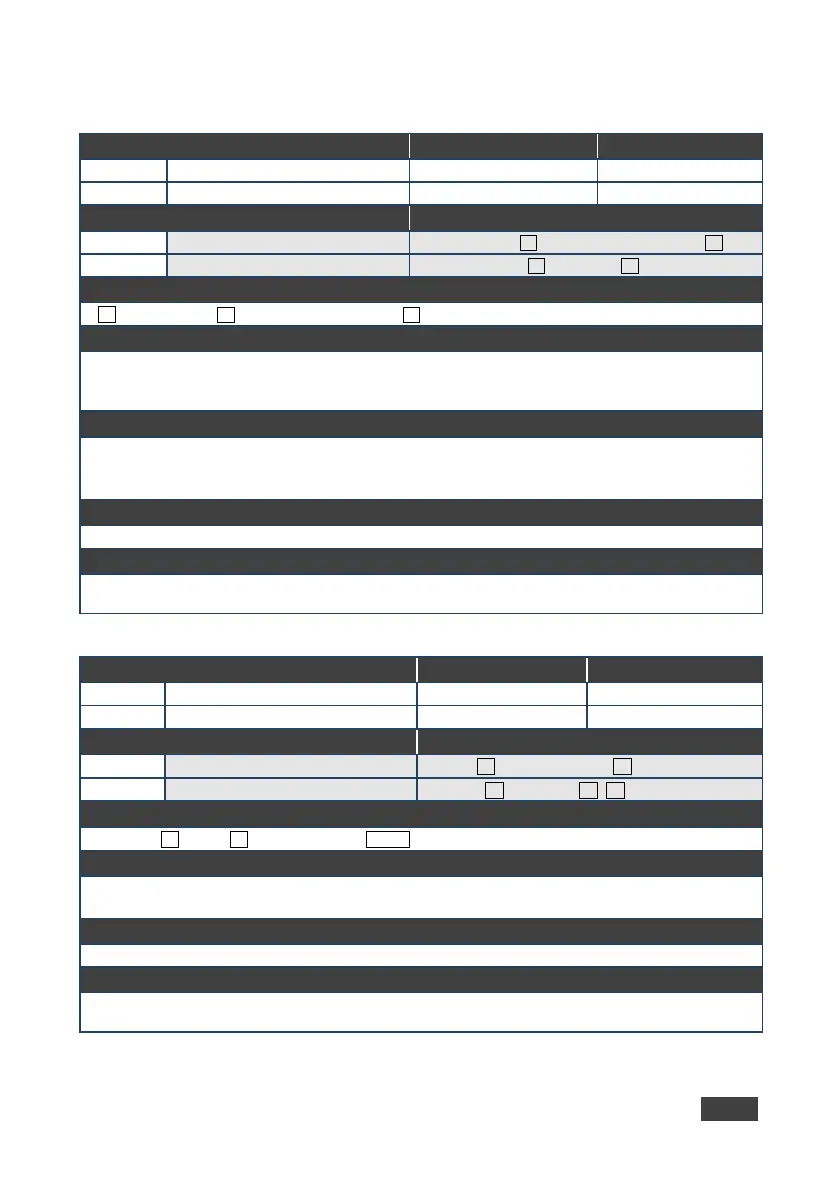
13.3.3.2 VID-PATTERN
Functions Permission Transparency
Set:
End User Public
Description Syntax
Set: Set test pattern on output
#VID-PATTERNSPoutput_id,pattern_idCR
Get test pattern on output
#VID-PATTERN?SPoutput_idCR
Response
~nn@VID-PATTERNSPoutput_id,pattern_idCR
Parameters
output_id - 1 (HDMI Out 1), 2 (HDMI Out 2)
pattern_id - 1 (Pattern 1: vertical color bars), 2 (Pattern 2: checkerboard), 3 (Pattern 3: gradient),
Response Triggers
After execution, response is sent to the com port from which the Set/Get was received
After execution, response is sent to all com ports if VID-PATTERN was set by any other external control
device (button press, WEB, device menu and similar)
Notes
K-Config Example
Set HDMI Out 2 to pattern 2 (checkerboard):
“#VID-PATTERN,2,2”,0x0D
13.3.3.3 VMUTE
Functions Permission Transparency
Set:
End User Public
Description Syntax
Set: Set enable/disable video on output
Get video on output status
output_id
Response
Set / Get:
output_id,flag
Parameters
flag –
(disable video on output),
(enable video on output),
(blank video)
Response Triggers
K-Config Example
Disable the video output on HDMI Out:
“#VMUTE 2,0”,0x0D



 To Next Page